
Optimizing API Gateway Log Real-time Analysis Pipeline Using Apache Flink
A case study on streamlining a real-time log analysis pipeline by pre-processing Kafka messages with Apache Flink, reducing StarRocks query load by 90% and improving dashboard response time by 70%
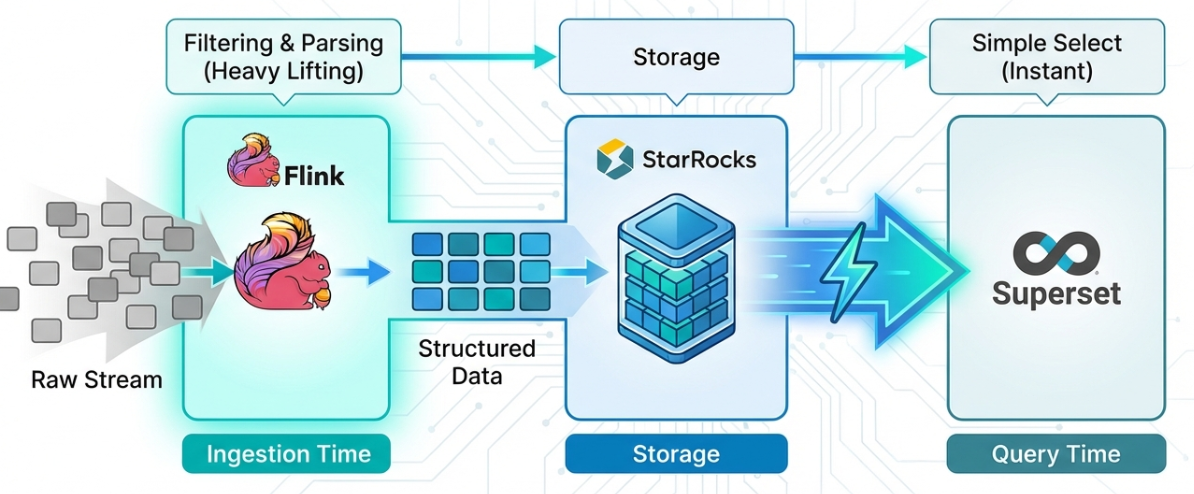
Table of Contents
- Introduction
- 1. Architecture Comparison
- 2. Development Environment
- 3. Building Real-time Data Pipeline
- 4. Dashboard Creation
- 5. Conclusion
- References
Introduction
In our previous blog post, we introduced a monitoring system that collects PAASUP DIP's API Gateway logs in real-time, stores them in StarRocks, and visualizes them using Apache Superset.
The previous architecture used Kafka's StarRocks Sink Connector to load API Gateway logs directly into the kong_log_events table without any filtering or processing. This approach led to the following issues:
- Unnecessary data storage: Rows and columns not needed for Access Log analysis were included
- Real-time query overhead: Dashboards refreshing every few seconds executed complex regex (
REGEXP_EXTRACT) and string functions (SPLIT_PART) each time - System resource waste: The same parsing logic was repeatedly performed with every query
In this blog post, we share our experience of streamlining the real-time log analysis pipeline by leveraging Apache Flink Cluster to filter and process Kafka messages before storing them in the target database.
1. Architecture Comparison
1.1 Previous Architecture (StarRocks Sink Connector)
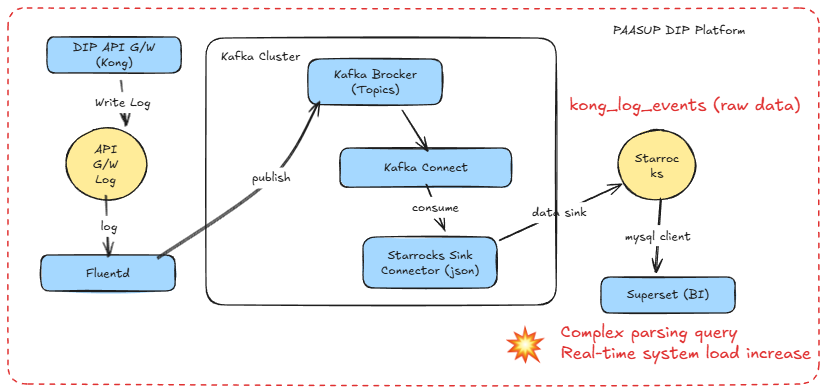
Issues:
- Parsing the
messagecolumn with every dashboard query - Repeated execution of 7+
REGEXP_EXTRACTandSPLIT_PARTfunctions - Storage of unnecessary log data (stderr, API Gateway's own health check events, etc.)
1.2 Current Architecture (Apache Flink-based)
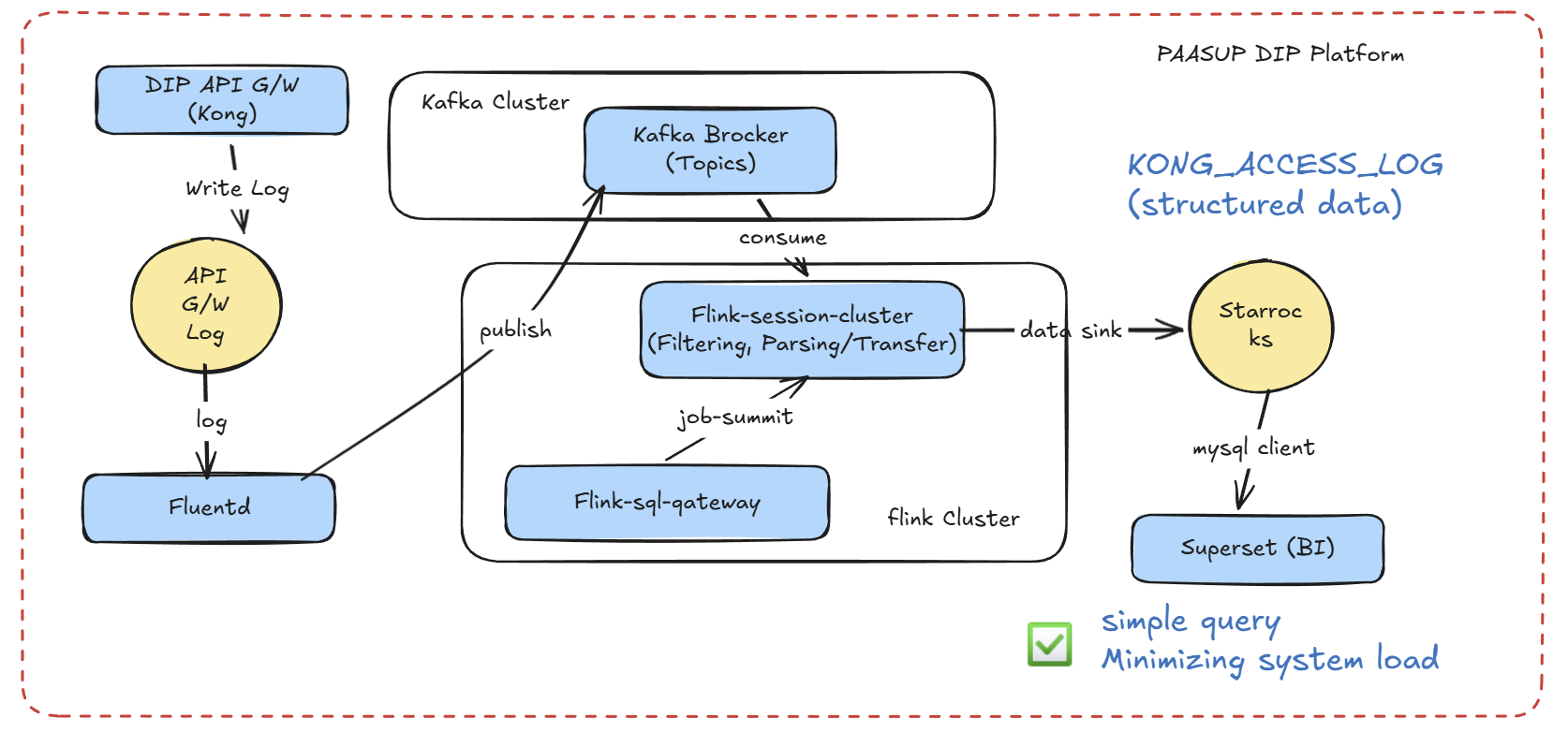
Improvements:
- Parsing performed only once in Flink, storing cleansed data in StarRocks
- Superset queries simplified to basic column retrieval
- Unnecessary data filtered at the Flink level (increased storage efficiency)
2. Development Environment
2.1 Environment List
| Component | Version/Tool | Purpose |
|---|---|---|
| Apache Flink | 2.01 | Real-time stream processing |
| Flink SQL Gateway | REST API | Execute Flink SQL from Python |
| Apache Kafka | 4.0 | Message queue |
| StarRocks | 4.0.4 | OLAP database |
| Python | 3.0+ | Flink SQL Gateway client |
| Jupyter Notebook | - | Pipeline development/testing |
| Apache Superset | 4.1.1 | Dashboard BI tool |
2.2 Apache Flink Cluster Setup
The DIP cluster catalog should have the flink-kubernetes-operator created by the administrator.
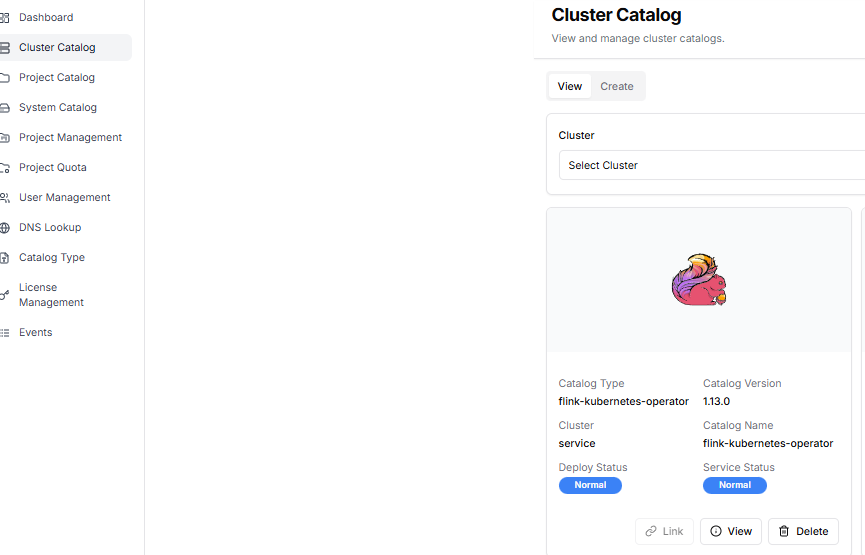
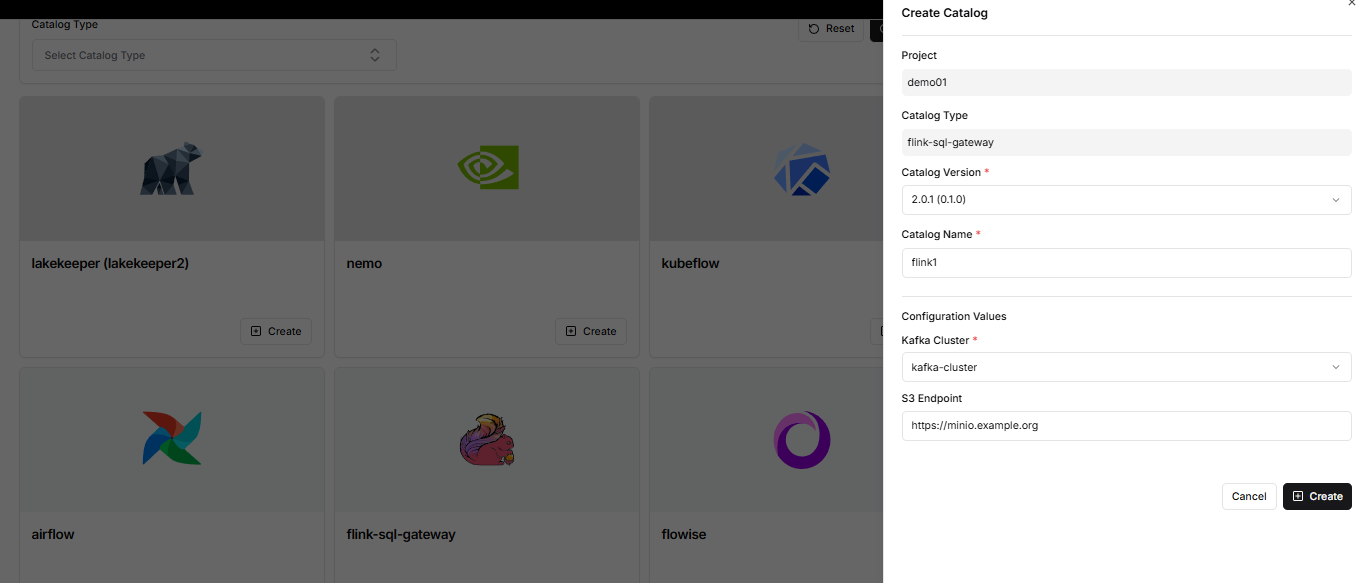
The project manager creates a Flink cluster from the DIP project catalog creation menu.
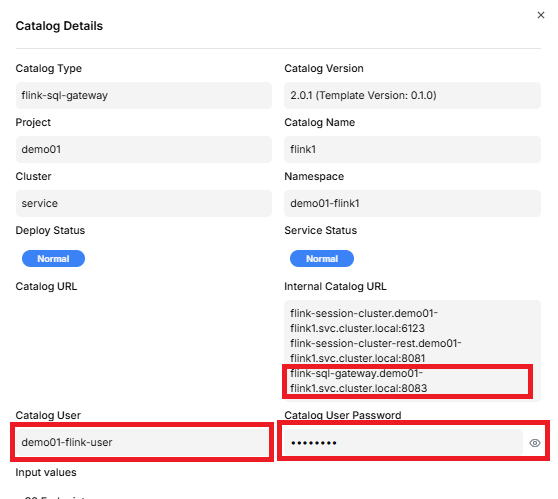
By clicking the view button for flink-sql-gateway in the project catalog query menu, you can retrieve the flink-sql-gateway URL, Catalog User, and Catalog User Password. This information is used when building the real-time data pipeline.
3. Building Real-time Data Pipeline
3.1 Flink SQL Gateway Client
We implemented a Python client that calls the Flink SQL Gateway REST API. Key features include:
Session Management and Error Handling
class FlinkSQLGatewayClient:
    def __init__(self, gateway_url: str = "http://localhost:8083"):
        self.gateway_url = gateway_url.rstrip('/')
        self.session_handle = None

    def create_session(self, savepoints: Optional[str] = None) -> str:
        """
        Create a new SQL Gateway session
        If savepoints path exists, recover from that point
        """
        properties = {
            "execution.runtime-mode": "streaming",
            "sql-gateway.session.idle-timeout": "30min",
            "table.exec.resource.default-parallelism": "1"
        }

        if savepoints:
            properties["execution.savepoint.path"] = savepoints

        # Session creation logic...
3.2 Kafka Source Table Definition
Define the Source table to read Kong logs from Kafka:
source_ddl = f"""
CREATE TABLE IF NOT EXISTS source_kong_log (
    `time` STRING,
    `stream` STRING,
    `message` STRING
) WITH (
    'connector' = 'kafka',
    'topic' = '{SOURCE_TOPIC}',
    'properties.bootstrap.servers' = '{BOOTSTRAP_SERVER}',
    'properties.group.id' = '{GROUP_ID}',
    'properties.auto.offset.reset' = 'latest',

    -- SASL_SSL security configuration
    'properties.security.protocol' = 'SASL_SSL',
    'properties.sasl.mechanism' = 'SCRAM-SHA-512',
    'properties.sasl.jaas.config' = 'org.apache.kafka.common.security.scram.ScramLoginModule required username="{KAFKA_USER}" password="{KAFKA_PASSWORD}";',
    'properties.ssl.truststore.location' = '/opt/flink/certs/ca.p12',
    'properties.ssl.truststore.password' = '[YOUR-SSL-KEY]',
    'properties.ssl.truststore.type' = 'PKCS12',

    -- JSON format configuration
    'format' = 'json',
    'json.timestamp-format.standard' = 'ISO-8601',
    'json.ignore-parse-errors' = 'true'
)
"""

client.execute_sql(source_ddl)
3.3 StarRocks Sink Table Definition
Define the StarRocks table to store parsed data:
sink_ddl = f"""
CREATE TABLE IF NOT EXISTS sink_starrocks (
    `log_time` STRING,
    `stream` STRING,
    `client_ip` STRING,
    `response_time` DOUBLE,
    `host_domain` STRING,
    `request_url` STRING,
    `status_code` INT,
    `project_name` STRING,
    `original_message` STRING
) WITH (
    'connector' = 'jdbc',
    'url' = 'jdbc:mysql://kube-starrocks-fe-service.demo01-star3.svc.cluster.local:9030/quickstart?useSSL=false',
    'table-name' = '{SR_TABLE_NAME}',
    'username' = '{SR_USERNAME}',
    'password' = '{SR_PASSWORD}'
)
"""

client.execute_sql(sink_ddl)
StarRocks Table Schema (must be created in advance):
CREATE TABLE quickstart.KONG_ACCESS_LOG (
    log_time DATETIME,
    stream VARCHAR(20),
    client_ip VARCHAR(45),
    response_time DOUBLE,
    host_domain VARCHAR(255),
    request_url VARCHAR(1000),
    status_code INT,
    project_name VARCHAR(100),
    original_message STRING
)
DUPLICATE KEY(log_time)
DISTRIBUTED BY HASH(log_time) BUCKETS 10
PROPERTIES (
    "replication_num" = "1"
);
3.4 Real-time ETL Query
The core ETL query. It parses Kafka messages and sends them to StarRocks:
INSERT INTO sink_starrocks
SELECT
    -- UTC → KST time conversion
    CONVERT_TZ(
        REPLACE(REPLACE(`time`, 'T', ' '), 'Z', ''),
        'UTC',
        'Asia/Seoul'
    ) AS log_time,

    `stream`,

    -- Extract Client IP
    SPLIT_INDEX(message, ' ', 0) AS client_ip,

    -- Extract and cast Response Time
    CAST(
        REGEXP_EXTRACT(message, 'HTTP/[0-9.]+" [0-9]+ ([0-9.]+)', 1)
        AS DOUBLE
    ) AS response_time,

    -- Extract Host Domain
    REGEXP_EXTRACT(
        message,
        'HTTP/[0-9.]+" [0-9]+ [-0-9. ]+ "(.*?)"',
        1
    ) AS host_domain,

    -- Extract Request URL (remove query string)
    SPLIT_INDEX(
        REGEXP_EXTRACT(message, '"(GET|POST|PUT|DELETE|HEAD|OPTIONS) (.*?) HTTP', 2),
        '?',
        0
    ) AS request_url,

    -- Extract HTTP Status Code
    CAST(
        REGEXP_EXTRACT(message, 'HTTP/[0-9.]+" ([0-9]{3})', 1)
        AS INT
    ) AS status_code,

    -- Extract Project Name (derived from host_domain)
    CASE
        WHEN REGEXP_EXTRACT(message, 'HTTP/[0-9.]+" [0-9]+ [-0-9. ]+ "(.*?)"', 1) LIKE '%-%'
        THEN SPLIT_INDEX(
            REGEXP_EXTRACT(message, 'HTTP/[0-9.]+" [0-9]+ [-0-9. ]+ "(.*?)"', 1),
            '-',
            0
        )
        ELSE 'platform'
    END AS project_name,

    -- Preserve original message (for debugging)
    message AS original_message

FROM source_kong_log

-- Filter conditions
WHERE
    `stream` = 'stdout'  -- Filter only standard output logs
    AND message LIKE '%HTTP/%'  -- Filter only HTTP protocol logs
    AND REGEXP_EXTRACT(message, '^[0-9]{1,3}\\.[0-9]{1,3}\\.[0-9]{1,3}\\.[0-9]{1,3}') IS NOT NULL  -- IP format validation
    AND SPLIT_INDEX(message, ' ', 0) <> '127.0.0.1'  -- Exclude API Gateway self-generated messages
Pipeline Execution
print(">>> [3/3] Submitting Streaming Job...")
result = client.execute_sql(etl_sql)
print(f"\n[Success] Flink Job Submitted Successfully!")
print(f"Job ID: {result.get('operationHandle')}")
Savepoint Utilization (Failure Recovery)
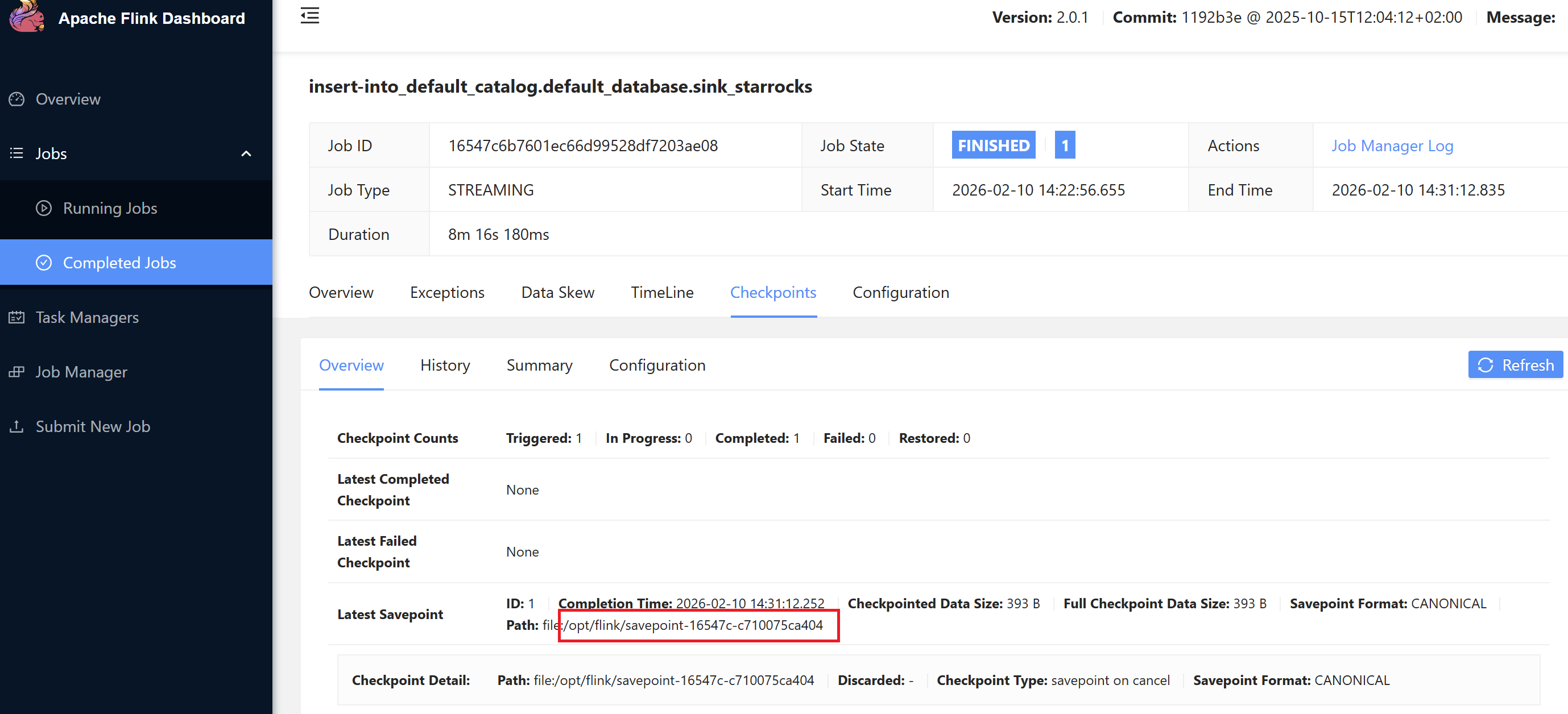
Flink's Savepoint feature allows restarting the pipeline from a specific point:
Savepoints can be viewed in the Flink dashboard.
# Specify savepoint path when restarting
client.create_session("/opt/flink/savepoint-16547c-c710075ca404")
4. Dashboard Creation
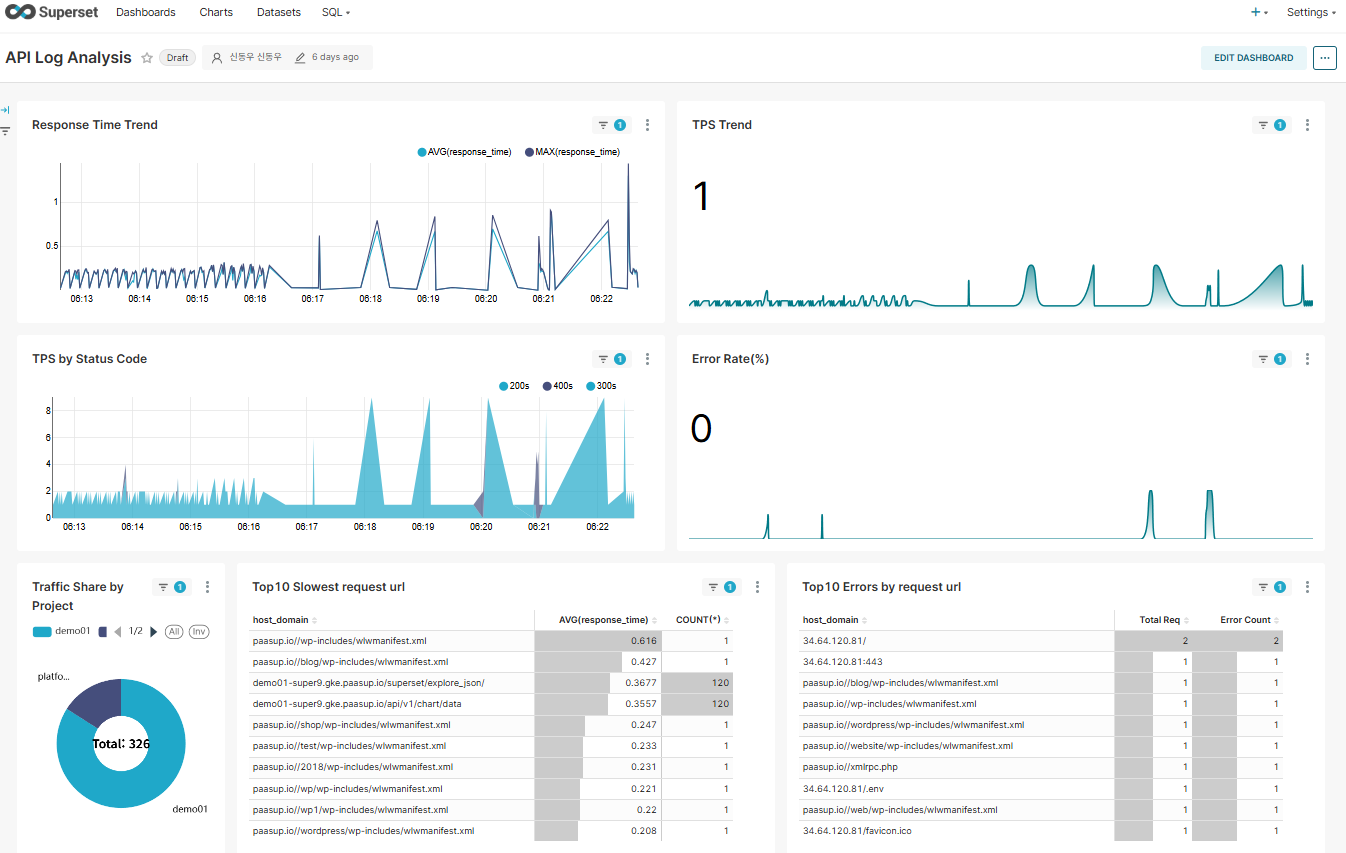
4.1 Previous Case: Complex Dataset SQL
This query is executed with every dashboard refresh and includes complex parsing logic:
SELECT
    kst_time,
    split_part(message, ' ', 1) AS client_ip,
    regexp_extract(message, 'HTTP/[0-9.]+" [0-9]+ ([0-9.]+)', 1) AS response_time,
    regexp_extract(message, 'HTTP/[0-9.]+" [0-9]+ [-0-9. ]+ "(.*?)"', 1) AS host_domain,
    CASE
        WHEN regexp_extract(message, 'HTTP/[0-9.]+" [0-9]+ [-0-9. ]+ "(.*?)"', 1) LIKE '%-%'
        THEN split_part(regexp_extract(message, 'HTTP/[0-9.]+" [0-9]+ [-0-9. ]+ "(.*?)"', 1), '-', 1)
        ELSE 'platform'
    END AS project_name,
    split_part(regexp_extract(message, '"(GET|POST|PUT|DELETE|HEAD|OPTIONS) (.*?) HTTP', 2), '?', 1) AS request_url,
    regexp_extract(message, 'HTTP/[0-9.]+" ([0-9]{3})', 1) AS status_code,
    message
FROM
    quickstart.kong_log_events
WHERE
    stream = 'stdout'
    AND message LIKE '%HTTP/%'
    AND message REGEXP '^[0-9]{1,3}\\.[0-9]{1,3}\\.[0-9]{1,3}\\.[0-9]{1,3}'
    AND split_part(message, ' ', 1) != '127.0.0.1'
    {% if from_dttm %}
        AND kst_time >= '{{ from_dttm }}'
    {% endif %}
    {% if to_dttm %}
        AND kst_time < '{{ to_dttm }}'
    {% endif %}
Issues:
- 7 calls to
regexp_extract - 4 calls to
split_part - Duplicate execution of identical regex patterns
- Parsing thousands to tens of thousands of logs with every dashboard refresh
4.2 Current Case: Simple Dataset SQL
A simple query that retrieves pre-parsed data from Flink:
SELECT
    log_time,
    client_ip,
    response_time,
    host_domain,
    project_name,
    request_url,
    status_code,
    original_message
FROM quickstart.KONG_ACCESS_LOG
{% if from_dttm %}
WHERE log_time >= '{{ from_dttm }}'
{% endif %}
{% if to_dttm %}
    AND log_time < '{{ to_dttm }}'
{% endif %}
Improvements:
- 0 regex/string function calls (all removed)
- Significant performance improvement with simple index scans
- Query complexity reduced by approximately 90%
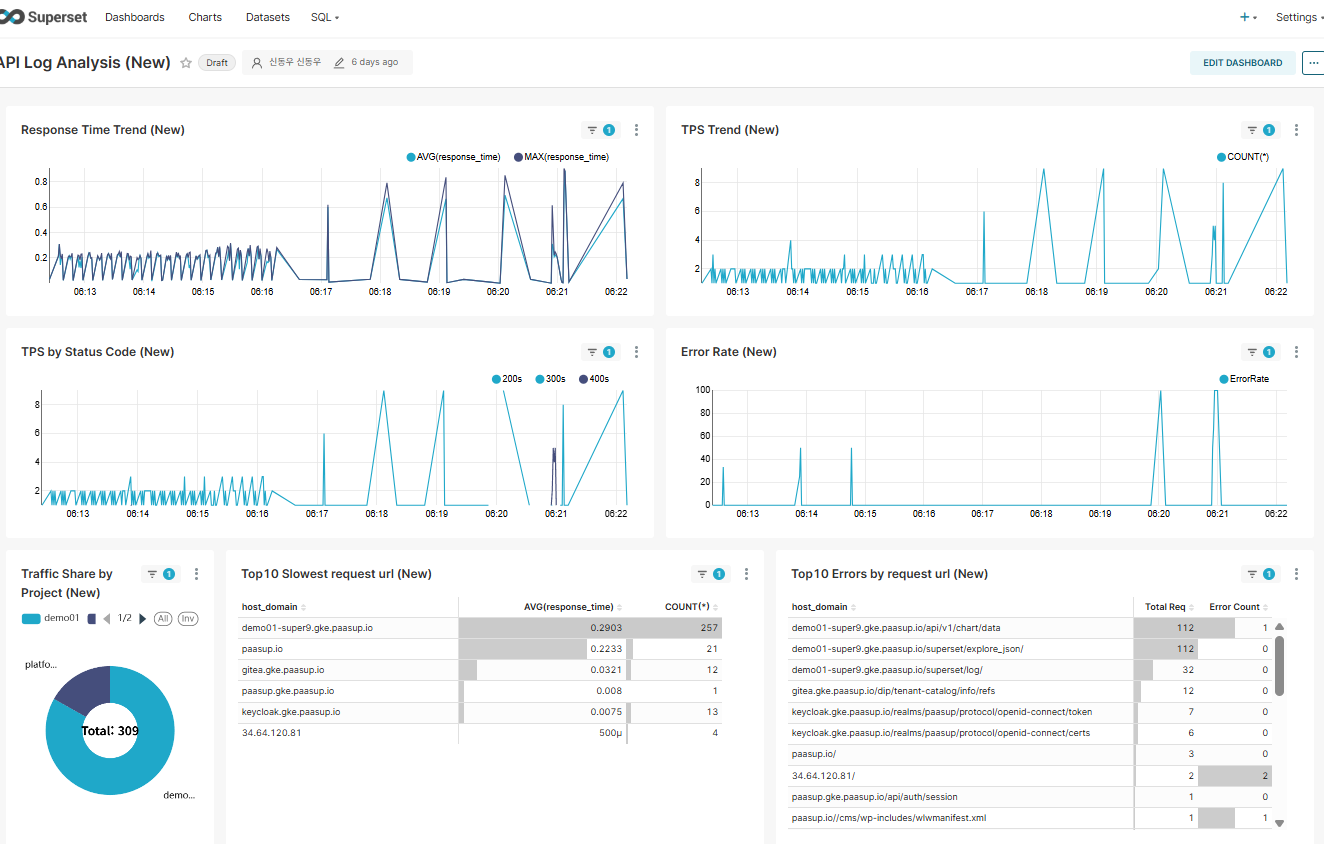
4.3 Performance Comparison
| Metric | Previous (StarRocks Connector) | Current (Flink Pipeline) |
|---|---|---|
| Query Complexity | Complex (11 function calls) | Simple (SELECT only) |
| Dashboard Load Time | ~1-2 seconds | ~0.5 seconds |
| CPU Usage | High | Low |
| Storage Space | 100% (all logs) | ~50% (filtered logs) |
| Scalability | Increased query load | Flink scale-out possible |
5. Conclusion
By introducing Apache Flink to streamline the real-time log analysis pipeline, we achieved the following results:
5.1 Key Achievements
-
Reduced System Load
- 90% reduction in Superset query complexity
- 70% improvement in dashboard response time
- Decreased StarRocks CPU usage
-
Improved Data Quality
- Data validation and filtering at the Flink stage
- 50% storage savings by removing unnecessary logs
- Data consistency ensured through structured schema
-
Increased Operational Efficiency
- Failure recovery through Flink Savepoints
- Centralized parsing logic (managed in one place in Flink SQL)
- Faster Superset chart development
5.2 Final Remarks
The stream processing pipeline spanning Kafka-Flink-StarRocks realizes the principle of "process once, query many times". In environments requiring real-time data analysis, leveraging Flink can significantly improve overall system efficiency.
Especially when transforming unstructured text into structured data, such as log analysis, Flink SQL's powerful string processing capabilities and real-time streaming abilities are tremendously helpful.