Lakehouse Governance Implementation Guide Using Lakekeeper
This is a guide for building Lakehouse governance based on Apache Iceberg using Lakekeeper. It provides step-by-step coverage of fine-grained permission management with OpenFGA, role-based access control (RBAC) implementation, and real-world examples through integration with Spark and StarRocks

Table of Contents
- Overview
- Lakekeeper Authorization Framework
- Granting Permissions via Lakekeeper UI
- Permission Verification
- Connecting StarRocks for Data Visualization
- Conclusion
Overview
In modern lakehouse environments, data security and access control are becoming increasingly critical. Particularly when multiple teams and diverse analytical tools use the same data sources, centralized metadata management and fine-grained permission control are essential.
This blog introduces how to build a governance framework for an Apache Iceberg-based lakehouse using Lakekeeper, an Iceberg REST Catalog. Lakekeeper replaces the traditional Hive Metastore (HMS) and provides the following core capabilities:
- Centralized Metadata Management: Manage all tables and data structures in one place
- Fine-grained Access Control: Permission management at project, warehouse, namespace, and table levels
- Multi-engine Compatibility: Seamless integration with various query engines like Spark and StarRocks
- Data Lineage Tracking: Track data change history and operations
Through Lakekeeper, the system catalog of PAASUP DIP, we'll explore actual implementation cases step by step, covering the entire process of configuring and validating Role-Based Access Control (RBAC).
Lakekeeper Authorization Framework
Lakekeeper uses OpenFGA, a CNCF project, to store and evaluate permissions. OpenFGA provides a powerful permission model that supports bidirectional inheritance, optimized for modern lakehouse environments with hierarchical namespaces.
To effectively utilize Lakekeeper's data access management, you must first understand the permission structure.
Permissions by Entity
| Entity | Available Permissions |
|---|---|
| server | admin, operator |
| project | project_admin, security_admin, data_admin, role_creator, describe, select, create, modify |
| warehouse | ownership, pass_grants, manage_grants, describe, select, create, modify |
| namespace | ownership, pass_grants, manage_grants, describe, select, create, modify |
| table | ownership, pass_grants, manage_grants, describe, select, modify |
| view | ownership, pass_grants, manage_grants, describe, modify |
| role | assignee, ownership |
Entity Hierarchy
server > project > warehouse > namespace > table or view
Key Permission Descriptions
Ownership and Management Permissions:
-
ownership: The owner of an object has all permissions on that object. When a principal creates a new object, they automatically become the owner and can grant permissions to other users by default.
-
server admin: The
adminrole on the server is the most powerful role within the server. To ensure auditability, they can list and manage all projects but cannot directly access data within projects. If data access is required, they must assign themselves theproject_adminrole.admincan manage all projects, server settings, and users. -
project_admin: Includes responsibilities of both
security_adminanddata_adminwithin a project. Can perform all security-related aspects including permission and ownership management, and all data-related operations including creating, modifying, and deleting objects. -
data_admin: Can manage all data-related operations including creating, modifying, and deleting objects within a project, but cannot grant permissions or manage ownership.
Data Access Permissions:
-
describe: Can view metadata and details without modifying the object.
-
select: Can read data from tables or views. Includes querying and data retrieval.
-
create: Can create new objects such as tables, views, and namespaces within an entity.
createpermission implicitly includesdescribepermission. -
modify: Can change the content or properties of objects, such as updating table data or changing views.
modifypermission implicitly includesselectanddescribepermissions.
Permission Management:
-
pass_grants: Can pass one's own permissions to other users.
-
manage_grants: Can manage all permissions on objects, including creating, modifying, and revoking permissions. Includes
manage_grantsandpass_grantspermissions.
Inheritance
Lakekeeper's permission framework supports bidirectional inheritance:
Top-Down Inheritance:
Permissions on parent entities are inherited by child entities. For example, if a principal is granted modify permission on a warehouse, they can modify all namespaces, tables, and views within it, including nested namespaces.
Bottom-Up Inheritance:
Permissions on lower entities like tables inherit basic navigation permissions to all parent hierarchies. For example, if a user is granted select permission on the ns1.ns2.table_1 table, they automatically get limited list permissions on ns1 and ns2. Users only see items in their direct path, so even if ns1.ns3 exists, listing ns1 will only show ns1.ns2.
Granting Permissions via Lakekeeper UI
When PAASUP DIP is installed, Lakekeeper, the system catalog, is automatically installed and creates two default users:
- service-account-lakekeeper-admin: Application user with server admin privileges
- dataup: Human user with server admin privileges and enterprise-wide data governance administrator who has the authority to initially log into the Lakekeeper UI
Accessing Lakekeeper UI
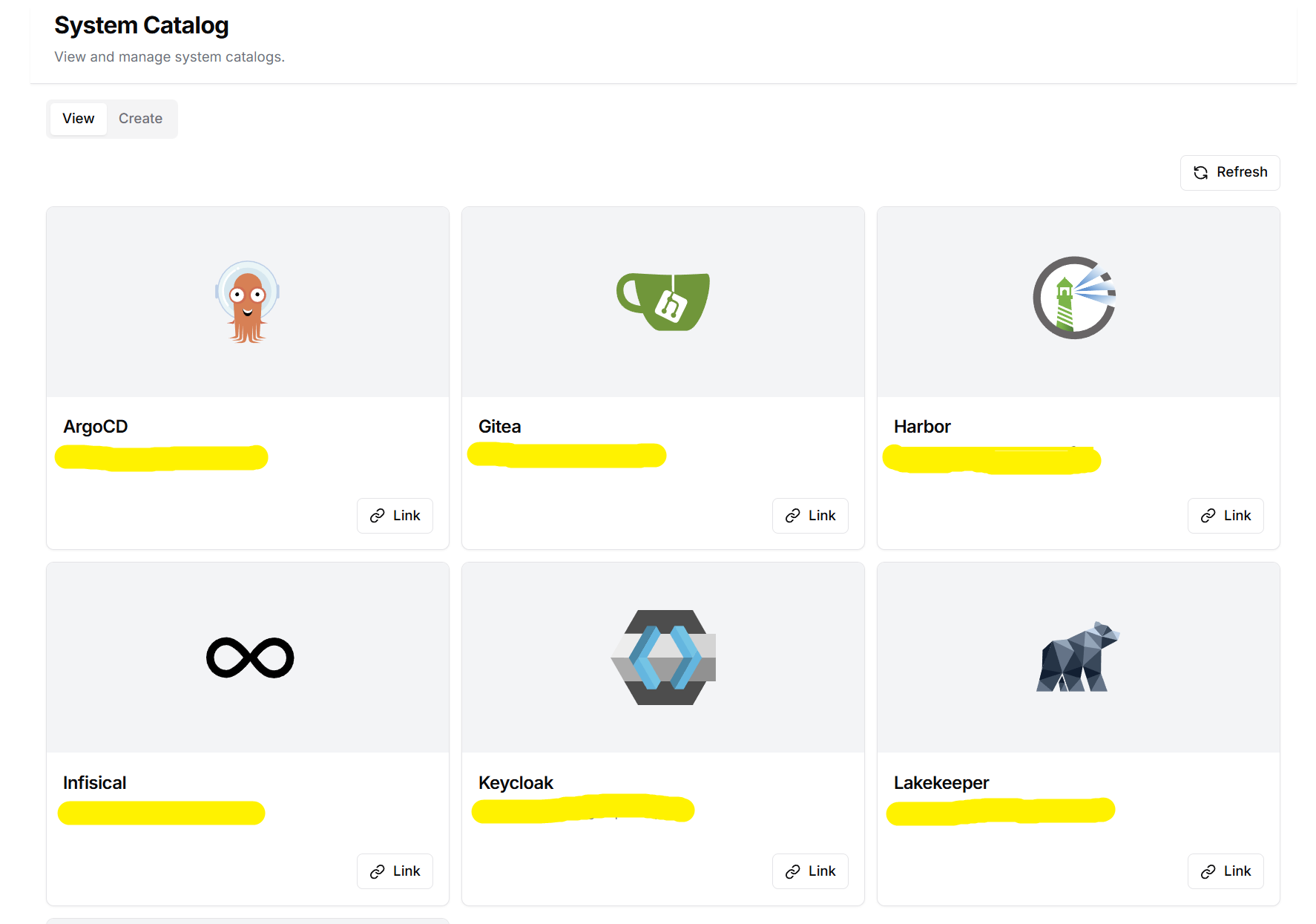
Click the Lakekeeper Link from the Project Catalog menu to open the Lakekeeper UI window.
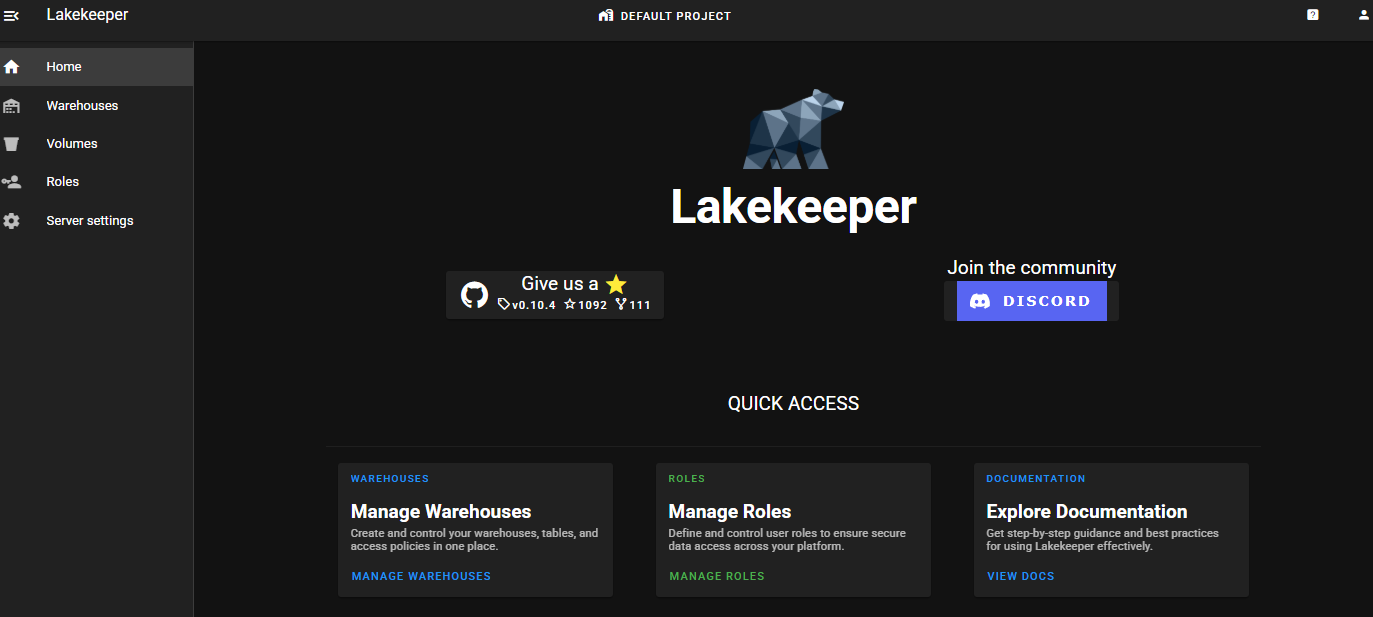
Log in as dataup.
Verifying Server Settings
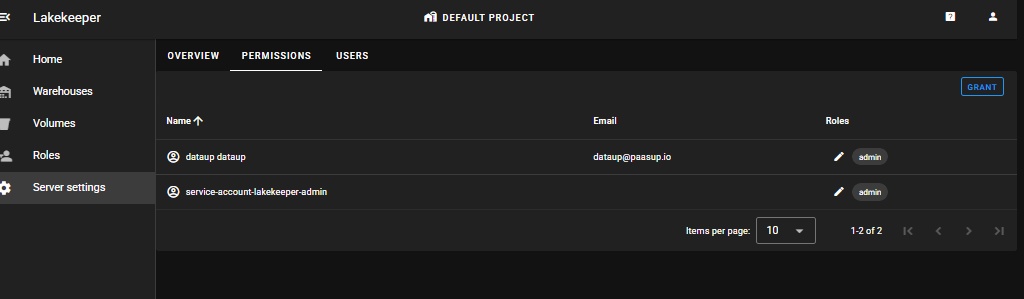
Server settings > PERMISSIONS
You can verify 2 admin users (1 application user, 1 human user).
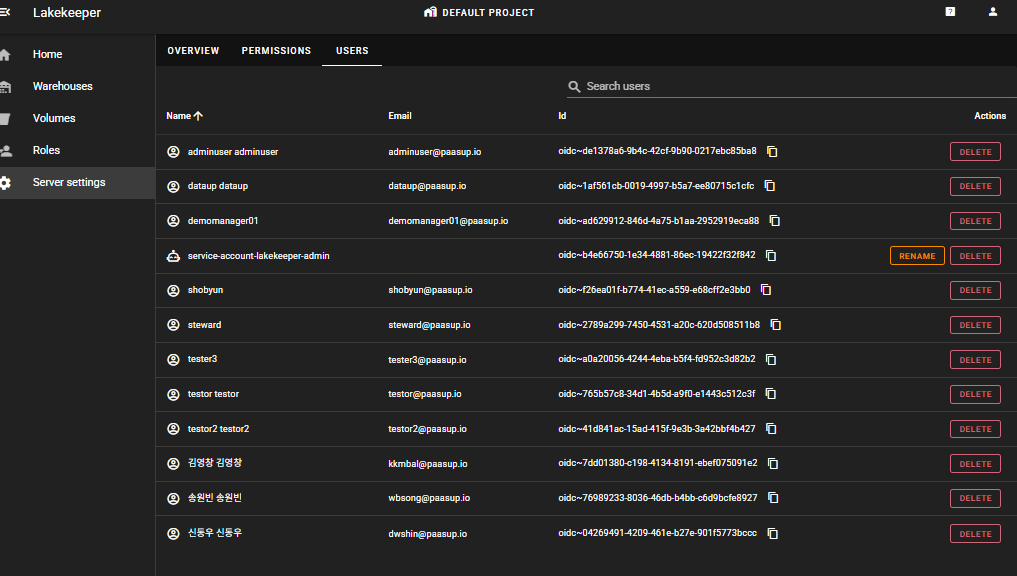
Server settings > USERS
Only users with server admin privileges can see the USERS tab, where you can view the list of users integrated with Keycloak.
Creating Projects and Granting Permissions
DEFAULT PROJECT is a project created by default, and you can create new projects as needed by clicking DEFAULT PROJECT at the top. In this example, we'll use DEFAULT PROJECT.
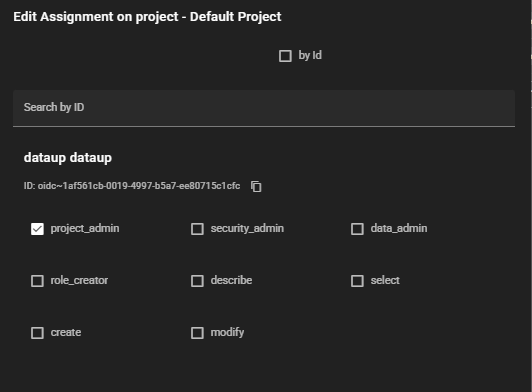
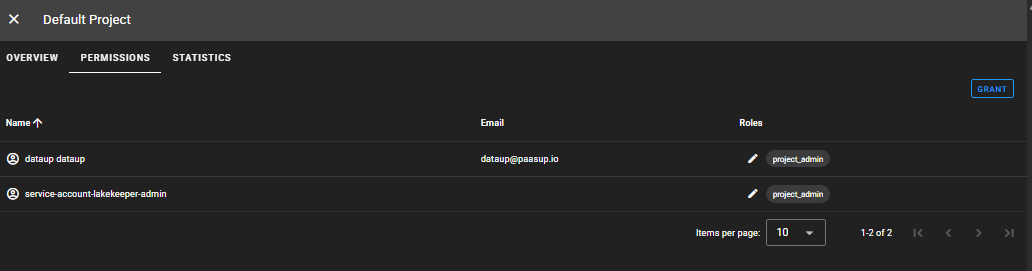
DEFAULT Project > PERMISSIONS > GRANT
The dataup user must also grant themselves permissions to access data within the project.
Creating a Warehouse
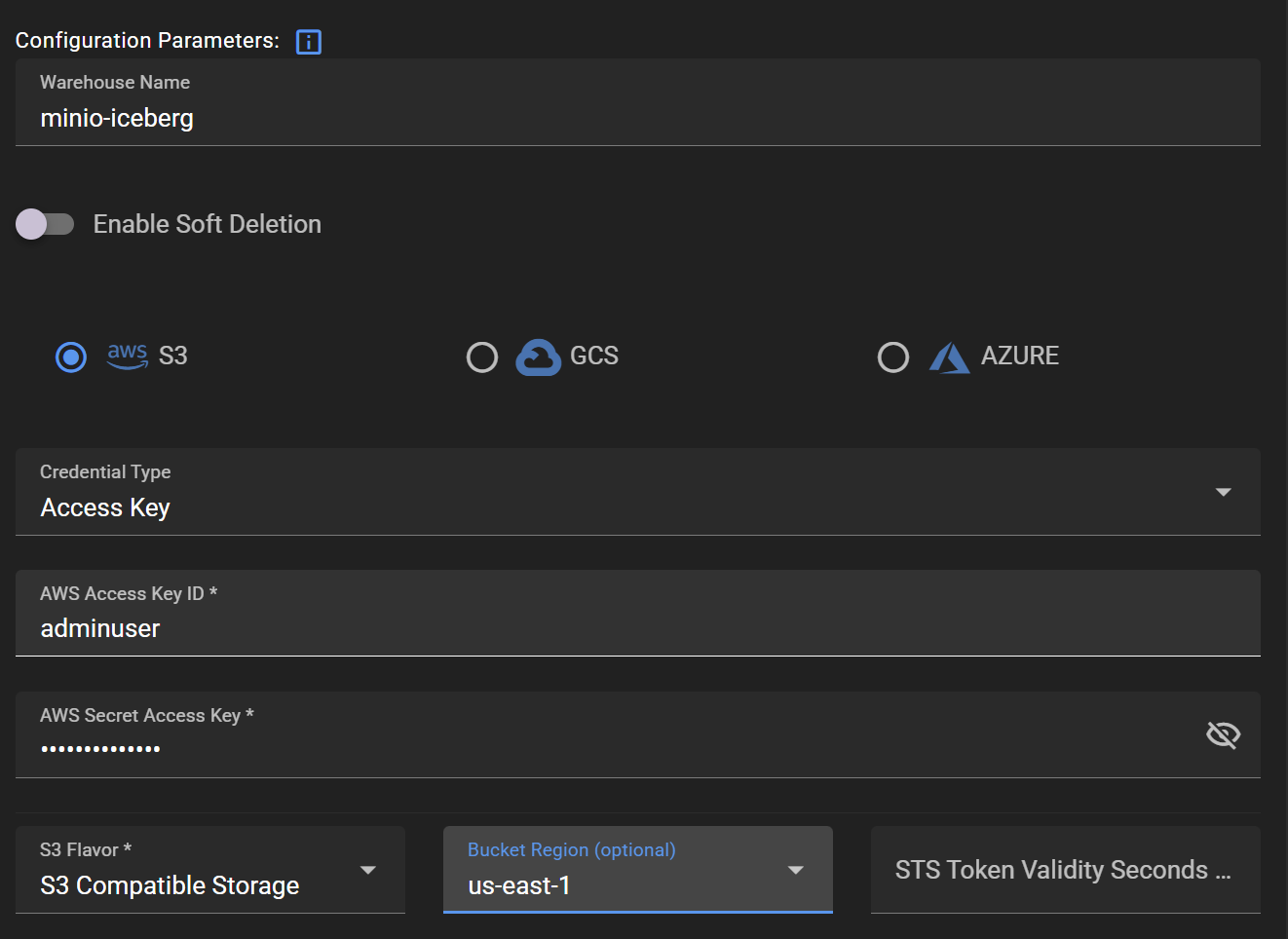
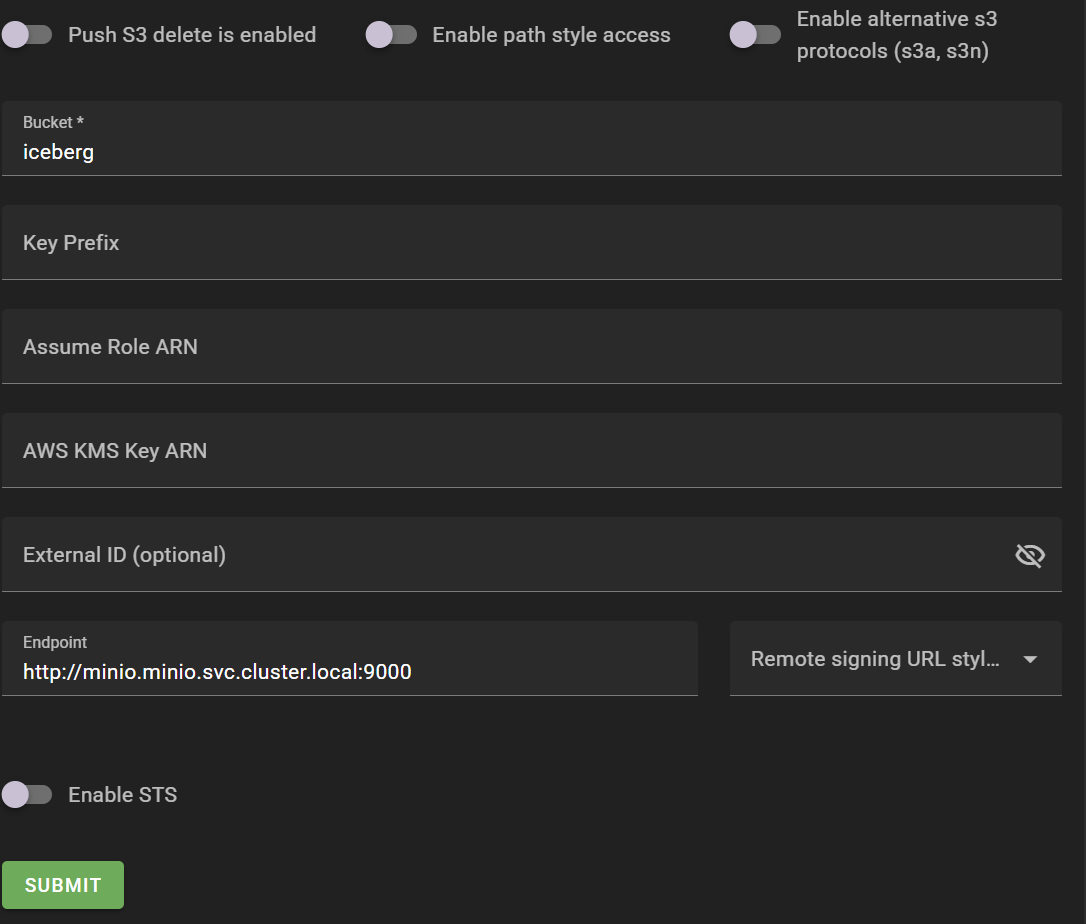
Create a warehouse, the actual data storage, as a sub-group under the project. To create a warehouse, you need to enter credentials for storage access, bucket region, bucket name, endpoint, etc.
Warehouses > ADD WAREHOUSE
Creating ROLE and Assigning USER
The target of grants is either User (authenticated individual principal) or Role (permission set that users are assigned). While it's possible to grant permissions directly to users, this example will cover the method of granting permissions using Roles.
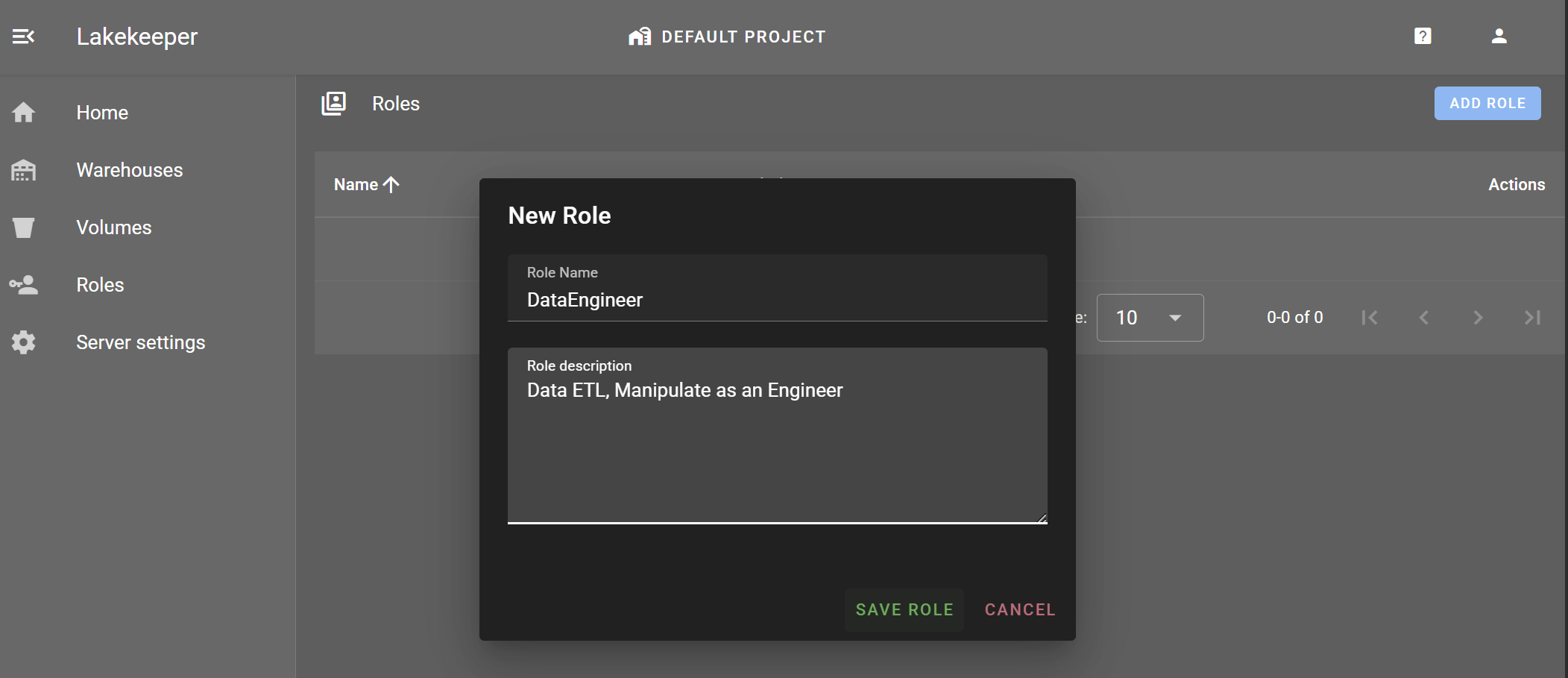
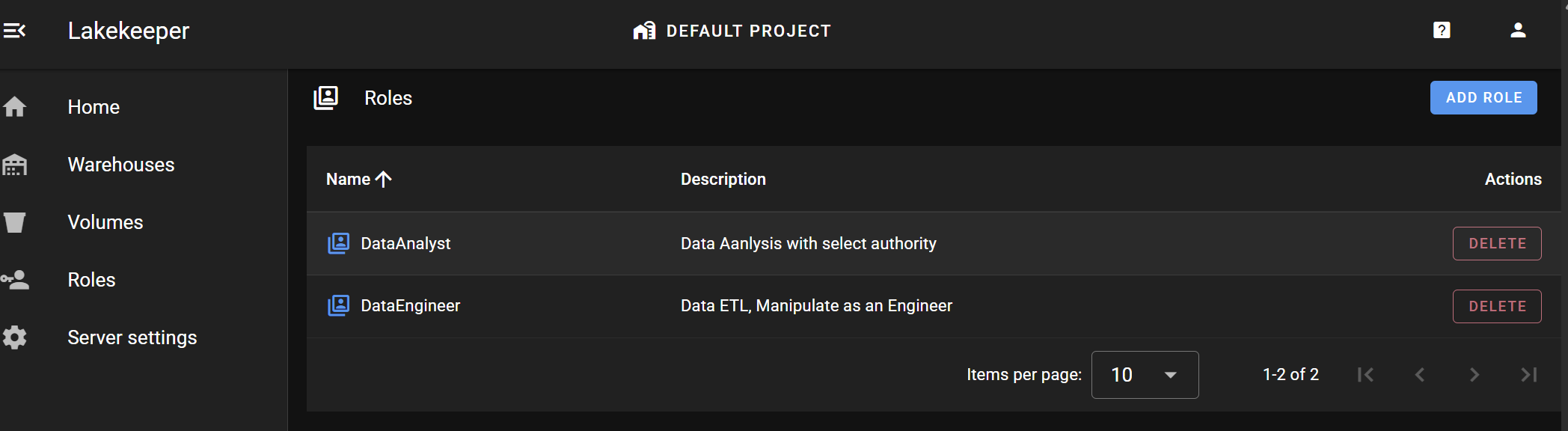
Roles > ADD ROLE
Create DataEngineer and DataAnalyst Roles.
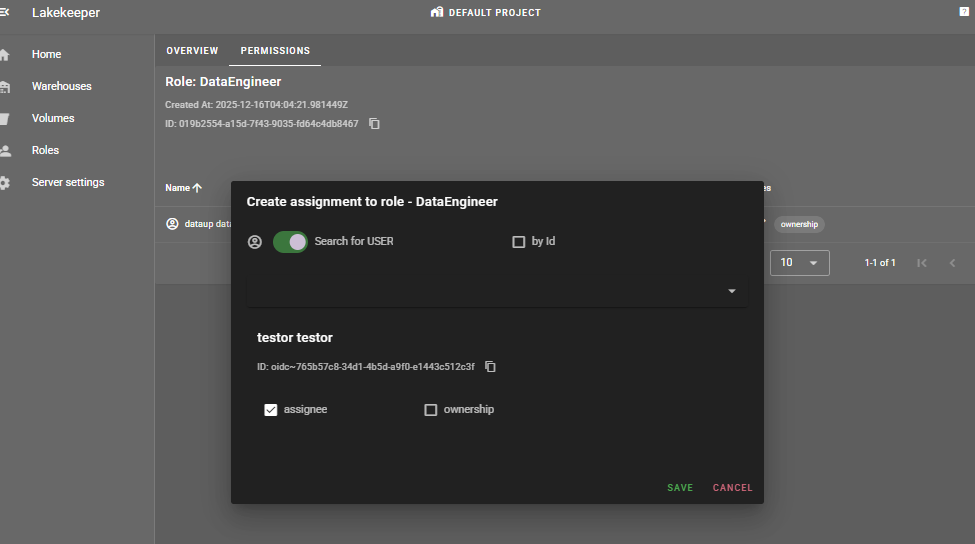
Roles > [role_name] > PERMISSIONS > GRANT
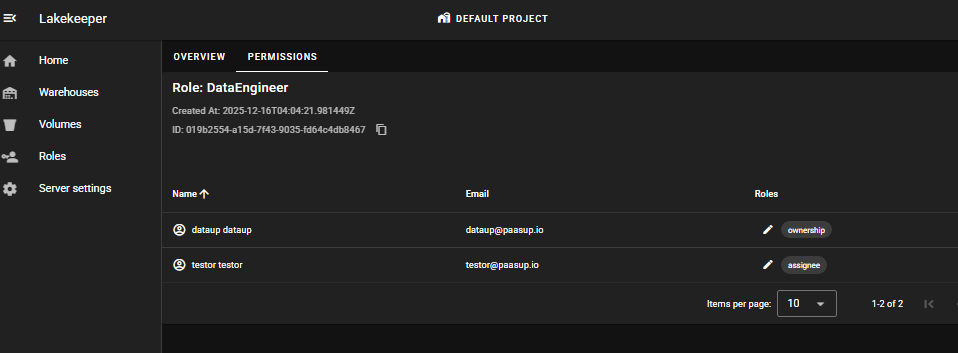
Assign the DataEngineer role to testor user and the DataAnalyst role to testor2 user.
Granting Entity Access Permissions to ROLE
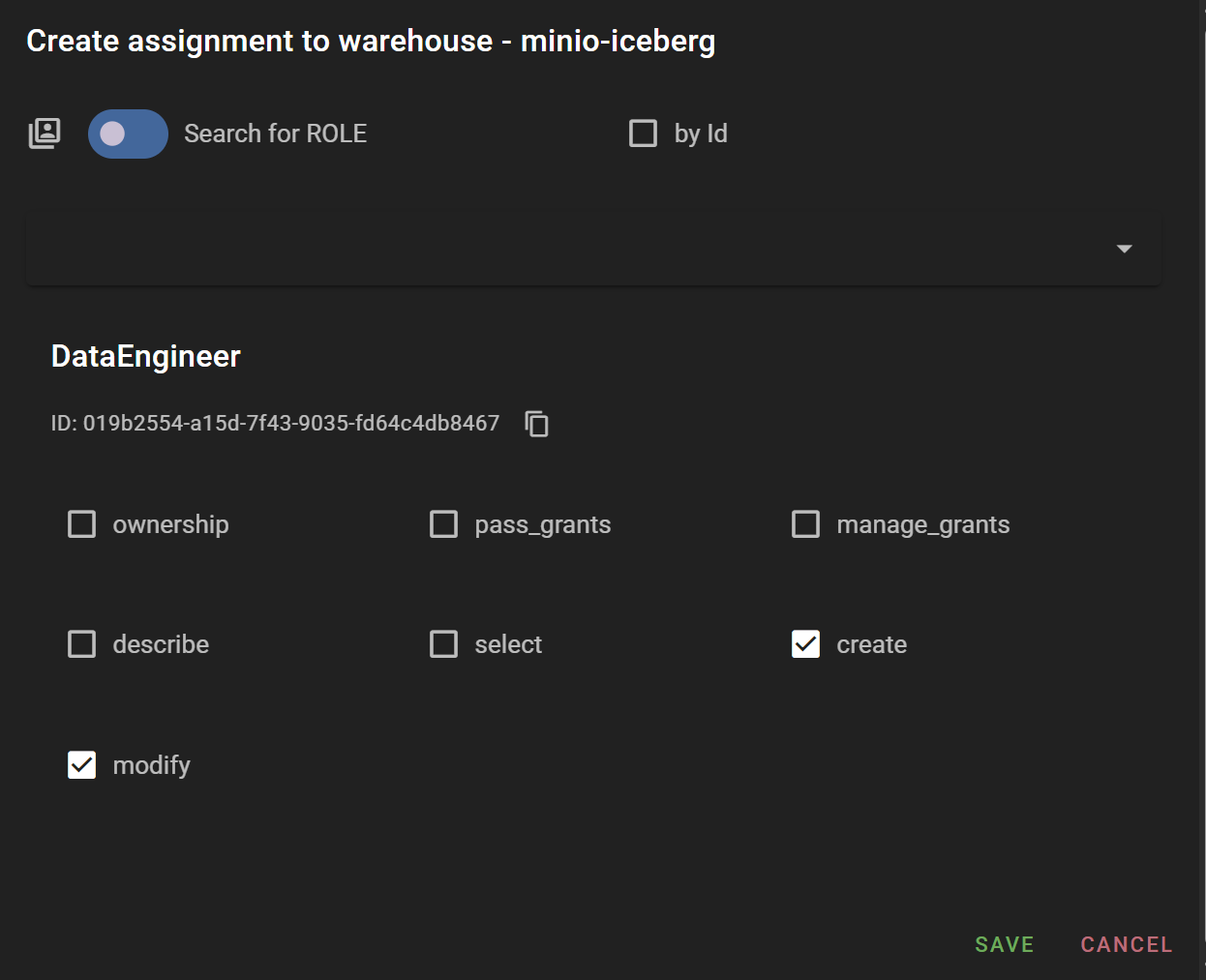
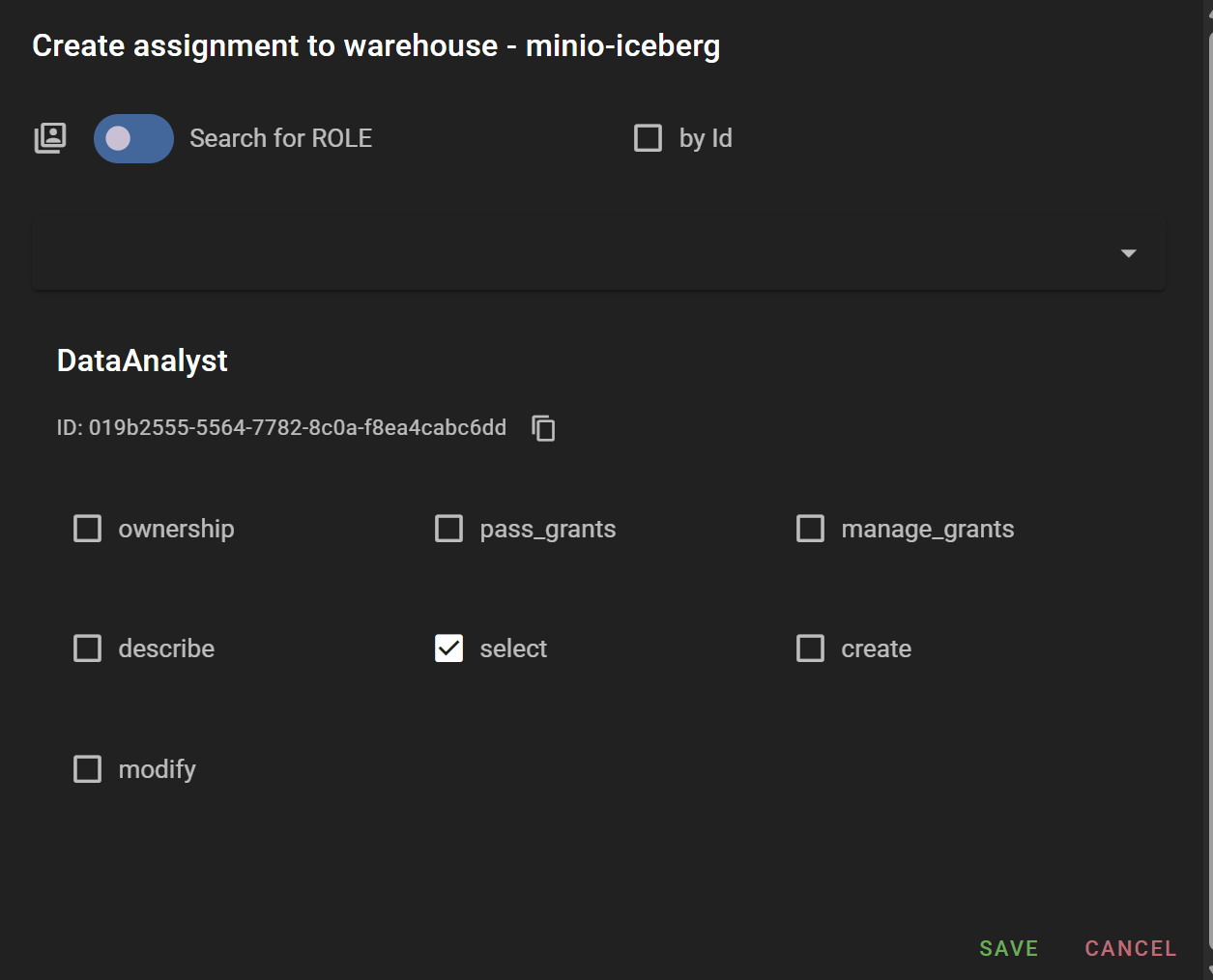
According to the entity hierarchy, data access permissions can be granted at Project, Warehouse, Namespace, and Table levels. In this example, we'll grant select permission to the DataAnalyst Role and create and modify permissions to the DataEngineer Role at the minio-iceberg warehouse level created above.
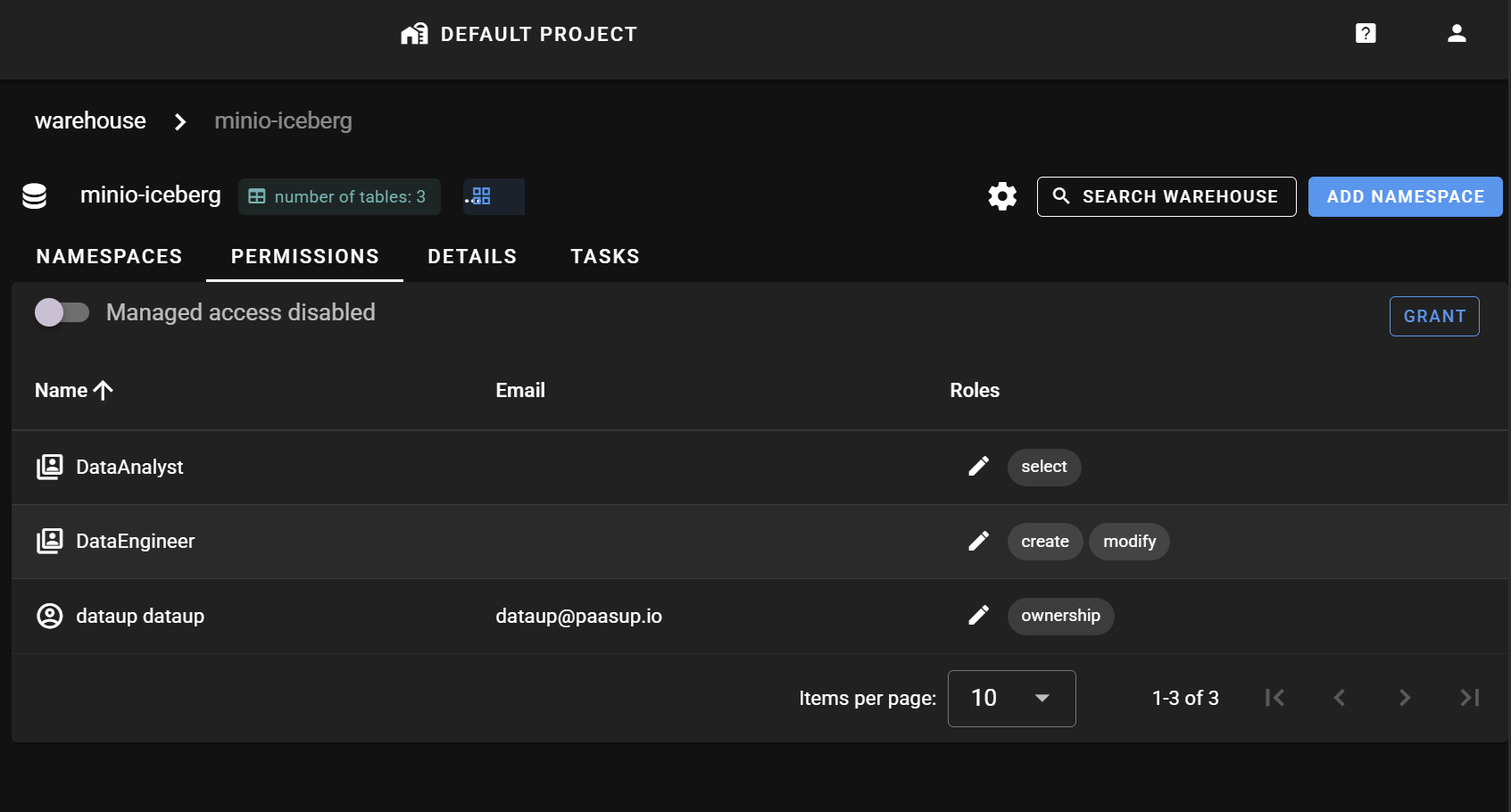
Summary of Permissions Granted So Far
- DataEngineer (Role): Assigned to testor user, granted
create,modifypermissions on minio-iceberg (warehouse) entity - DataAnalyst (Role): Assigned to testor2 user, granted
selectpermission on minio-iceberg (warehouse) entity
Permission Verification
We'll verify the data access permission framework granted through Lakekeeper in an actual Jupyter Notebook environment through Spark batch. The dataset used for verification is WHO's COVID-19 statistical data (WHO-COVID-19-global-daily-data.csv).
Spark Session Configuration
Create a Spark session that accesses Iceberg through the Lakekeeper catalog. There are two methods for creating a Spark session:
- Connect to Lakekeeper catalog with temporary token
- Connect to Lakekeeper catalog with Keycloak client ID
In this example, we need to verify permissions granted to a human user (not registered as a Keycloak client), so we'll use the temporary token method.
testor User Permission Verification
Lakekeeper Temporary Token Issuance
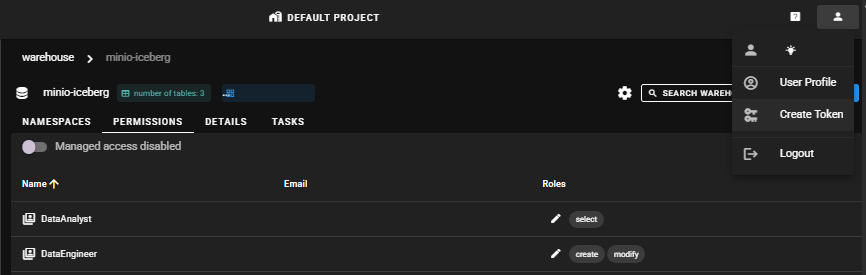
Access the Lakekeeper UI as testor user, click profile in the upper right corner > Create token, and the temporary token will be saved to the clipboard.
Spark Session Creation
Create a Spark session by entering the issued temporary token value. The catalog_name is set to 'demo'.
from pyspark import SparkConf, SparkContext
from pyspark.sql import SparkSession
from pyspark.sql.functions import col, lit
import pyspark
import os

def define_conf_token(conf:SparkConf, notebook_name, notebook_namespace, token, CATALOG_URL, WAREHOUSE):
    pyspark_version = pyspark.__version__
    pyspark_version = ".".join(pyspark_version.split(".")[:2]) # Strip patch version
    iceberg_version = "1.6.1"

    jar_list = ",".join([
        "org.apache.hadoop:hadoop-common:3.3.4",
        "org.apache.hadoop:hadoop-aws:3.3.4",
        "com.amazonaws:aws-java-sdk:1.11.655",
        f"org.apache.iceberg:iceberg-spark-runtime-{pyspark_version}_2.12:{iceberg_version},"
        f"org.apache.iceberg:iceberg-aws-bundle:{iceberg_version},"
        f"org.apache.iceberg:iceberg-azure-bundle:{iceberg_version},"
        f"org.apache.iceberg:iceberg-gcp-bundle:{iceberg_version}"
    ])

    # jar package configuration
    conf.set("spark.jars.packages", jar_list)

    # SparkSessionCatalog (spark_catalog replacement)
    conf.set("spark.sql.catalog.spark_catalog", "org.apache.iceberg.spark.SparkSessionCatalog")
    conf.set("spark.sql.catalog.spark_catalog.type", "hive")  # or in-memory, configure as needed
    conf.set("spark.sql.extensions", "org.apache.iceberg.spark.extensions.IcebergSparkSessionExtensions")

    # RESTCatalog (for Lakekeeper REST API connection)
    catalog_name = "demo"
    conf.set(f"spark.sql.catalog.{catalog_name}", "org.apache.iceberg.spark.SparkCatalog")
    conf.set(f"spark.sql.catalog.{catalog_name}.catalog-impl", "org.apache.iceberg.rest.RESTCatalog")
    conf.set(f"spark.sql.catalog.{catalog_name}.uri", CATALOG_URL)
    conf.set(f"spark.sql.catalog.{catalog_name}.token", token)
    conf.set(f"spark.sql.catalog.{catalog_name}.warehouse", WAREHOUSE)

notebook_name      = "demo01"
notebook_namespace = "demo01-kubeflow"

CATALOG_URL = "[YOUR_CATALOG_URL]"  # lakekeeper's catalog api URL
WAREHOUSE = "minio-iceberg"

# Token issuance: lakekeeper UI upper right profile > click create token : token valid for 24 hours only
# testor : DataEngineer
lakekeeper_token = "[TESTOR_TOKEN_HERE]"

conf = SparkConf()
define_conf_token(
    conf=conf,
    notebook_name      = notebook_name,
    notebook_namespace = notebook_namespace,
    token = lakekeeper_token,
    CATALOG_URL=CATALOG_URL,
    WAREHOUSE=WAREHOUSE
)

appname = 'ingest_covid_daily'
spark = SparkSession.builder.config(conf=conf)\
    .appName(appname)\
    .master("local")\
    .getOrCreate()
Namespace Creation Test
The DataEngineer Role has create permission on minio-iceberg, so testor user's temporary token can create namespaces under minio-iceberg.

Table Creation and Data Manipulation Test
The DataEngineer Role has create, modify permissions on minio-iceberg, so testor user's temporary token can create tables under minio-iceberg and insert data.
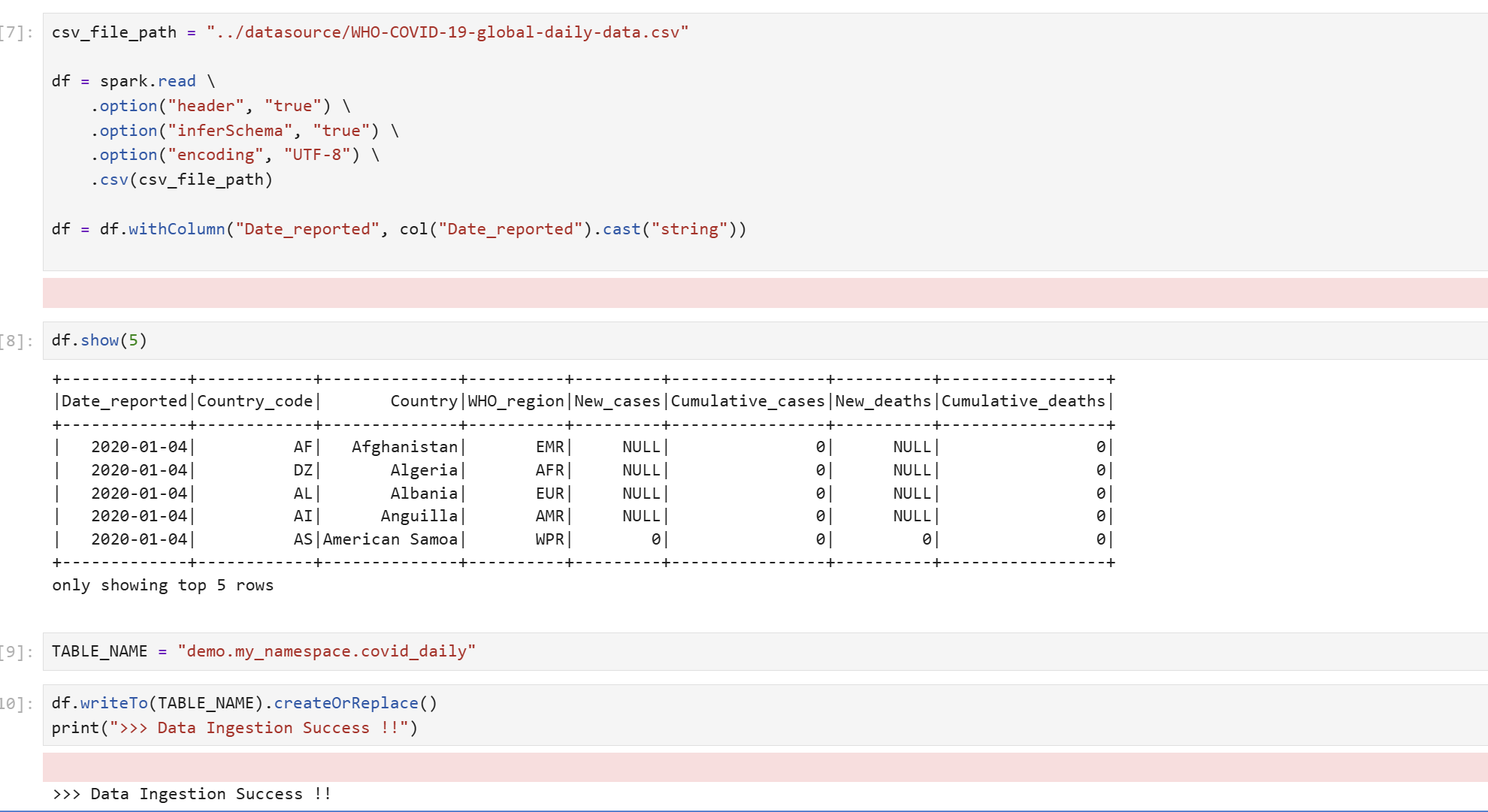
Table Select Test
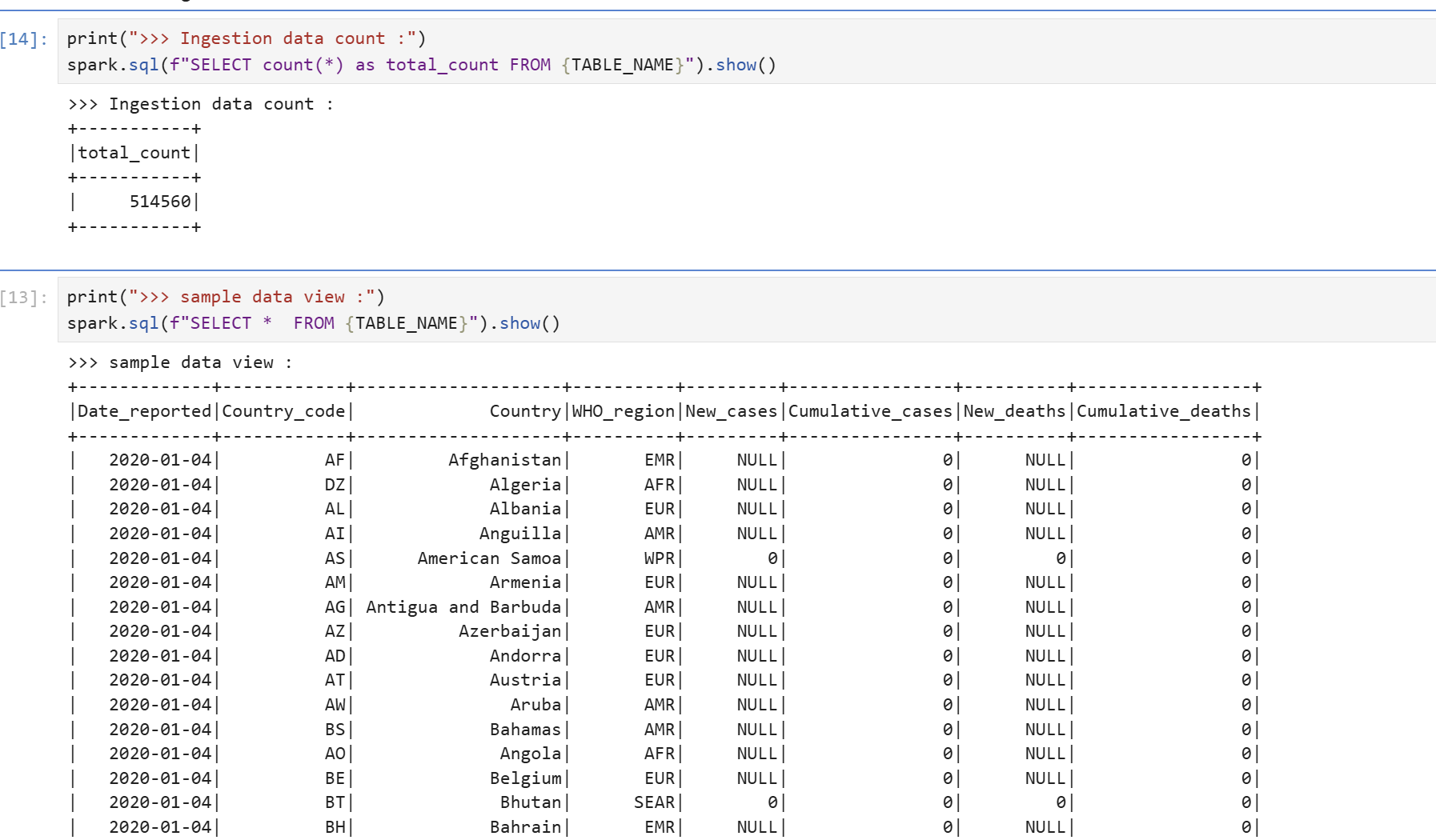
The DataEngineer Role has modify permission on minio-iceberg, and modify permission implicitly includes select and describe permissions, so testor user's temporary token can query tables under minio-iceberg.
testor2 User Permission Verification
Spark Session Creation
Create a Spark session by entering testor2's temporary token value.
...
# testor2 : DataAnalyst
lakekeeper_token = "[TESTOR2_TOKEN_HERE]"
...
appname = 'ingest_covid_daily'
spark = SparkSession.builder.config(conf=conf)\
    .appName(appname)\
    .master("local")\
    .getOrCreate()
Table Creation and Data Manipulation Test
The DataAnalyst Role only has select permission on minio-iceberg, so testor2 user's temporary token cannot create tables under minio-iceberg or insert data.
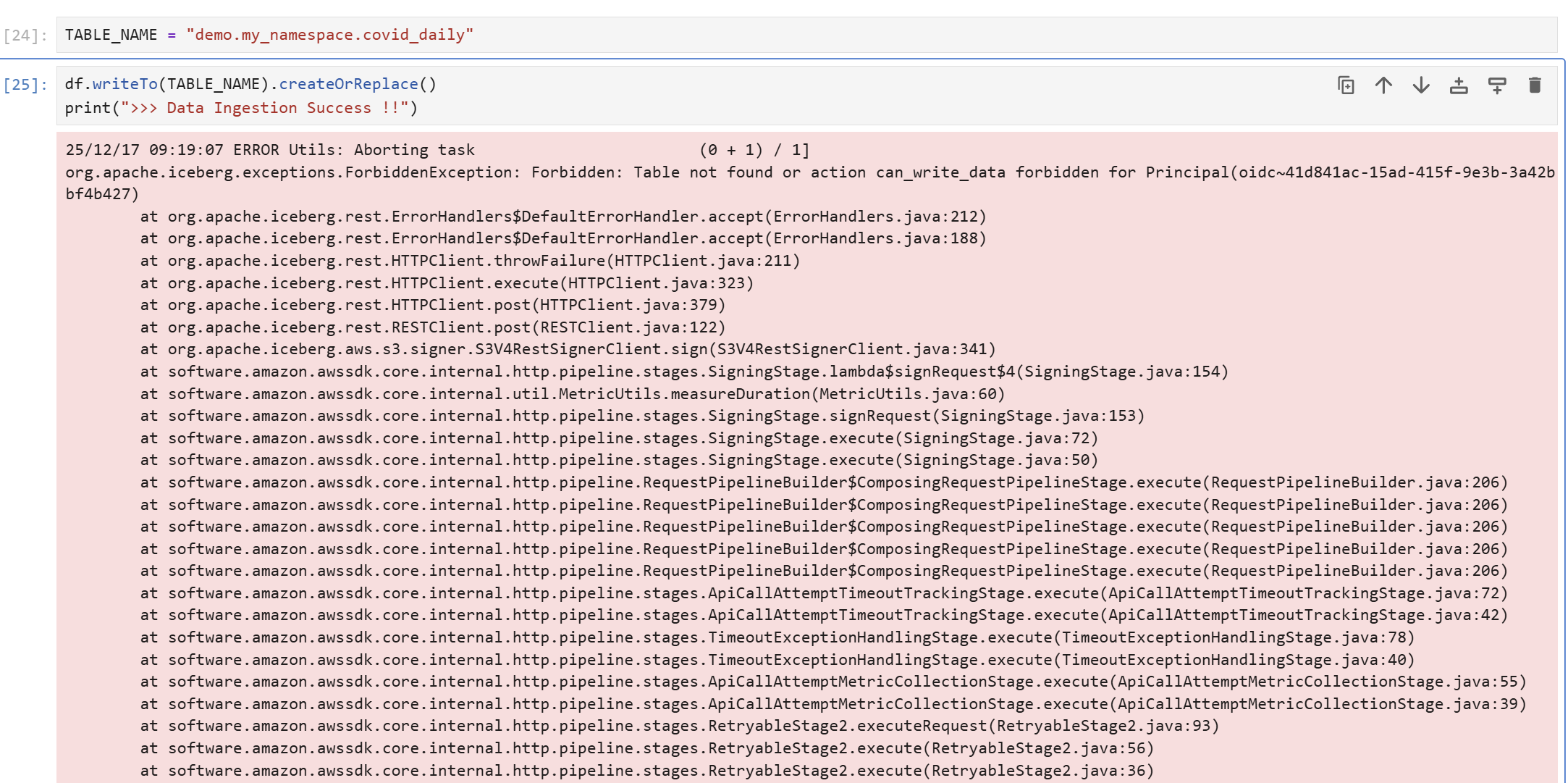
Table Select Test
However, the DataAnalyst Role has select permission on minio-iceberg, so testor2 user's temporary token can query tables under minio-iceberg.
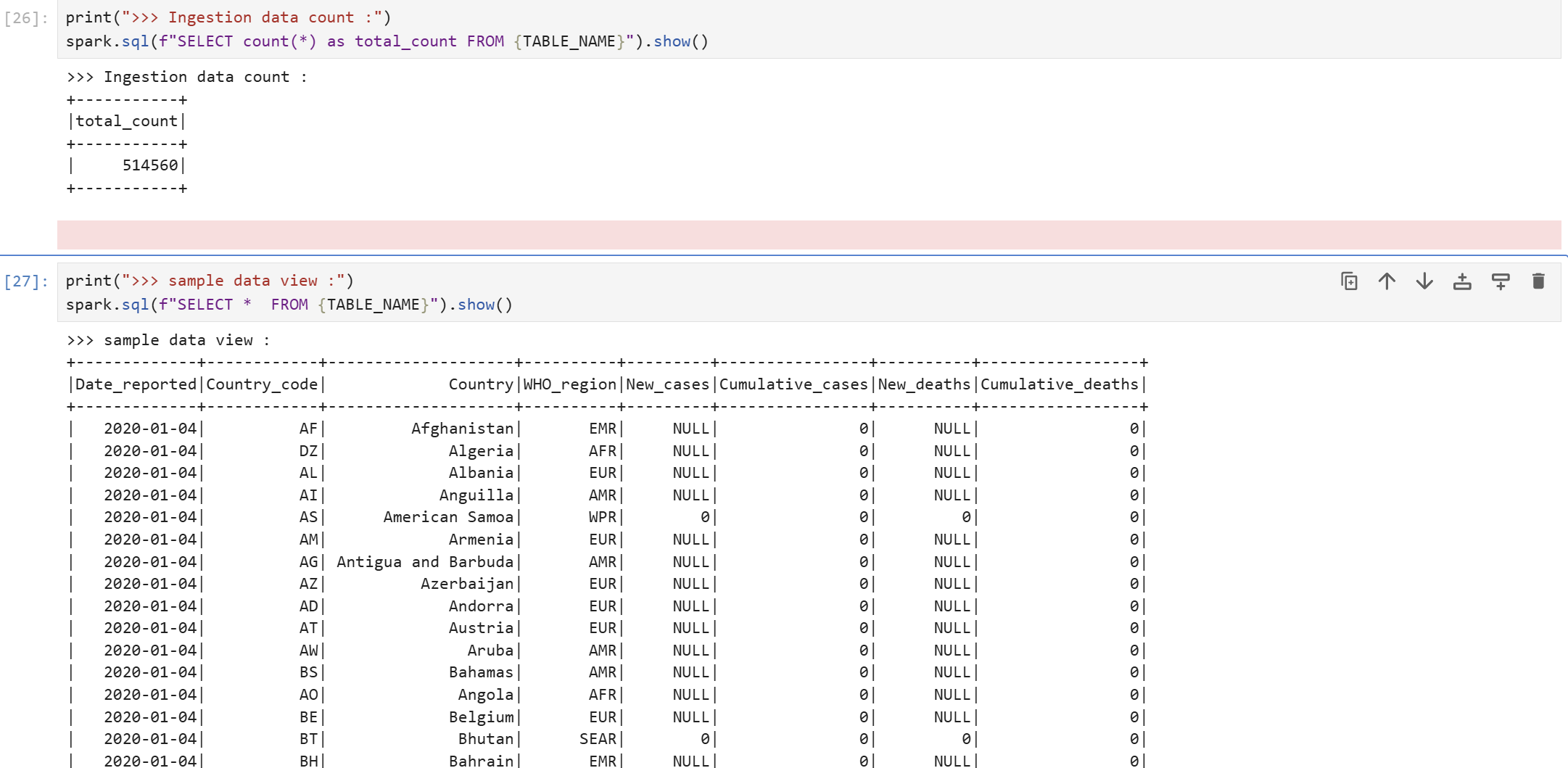
Checking Table Information in Lakekeeper UI
You can view various information about tables in the Lakekeeper UI.
Project > Warehouses > NAMESPACES
You can view the list of tables.
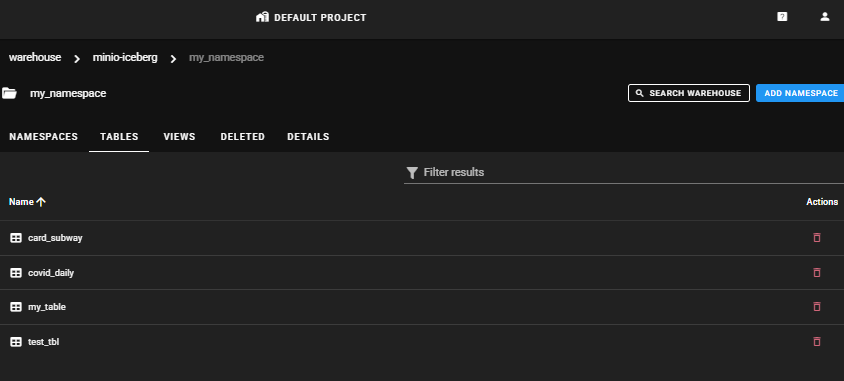
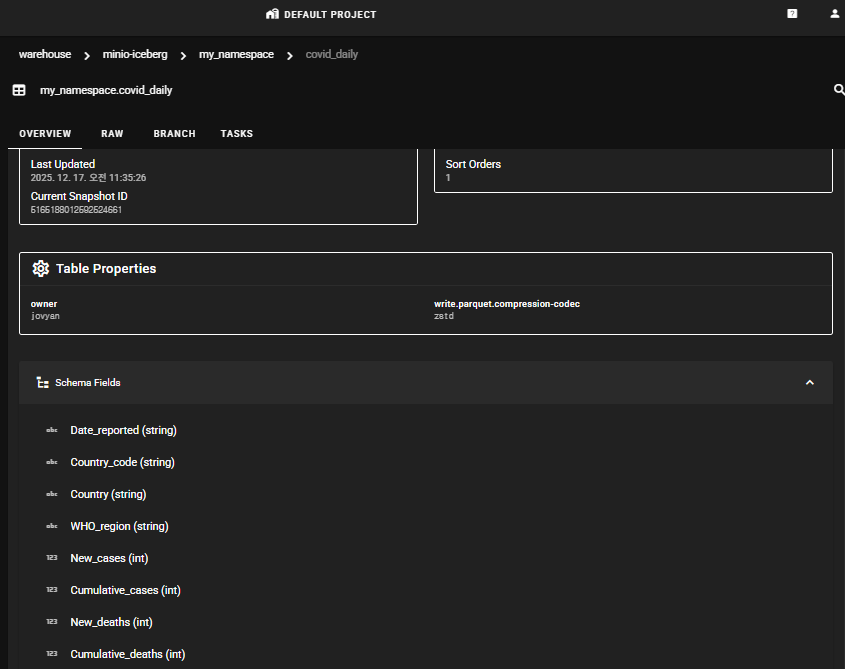
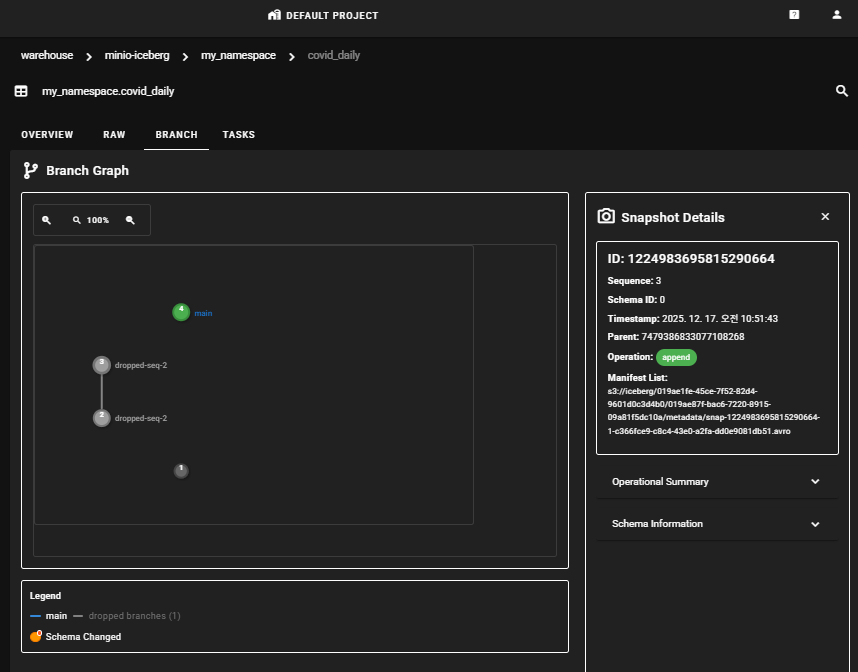
Project > Warehouses > NAMESPACES > TABLES
Clicking the table name allows you to view schema information and work history information in the OVERVIEW, RAW, BRANCH, and TASK tabs.
Connecting StarRocks for Data Visualization
Through an IRC (Iceberg REST Catalog) like Lakekeeper, you can create an external catalog for StarRocks DB and directly query data from the Iceberg lakehouse in the StarRocks Client (using MySQL client).
Creating Iceberg External Catalog
When creating an Iceberg External Catalog through IRC, the credentials for Lakekeeper access must be an application user registered as a Keycloak client. Human users must access via temporary tokens, so they are not suitable for external catalog declarations.
CREATE EXTERNAL CATALOG lakekeeper_catalog
PROPERTIES (
    "type" = "iceberg",
    "iceberg.catalog.type" = "rest",
    "iceberg.catalog.security" = "oauth2",
    -- LakeKeeper Credentials
    "iceberg.catalog.uri" = "[LAKEKEEPER_CATALOG_URI]",
    "iceberg.catalog.oauth2.server-uri" = "[KEYCLOAK_SERVER_URI]",
    "iceberg.catalog.warehouse" = "minio-iceberg",
    "iceberg.catalog.oauth2.credential" = "[KEYCLOAK_CLIENT_ID]:[CLIENT_PASSWORD]",
    "iceberg.catalog.oauth2.scope" = "lakekeeper",
    "aws.s3.region" = "us-east-1",
    "aws.s3.enable_path_style_access" = "true" -- true when using S3-compatible storage
);
Query Testing
You can perform query tests in the SQL Client using the External Catalog.
SHOW DATABASES
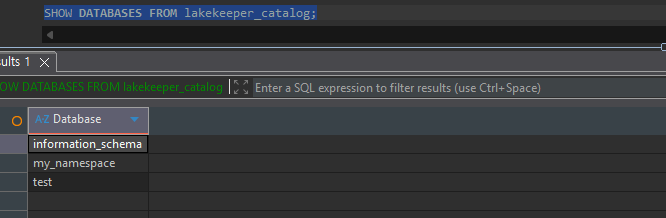
Table Description
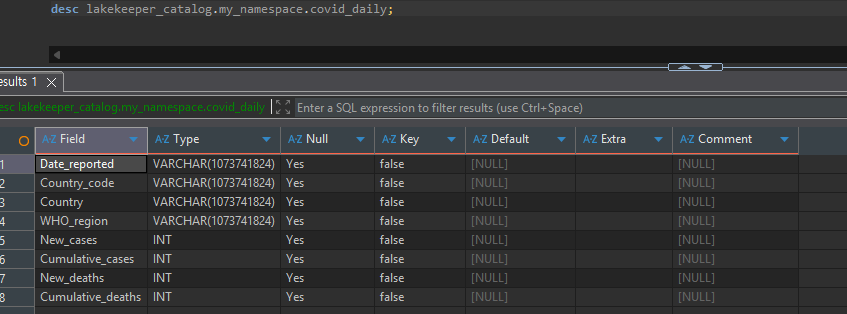
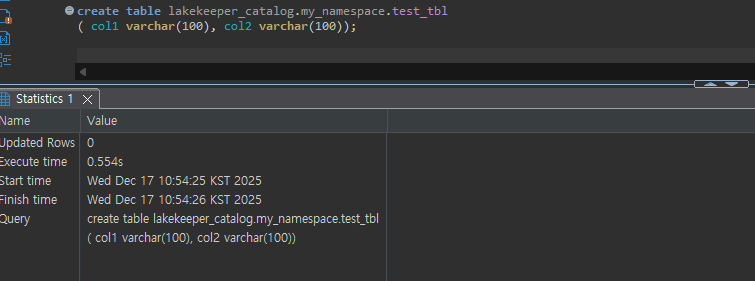
Table Create
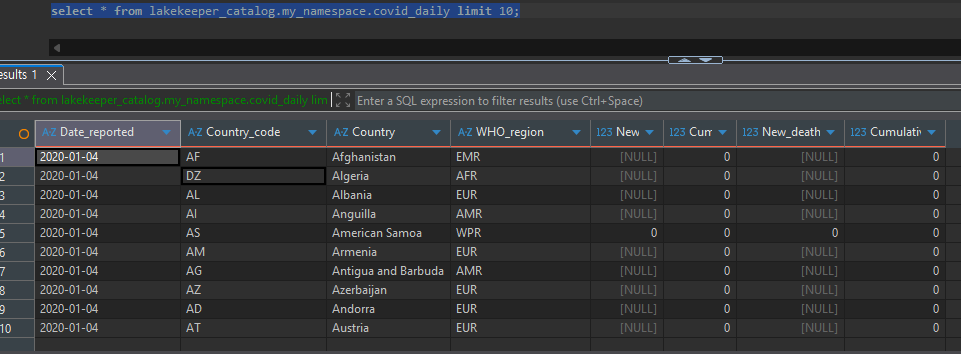
Data Manipulation
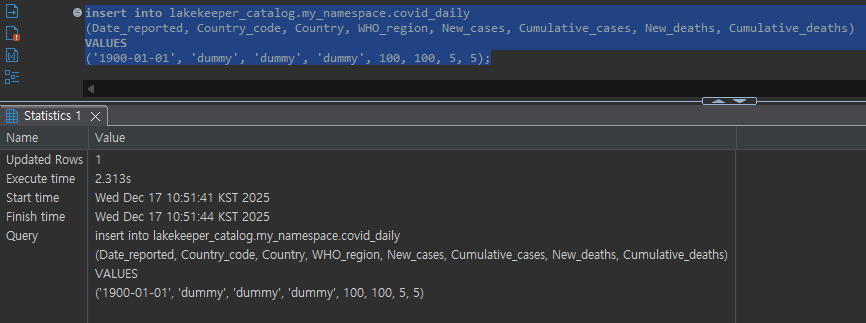
Data Select:
Data Insert:
Data Visualization with Apache Superset
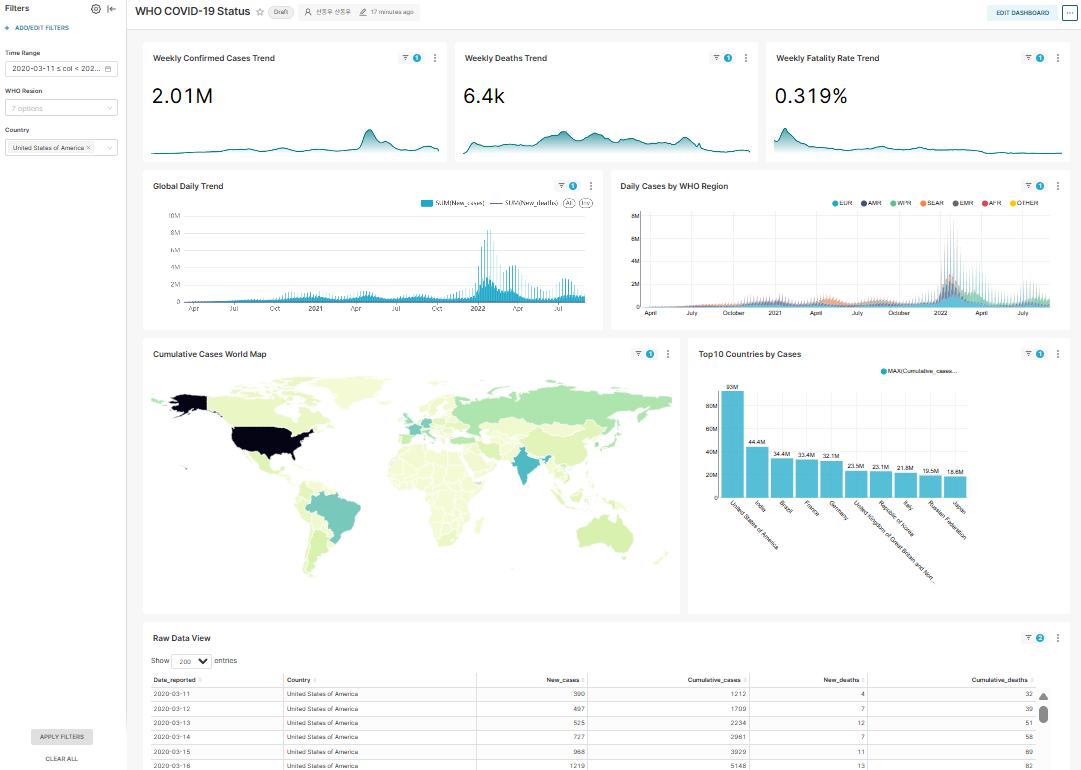
The dashboard is organized in the order of [Summary (KPI)] > [Time Series Trends] > [Geographic Distribution] > [Detailed Ranking].
Dashboard Filter Definition
- Time Range: Applied by converting the Date_reported column to DateType
- WHO Region: WHO_region column filtering
- Country: Country filter applied only to the Raw data (table) Chart
Dataset Definition
SELECT
    -- [Core] Convert string to date
    -- This allows Superset to recognize this column as 'Temporal'
    CAST(Date_reported AS DATE) AS Date_reported,

    -- Dimension
    Country_code,
    Country,
    WHO_region,

    -- Metric - NULL handling
    COALESCE(New_cases, 0) AS New_cases,
    COALESCE(New_deaths, 0) AS New_deaths,
    COALESCE(Cumulative_cases, 0) AS Cumulative_cases,
    COALESCE(Cumulative_deaths, 0) AS Cumulative_deaths

FROM  lakekeeper_catalog.my_namespace.covid_daily
WHERE 1 = 1
{% if from_dttm %}
        AND Date_reported >= DATE_FORMAT('{{ from_dttm }}' , '%Y-%m-%d')
{% endif %}
{% if to_dttm %}
    AND Date_reported <  DATE_FORMAT('{{ to_dttm }}' , '%Y-%m-%d')
{% endif %}
{% if filter_values('WHO_region') %}
  AND WHO_region IN ({{ "'" + "','".join(filter_values('WHO_region')) + "'" }})
{% endif %}
Chart Definition
- Weekly Confirmed Cases Trend (BIG Number with time-series chart)
- Weekly Deaths Trend (BIG Number with time-series chart)
- Weekly Fatality Trend (BIG Number with time-series chart)
- Global Daily Trend (Mixed chart)
- Daily Cases by WHO Region (Bar chart (stack))
- Cumulative Cases World Map (World Map chart)
- Top10 Countries by Cases (Bar chart)
- Raw Data View (Table chart)
Conclusion
In this article, we explored how to build a governance framework for an Apache Iceberg-based lakehouse using Lakekeeper, along with actual implementation cases.
Key Achievements
Systematic Permission Management
- Implemented fine-grained access control from server to table level through OpenFGA's powerful permission model.
- Clearly separated and managed permissions for DataEngineer and DataAnalyst through Role-Based Access Control.
- Reduced permission management complexity while maintaining security through a bidirectional inheritance framework.
Multi-engine Integration
- Integrated batch processing via Spark and real-time queries via StarRocks into a single catalog.
- Ensured data governance consistency by applying the same permission framework consistently across each engine.
Practical Verification
- Bridged the gap between theory and actual implementation through permission verification using real COVID-19 data.
- Completed an end-to-end data pipeline by connecting visualization through Apache Superset.
Implementation Benefits
By adopting Lakekeeper, you can expect the following benefits:
- Enhanced Security: Minimize data leakage risks and meet compliance requirements through fine-grained permission control.
- Operational Efficiency: Improve data asset visibility and reduce management costs through centralized metadata management.
- Scalability: Flexibly respond to organizational requirement changes through compatibility with various query engines.
- Audit Trail: Track data access and change history to meet governance requirements.
Lakekeeper is an effective solution for building a powerful and flexible governance framework in modern lakehouse environments. We hope this article provides practical help in building your data governance framework.