
Connecting Your Service to AI Agents with MCP - Embedded vs Bridge Patterns in Practice
Based on experience with a FastAPI RAG server, this post walks through the difference between the Embedded pattern (MCP lives inside your app) and the Bridge pattern (MCP runs as a separate process), how to choose the right Transport, and how to write Tool descriptions that actually guide the LLM.
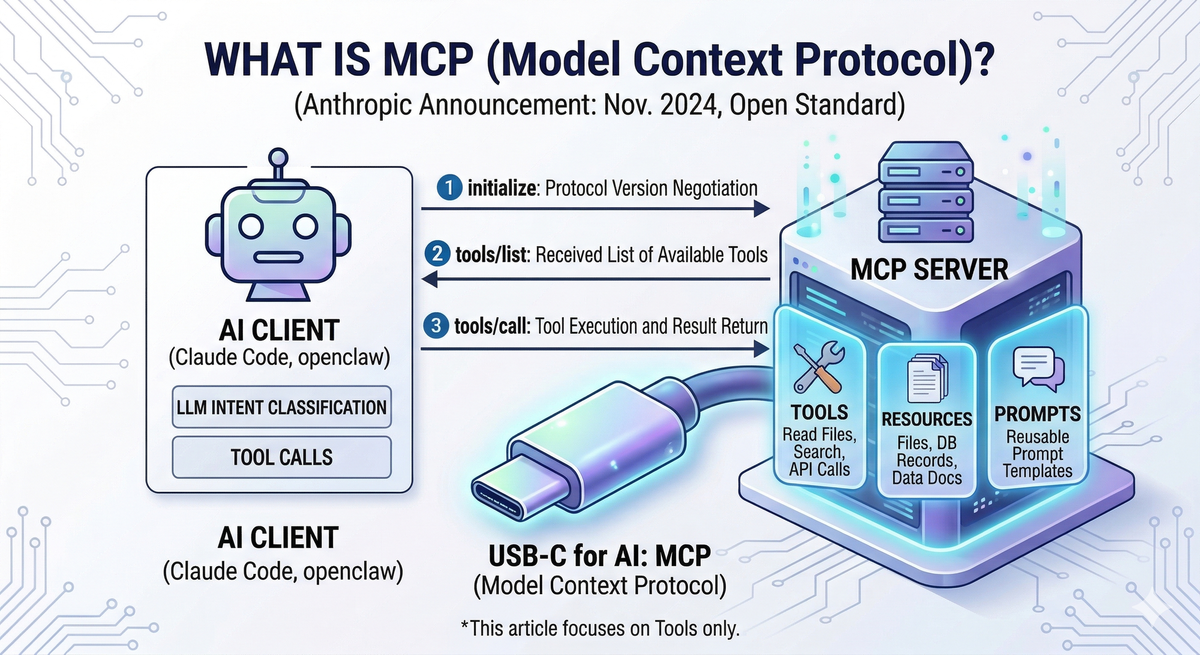
Table of Contents
- Introduction
- What is MCP?
- Two Ways to Connect an Existing Service to MCP
- Choosing a Transport: Streamable HTTP vs stdio
- Implementation A: Embedding MCP in a FastAPI App
- Implementation B: The Bridge MCP Pattern
- Tool Descriptions — Instructions for the LLM
- Wrapping Up
1. Introduction
Your service is done. It has API endpoints and documentation. But how do you make an AI agent like Claude actually use it?
Before MCP (Model Context Protocol), there was no clean answer. You'd feed API spec documents to the agent directly, or hand-craft schemas in OpenAI function calling format. Every time the service changed, the schemas had to change with it. And as the number of clients grew, each one needed its own integration code to maintain separately.
MCP solves this with a standard protocol. AI agents can discover and call your service on their own.
This post is based on real experience adding MCP to a RAG server. It covers, in order:
- MCP concepts and how it works
- Two patterns for connecting an existing service to MCP (Embedded vs Bridge)
- Transport selection (Streamable HTTP vs stdio)
- Implementation A (Embedded) / Implementation B (Bridge) code
- Writing Tool descriptions for LLMs
2. What is MCP?
MCP (Model Context Protocol) is an open standard protocol released by Anthropic in November 2024. Think of it as USB-C for AI — before USB-C, every device needed a different cable; before MCP, every service needed its own AI integration code.
All messages are exchanged in JSON-RPC 2.0 format. The client sends a request, and the server returns a result.
An MCP server exposes three types of capabilities:
- Tools: Executable functions the AI can call (e.g., file read, search, API call)
- Resources: Data or documents the AI can read (e.g., files, DB records)
- Prompts: Reusable prompt templates
This post covers Tools only, since the goal is letting AI agents directly execute service functionality.
How It Works
┌───────────────────────────────────────────┐
│  AI Client (Claude Code, Claude Desktop)  │
└───────────────────────┬───────────────────┘
                        │  MCP Protocol (JSON-RPC 2.0)
                        │
                        │  1. initialize  ← protocol version negotiation
                        │  2. tools/list  ← receive available Tools
                        │  3. tools/call  ← execute Tool + return result
                        ▼
                ┌──────────────┐
                │  MCP Server  │
                └──────────────┘
When a client connects, it first performs a handshake via initialize, then retrieves available Tools via tools/list. The LLM evaluates user intent and calls the appropriate Tool via tools/call. The result is added to the LLM's context for generating a final response.
3. Two Ways to Connect an Existing Service to MCP
There are two primary approaches.
Pattern A: Embedded MCP
MCP is embedded directly inside your existing app. The REST API and MCP run in the same process, and MCP Tools call internal service functions without going through HTTP. You need to modify existing code, but there are no extra network hops — REST and MCP share the same DB connections and resources.
          ┌─────────────┐
          │  AI Client  │
          └──────┬──────┘
                 │ Streamable HTTP (POST /mcp)
                 ▼
┌──────────────────────────────────────────┐
│       Existing App (FastAPI, etc.)       │
│                                          │
│   ┌─────────────────────────────────┐    │
│   │  REST Adapter  (/api/...)       │    │
│   └─────────────────────────────────┘    │
│   ┌─────────────────────────────────┐    │
│   │  MCP Adapter   (/mcp)           │    │
│   └───────────────┬─────────────────┘    │
│                   │ direct function call │
│                   ▼                      │
│   ┌─────────────────────────────────┐    │
│   │    Internal Services / Logic    │    │
│   └─────────────────────────────────┘    │
└──────────────────────────────────────────┘
Pattern B: Bridge MCP (Separate Process)
A standalone MCP server runs completely separate from the existing server. The AI agent talks to this Bridge server, and the Bridge internally calls the existing REST API over HTTP. The existing server is untouched — you just spin up an additional Bridge process to mediate between the AI agent and the existing server. Most open-source MCP servers (e.g., mcp-server-github, mcp-server-postgres) follow this pattern.
     ┌─────────────┐
     │  AI Client  │
     └──────┬──────┘
            │ stdio or HTTP
            ▼
┌───────────────────────────┐
│   MCP Bridge Server       │
│   (separate process)      │
└─────────────┬─────────────┘
              │ HTTP REST (httpx, etc.)
              ▼
┌───────────────────────────┐
│   Existing Server (REST)  │
│   no modifications        │
└───────────────────────────┘
Comparison
| Embedded MCP (Pattern A) | Bridge MCP (Pattern B) | |
|---|---|---|
| Deployment complexity | Low (single process) | Higher (2 processes) |
| Performance | High (direct function call) | Lower (HTTP overhead) |
| Modify existing server | Required | Not required |
| Best for | Service owner adding MCP | Wrapping an external service with MCP |
| Common Transport | Streamable HTTP | stdio |
| Notable examples | This post's implementation | mcp-server-github, mcp-server-postgres |
4. Choosing a Transport: Streamable HTTP vs stdio
Transport is how the AI client and MCP server exchange messages — in other words, "what channel they connect over."
SSE (Server-Sent Events) was used in earlier versions of MCP. It has since been replaced by Streamable HTTP and should not be used in new projects.
Streamable HTTP — for remote server deployments
The MCP server runs as an HTTP server. It opens a port and waits for client connections, supporting multiple simultaneous clients. Because it's exposed over the network, an authentication layer is required.
Claude Code configuration example:
// .claude/settings.json
{
  "mcpServers": {
    "my-service": {
      "type": "http",
      "url": "http://localhost:8001/mcp/"
    }
  }
}
stdio — for local clients
The MCP server does not run as an HTTP server. Instead, the client launches the MCP server process directly using the command specified in the configuration, then communicates with it over stdin/stdout. No server needs to be running in advance, and no authentication is needed. This is the transport commonly used with the Bridge MCP pattern.
Claude Code configuration example. The client launches the MCP server using the command and args specified in the config:
// .claude/settings.json
{
  "mcpServers": {
    "my-service-bridge": {
      "command": "python",
      "args": ["bridge_server.py"]
    }
  }
}
Decision Guide
Remote deployment / multiple clients / Embedded pattern  →  Streamable HTTP
Local only / Bridge pattern                              →  stdio
5. Implementation A: Embedding MCP in a FastAPI App
The example service is a document search RAG server — a FastAPI app that ingests PDF documents into a vector DB and provides search. MCP is added without touching the existing REST routers.
5-1. Creating the FastMCP Instance
Use the FastMCP class from the Python mcp library.
# backend/api/mcp/server.py
from mcp.server.fastmcp import FastMCP

mcp_server = FastMCP("rag-mcp-server", streamable_http_path="/")

# Tool registration — @mcp_server.tool() decorators run on import
import backend.api.mcp.tools  # noqa: F401, E402
streamable_http_path="/" sets the internal endpoint path within the FastMCP app. After mounting at /mcp in FastAPI, the final MCP endpoint becomes /mcp/.
The last import line is the key. The moment tools.py (the Tool definition file) is imported, all @mcp_server.tool() decorators execute and Tool registration completes. No manual registration code required.
5-2. Mounting in FastAPI + Lifespan Integration
Use FastAPI's sub-application mounting to attach MCP to the existing app.
# backend/api/server.py
from contextlib import asynccontextmanager
from fastapi import FastAPI

@asynccontextmanager
async def lifespan(app: FastAPI):
    await init_services()                          # initialize service singletons
    async with mcp_server.session_manager.run():   # start MCP session manager
        yield
    await shutdown_services()

def create_app() -> FastAPI:
    app = FastAPI(title=settings.APP_NAME, lifespan=lifespan)

    # Existing REST routers (unchanged)
    app.include_router(search.router)
    app.include_router(ingest.router)
    app.include_router(collections.router, prefix="/collections")
    # ...

    # MCP Adapter — Streamable HTTP transport (POST + GET /mcp)
    app.mount("/mcp", mcp_server.streamable_http_app())

    return app
REST API and MCP Tools share the same service instances. Adding MCP reuses existing business logic as-is.
5-3. Defining a Tool
All Tools — search, ingest, collection management, etc. — follow the same pattern. rag_search makes the structure clear:
# backend/api/mcp/tools.py
@mcp_server.tool()
async def rag_search(
    collection: str,
    query: str,
    top_k: int = 10,
    mode: str = "dense",
    filters: Optional[dict] = None,
) -> dict:
    """Search a document collection for relevant chunks. ..."""
    svc = get_search_service()          # singleton getter from deps.py
    req = SearchRequest(
        collection=collection,
        query=query,
        top_k=top_k,
        mode=SearchMode(mode),
        filters=filters,
    )
    resp = await svc.search(req)
    return resp.model_dump()
It calls the same service the REST API uses, directly.
5-4. Async Tasks — The "Fire and Poll" Pattern
Long-running tasks like PDF ingestion (which can take tens of seconds) are a problem. MCP connections have timeouts, so Tools must return a response immediately.
The solution is straightforward: submit the work to a job queue and return only a job_id. The AI agent then polls status using the rag_get_job_status Tool.
@mcp_server.tool()
async def rag_ingest(collection: str, source_type: str, ...) -> dict:
    """Ingest PDF documents into the RAG system for indexing. ..."""
    # ... build request object ...
    job_id = generate_job_id()
    await jm.submit(
        job_id,
        svc.execute_ingest(request, job_id),
        request.collection,
    )
    return {"job_id": job_id, "status": "pending", "message": "Job submitted"}
The job runs in the background and the Tool returns immediately with a job_id. The AI agent periodically calls rag_get_job_status(job_id) to check for completion.
6. Implementation B: The Bridge MCP Pattern
This approach wraps an existing server with MCP without modifying it at all.
# bridge_server.py — runs as a separate process
import httpx
from mcp.server.fastmcp import FastMCP

mcp = FastMCP("my-service-bridge")
SERVICE_BASE = "http://localhost:8001"

@mcp.tool()
async def search(query: str, collection: str = "default", top_k: int = 10) -> dict:
    """Search the service for relevant documents."""
    async with httpx.AsyncClient() as client:
        resp = await client.post(
            f"{SERVICE_BASE}/search",
            json={"query": query, "collection": collection, "top_k": top_k},
        )
        resp.raise_for_status()
        return resp.json()

if __name__ == "__main__":
    mcp.run(transport="stdio")
mcp.run(transport="stdio") is all it takes to make this script an MCP server. Claude Code, Claude Desktop, Cursor, and similar clients launch MCP servers this way.
Pros: Not a single line of the existing server changes. Any service with a REST API can be wrapped with MCP using this pattern.
Cons: HTTP round-trip overhead, and you now manage two processes — the existing server and the Bridge. Error propagation from the existing server through the Bridge can get complex.
This pattern is a good fit when you can't modify the existing server or need to wrap an external service with MCP.
7. Tool Descriptions — Instructions for the LLM
A Tool's docstring is the only API documentation the LLM has access to. Its quality directly affects how accurately an AI agent selects and uses Tools.
Bad Example
@mcp_server.tool()
async def rag_search(collection: str, query: str, top_k: int = 10) -> dict:
    """Search documents."""
From the LLM's perspective, there's nothing to work with — it can't tell what this Tool does, when to use it, or what values belong in each parameter. The result: wrong Tool selection or incorrect inputs.
Good Example
@mcp_server.tool()
async def rag_search(collection: str, query: str, top_k: int = 10, mode: str = "dense") -> dict:
    """Search a document collection for relevant chunks.

    When to use:
    - When the user asks questions about legal documents, contracts, regulations, etc.
    - When the answer needs to be grounded in document content

    Parameters:
    - collection: Name of the collection to search. If unknown, call rag_list_collections first.
    - query: Natural language search query. Pass through as-is.
    - top_k: Maximum results to return. 5 for simple questions, 20 for broad research.
    - mode: "dense" (semantic search) or "hybrid_parallel_rrf" (semantic + keyword, higher precision).

    Note: Specifying a non-existent collection will result in an error.

    Returns: list of matching chunks with score, content, and source metadata.
        Cite the content directly in your response rather than paraphrasing.
    """
Three key points:
① The "When to use" section is the most important. This is how the LLM decides whether to pick this Tool out of potentially dozens of options.
② Specify allowed values and recommended defaults. Without guidance, the LLM has to guess. With recommended values, you get consistent behavior.
③ Include hints about what to do with the result. Guiding the LLM's follow-up actions keeps the user experience predictable.
A Tool description isn't code — it's an instruction to the LLM. It's worth the time.
Security note: Embedded MCP exposes all Tools — including deletion and admin operations, not just search. In production, expose only the Tools the AI agent actually needs, and isolate the
/mcpendpoint within your internal network.
8. Wrapping Up
Adding MCP lets you give AI agents new capabilities without major changes to an existing service.
If you own the service and are adding MCP yourself, Embedded pattern + Streamable HTTP is the natural choice. If you can't modify the existing server, or you're setting up a local client workflow, Bridge pattern + stdio is a better fit.
MCP is a fast-moving ecosystem. Supported Transports and feature availability vary across clients, so check the documentation for the client you're connecting to before you start.
Code in Implementation A is excerpted from a real FastAPI + FastMCP RAG server. Implementation B is example code for illustrating the pattern.