
mcp-link: Turn Any REST API into an MCP Server
You have REST APIs that work. Connecting them to AI agents means building an MCP server for each one. mcp-link takes an OpenAPI spec and instantly turns every endpoint into an AI tool. No spec? Generate one with AI first, then connect.
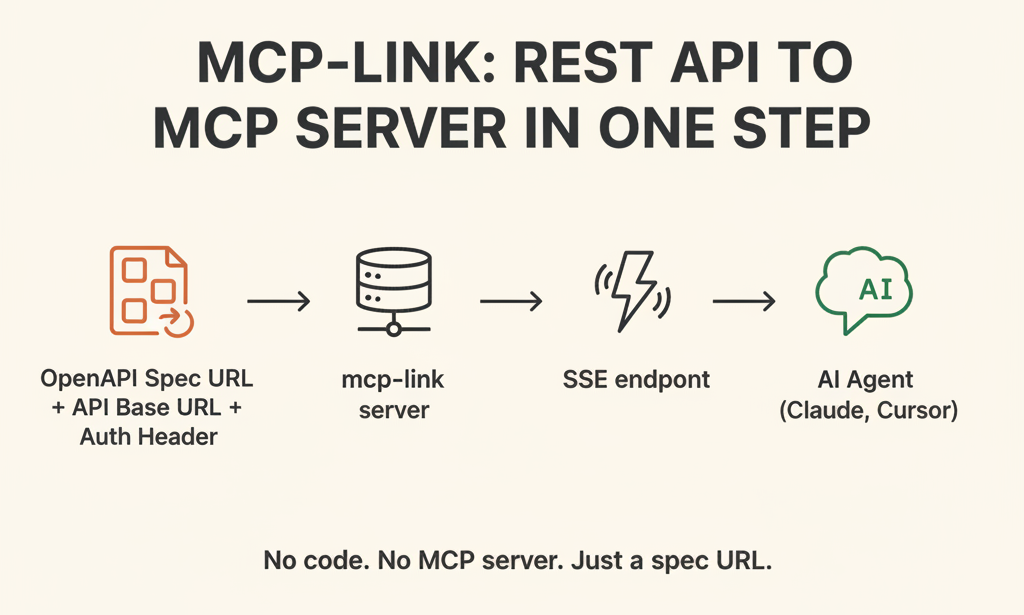
"Can we get Claude to query our ERP?" Every developer who's tried connecting an internal REST API to an AI agent has asked some version of this question. The system works fine, the AI agent is there — the only missing piece is the bridge between them.
The problem is the interface. AI agents don't speak REST. They can only use tools wrapped in a standard format called MCP (Model Context Protocol). That means writing a new MCP server for every existing REST API — and if you have dozens of endpoints, that's days of boilerplate work.
mcp-link automates that conversion. Feed it an OpenAPI spec and every endpoint in that API becomes an AI tool. Even legacy APIs without a spec can be connected — just have AI write the spec first.
1. What is mcp-link?
mcp-link is a Go-based tool that automatically converts an OpenAPI V3 spec (the REST API standard maintained by the Linux Foundation's OpenAPI Initiative) into a running MCP server.
"If you have an OpenAPI spec, every REST API instantly becomes an AI agent tool."
MCP is an open protocol proposed by Anthropic that defines how AI agents communicate with external tools. Claude, Cursor, Windsurf, and other AI agents all support it — but thousands of existing REST APIs don't have MCP servers yet. mcp-link bridges that gap.
2. Why Building an MCP Server by Hand Is Painful
Every API needs its own MCP server
Connecting Slack means building a Slack MCP server. Connecting Notion means building a Notion MCP server. For each one, you translate every endpoint into an MCP tool schema (name, description, parameter types), handle authentication separately (API Key, Bearer Token), and serialize responses into the MCP format. The work is nearly identical for every API, yet you repeat it every time.
Upstream changes break things
When an API adds a new endpoint or changes a parameter, you have to update the MCP server code manually — even though the OpenAPI spec already captures that change. You end up maintaining two sources of truth.
MCP itself is brand new
The MCP spec was released in 2024. With few reference implementations around, building from scratch means figuring out field semantics and SSE connection handling from first principles.
3. How mcp-link Works
Core architecture
mcp-link takes three inputs and exposes an SSE endpoint.
[OpenAPI Spec URL]  +  [API Base URL]  +  [Auth Header]
                              ↓
                        mcp-link server
                              ↓
           http://localhost:8080/sse?s=...&u=...&h=...
                              ↓
                  AI Agent (Claude, Cursor, etc.)
- Spec parsing: Reads the OpenAPI V3 spec URL and parses every path, HTTP method, parameter type, and description.
- Tool generation: Converts each endpoint into an MCP tool.
GET /users/{id}becomes agetUsertool, with parameter types pulled directly from the OpenAPI schema. - SSE server: Exposes the tool list over SSE (Server-Sent Events) — a protocol where the server holds a connection open and pushes data to the client in real time. Agents register this single URL in their
mcpServersconfig. - Request proxy: When an agent calls a tool, mcp-link forwards the request to the original REST API as a standard HTTP call. Auth headers are automatically appended via the
h=parameter.
Endpoint filtering
When you don't need every endpoint, the f= parameter controls what's included or excluded.
f=+/messages/**,-/admin/**
+ includes, - excludes, and ** wildcards are supported. For example: expose only Slack's messaging endpoints while hiding the admin API entirely.
4. Try It Yourself
The example target is JSONPlaceholder (https://jsonplaceholder.typicode.com) — a free, developer-friendly test REST API with no official OpenAPI spec. This walkthrough covers the full process of connecting an API that starts without a spec.
Step 1: Install
git clone https://github.com/automation-ai-labs/mcp-link.git
cd mcp-link
go mod download
go run main.go serve --port 8080 --host 0.0.0.0
Go 1.21 or later is required. To skip installation entirely, use the hosted version at mcp-link.vercel.app.
Step 2: Prepare an OpenAPI V3 Spec
mcp-link accepts the spec via the s= parameter as a URL. If you already have a spec, skip ahead to Step 3.
If you don't have a spec — three options:
Option A: Framework auto-generation (for APIs you own)
| Framework | Auto-generated spec path |
|---|---|
| FastAPI (Python) | /openapi.json |
| Spring Boot (Java) | /v3/api-docs |
| Django REST Framework | /api/schema/ |
| ASP.NET Core | /swagger/v1/swagger.json |
Option B: Generate with AI (external API, docs available)
Ask Claude:
Write an OpenAPI V3 spec for the REST API athttps://jsonplaceholder.typicode.com. Include only the/posts,/todos, and/usersendpoints. Output as YAML.
Save the result as jsonplaceholder.yaml.
openapi: "3.0.0"
info:
  title: JSONPlaceholder API
  version: "1.0.0"
servers:
  - url: https://jsonplaceholder.typicode.com
paths:
  /posts:
    get:
      summary: List all posts
      operationId: listPosts
      parameters:
        - name: userId
          in: query
          schema:
            type: integer
      responses:
        "200":
          description: List of posts
  /posts/{id}:
    get:
      summary: Get a post by ID
      operationId: getPost
      parameters:
        - name: id
          in: path
          required: true
          schema:
            type: integer
      responses:
        "200":
          description: A single post
  /todos:
    get:
      summary: List todos
      operationId: listTodos
      parameters:
        - name: userId
          in: query
          schema:
            type: integer
        - name: completed
          in: query
          schema:
            type: boolean
      responses:
        "200":
          description: List of todos
  /users:
    get:
      summary: List all users
      operationId: listUsers
      responses:
        "200":
          description: List of users
  /users/{id}:
    get:
      summary: Get a user by ID
      operationId: getUser
      parameters:
        - name: id
          in: path
          required: true
          schema:
            type: integer
      responses:
        "200":
          description: A single user
Option C: Traffic capture (no docs, no source code)
# Install Microsoft Dev Proxy, then:
devproxy --record
# Use the API normally, then stop recording
devproxy generate-openapi
# → openapi.json is generated automatically
Host the spec file as a URL
mcp-link reads specs from a URL. Create a Gist on gist.github.com and grab the Raw URL.
https://gist.githubusercontent.com/{user}/{id}/raw/jsonplaceholder.yaml
Step 3: Connect mcp-link
| Parameter | Purpose |
|---|---|
s= |
OpenAPI spec URL |
u= |
API base URL |
h= |
Auth header (optional) |
f= |
Endpoint filter (optional) |
JSONPlaceholder has no auth, so only s= and u= are needed.
http://localhost:8080/sse?s={SPEC_URL}&u=https://jsonplaceholder.typicode.com
For APIs that require authentication, add the header via h=. Encode spaces in Bearer tokens as %20.
http://localhost:8080/sse?s={SPEC_URL}&u=https://api.example.com&h=Authorization:Bearer%20sk-xxxx
Step 4: Register with Claude Desktop
Add the following to claude_desktop_config.json and restart Claude Desktop.
{
  "mcpServers": {
    "@jsonplaceholder": {
      "url": "http://localhost:8080/sse?s=https://gist.githubusercontent.com/{user}/{id}/raw/jsonplaceholder.yaml&u=https://jsonplaceholder.typicode.com"
    }
  }
}
Step 5: Verify
The tools listPosts, getPost, listTodos, listUsers, and getUser will appear in the tool list. Ask Claude in plain language:
Show me the completed todos for user 1.
Claude calls listTodos with userId=1 and completed=true filled in automatically.
<실행 화면 예시>
![[Pasted image 20260717084010.png]]
Show me the posts written by user 3.
This time, listPosts is called with userId=3.
<실행 화면 예시>
![[Pasted image 20260717084141.png]]
5. Custom MCP Server vs. mcp-link
| Custom MCP Server | mcp-link | |
|---|---|---|
| Initial setup | Manually write tool schemas per endpoint | Provide one OpenAPI spec URL |
| Handling API updates | Edit and redeploy code | Auto-updates when spec URL is current |
| Authentication | Implement per API | Unified via h= parameter |
| Endpoint control | Select endpoints in code | Wildcard filter via f= |
| Response transformation | Full flexibility | Not supported (pure proxy) |
| Custom logic | Full flexibility | Not supported |
| Deployment | Self-hosted | Go server or Vercel |
Bottom line: Build a custom server when you need custom logic. Use mcp-link when you have an OpenAPI spec and want a fast connection.
6. mcp-link vs. MCP Gateway
mcp-link and MCP gateways (Microsoft MCP Gateway, IBM ContextForge, etc.) are often mentioned together, but they operate at different layers. The simplest summary:
mcp-link creates MCP servers from REST APIs. An MCP gateway manages a fleet of MCP servers.
The layered view
[REST API A]──mcp-link──┐
[REST API B]──mcp-link──┤
[REST API C]──mcp-link──┼──▶ MCP Gateway ──▶ AI Agent
[Custom MCP Server D]───┘
mcp-link sits in front of each REST API and turns it into an MCP server. The gateway sits in front of those MCP servers and handles auth, routing, and monitoring across all of them.
Feature comparison
| mcp-link | MCP Gateway | |
|---|---|---|
| Role | REST API → MCP server conversion | Front-door management for multiple MCP servers |
| Input | OpenAPI V3 spec | List of MCP server URLs |
| Auth | Forwards upstream API headers (h=) |
Token validation between agent and gateway |
| Access control | Endpoint filter (f=) |
Per-tool permission policies |
| Audit logging | None | Call history recorded |
| Rate limiting | None | Configurable |
| Operational scope | One instance per API | One gateway for many servers |
When do you need a gateway?
mcp-link alone is enough when:
- You're connecting a single API in a personal dev environment
- Usage is limited to a trusted internal network
- The goal is fast validation at the PoC or prototype stage
Add a gateway when:
- Multiple teams share different MCP servers
- You need to restrict which tools each agent can access
- Compliance or audit logging is required (SOC 2, ISO 27001, etc.)
- You need to expose mcp-link's SSE endpoint to the outside world
The natural progression is: connect with mcp-link first, add a gateway when the scale demands it. There's no need to set up a gateway upfront — mcp-link's MCP servers can be placed behind one at any time.
7. Limitations
OpenAPI V3 only. V2 (Swagger) specs are not supported. Older enterprise APIs need to be upgraded first.
No authentication on the mcp-link endpoint itself. Anyone with access to the SSE URL (localhost:8080/sse) can invoke your tools. That's fine in a local dev environment, but sharing the server or exposing it externally requires an auth layer in front of it. The simplest approach is a reverse proxy like Nginx or Caddy with Bearer token verification. For audit logging and per-tool access control, see Section 6.
No OAuth flow support for upstream REST APIs. The h= parameter accepts only static headers. APIs that use OAuth 2.0 require you to obtain a token separately, embed it as a fixed value, and manually update the URL when it expires. mcp-link does not handle token issuance or refresh. (This is separate from authenticating access to mcp-link itself.)
No response transformation. Aggregating multiple API responses, adding conditional logic, or reformatting output requires a custom MCP server.
Compatibility issues with some frameworks. Known issues have been reported (as of 2025) with Langgraph's MultiServerMCPClient and tool name conflicts in Spring AI.
8. Closing Thoughts
Most of the work in connecting a REST API to an AI agent is moving information that already exists in an OpenAPI spec into a different format. mcp-link automates that conversion.
Even APIs without a spec can be connected — generating one with AI now takes minutes rather than days. Start with mcp-link, and add infrastructure as the scale grows.