
From Piles of Documents to Knowledge That Answers (RAG Chatbot vs. Modoji Assistant)
"Where is that file?" "Is this the final version?" Documents pile up, but the answers stay in a few heads. Upload your documents as they are, and Modoji answers with the document name and page, checking each sentence against the source. This post maps an eight-part series.
Plan_final_v3_REALLY_final.pptx
Every team drive has a file like this. Materials are scattered across shared drives, personal laptops, messenger attachments, and inboxes, and nobody is quite sure which version is the latest. So the same person keeps answering the same questions, and when that person leaves the company, the knowledge leaves too.
Attaching AI to documents is no longer the hard part. The hard part is making its answers trustworthy, and making it work by the same rules tomorrow, for other people, and in other AI tools.
1. What Is the Modoji AI Assistant?
It does not just search. It reads and answers.
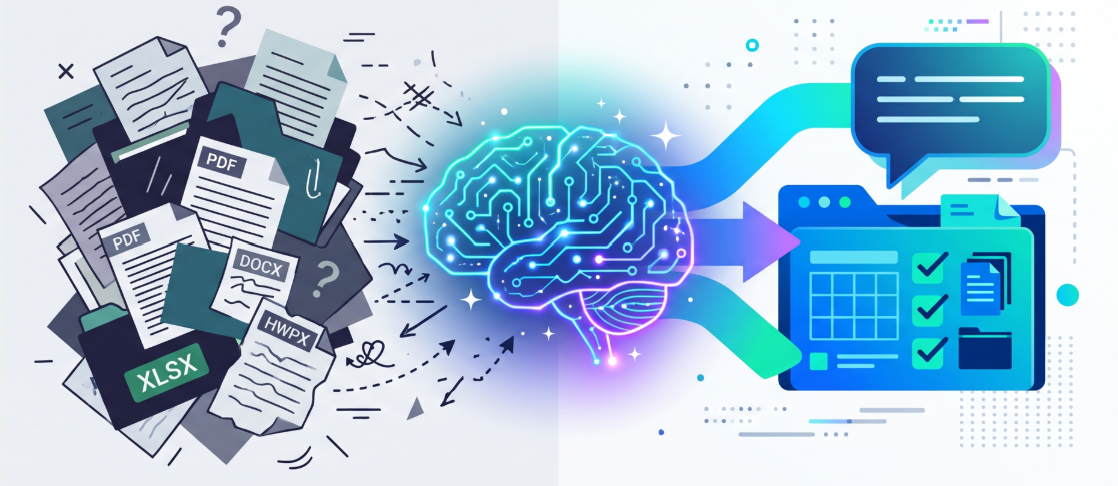
Modoji is an AI knowledge management service. It is not a note-taking app for writing new documents; it is a place where the documents you already have go to work. Upload eight kinds of files, including Hangul (HWP), Word, PDF, PowerPoint, and Excel, as they are, with no retyping, and the AI reads them down to the tables and figures, splits them into meaningful chunks, and indexes them.
From then on, you just ask. Ask "Last year's maintenance contract: by when do we have to give notice of non-renewal?" and the answer, "Written notice 60 days before expiry, due November 1," comes back with the contract's name and page. Only documents you are allowed to read are used as evidence, and every change, who made it and when, is recorded.
The AI assistant that produces these answers is the subject of this series.
2. Why "Document Search + LLM" Is Not Enough
There is no way to check whether the answer is right
A RAG chatbot says "according to the document," but you only know whether that sentence is really in the document by opening it yourself. The more costly a mistake would be, as with contract clauses or regulations, the higher this checking cost becomes.
Nothing remains when the conversation ends
You have to re-explain yesterday's report format, your team's terminology, and the company's writing rules every time. Switch AI tools, and you start over from scratch.
Giving everyone the same tools is risky
If you ask it to "search only in this folder," it should not dig through other repositories, and people without permission should never see admin tools. The more tools there are, the more likely the model is to pick the wrong one.
3. Under the Hood: How Does It Work?
Every question goes through four stages before it becomes an answer: guardrails, the capability loader, the agent loop, and citation verification.

Core Architecture Components
- Three entry points, one engine: Web chat, the mobile home screen, and MCP (Model Context Protocol, an open standard that lets AI tools call external functions) share the same tool implementations. A result found on the web and one found from Claude Code pass through the same code, the same permission checks, and the same result limits.
- Guardrails: Questions blocked by an administrator are stopped with a notice before they ever reach the model. Korean resident registration numbers, card numbers, and passport numbers are masked before being sent to the model, and the original text is kept only in the audit log.
- Capability loader: For every question, it looks at the user's permissions, the tenant's (company workspace's) feature configuration, and the scope the user selected, then decides which tools and prompts to load. If the user narrows the scope to "this folder only," other repositories are not searched, and web tools are loaded only when the user turns them on.
- Agent loop: For multi-step requests, the model first drafts a work plan (a checklist), then calls tools while updating the status of each item. It detects empty responses, cut-off answers, and repeated searches, and either nudges the model to continue or stops and explains why.
- Three axes
- Documents: Hybrid search that combines keyword search (BM25) with semantic search (vectors). Korean morphological analysis finds words even with particles attached. Results come back with file path, page number, and line number.
- Memory: Personal memories are stored as files in the user's personal repository, and organizational rules are injected into every session from a shared repository (the source of truth). When the two conflict, the organizational rule wins, but the personal memory is not deleted; the assistant flags the difference instead.
- Web: Loaded only when an administrator allows external access and the user turns it on for the current conversation.
- Citation verification: Each evidence marker attached to a sentence in the answer is compared with the source line. If there is no supporting line or the content differs, that spot is flagged in the answer. It does not block or rewrite the answer; it shows people where to check.
People Make Writes Final
The assistant can edit documents, but by default it only goes as far as a draft. Changes take effect only after a person submits and approves a document change request. The design keeps AI from finalizing company documents on its own.
4. Which Model Answers?
When you ask in Modoji on the web or mobile, the default model chosen by the administrator answers. Claude models and models that follow the OpenAI-compatible API can be used.
When you connect via MCP and ask from Claude Code or claude.ai, the answer is produced by the model you chose in that tool. Modoji only lends it tools such as document search, document reading, and memory.
Either way, search runs through the same permission checks on the Modoji server, so the range of documents you can see stays the same no matter which model answers. Each company (tenant) has its own separate database schema, so documents and memories of different companies using the same service never mix.
5. Try It Yourself
- Pre-register and upload documents: Pre-register at paasup.ai/modoji, and once sign-up opens, upload documents to your personal repository. Hangul (HWP) files upload as they are.
- Pick a scope and ask: In the chat window, select a repository or folder to narrow the scope, then ask your question. Click an evidence marker in the answer to jump to the exact line in the source.
- Connect the AI you already use: Issue a personal token in settings or connect through the claude.ai connector, and you can use the same documents and memories from Claude Code or claude.ai. Part #2 of this series covers the connection process in detail.
6. RAG Chatbot vs. Modoji Assistant: Key Comparison
| Item | Typical RAG chatbot | Modoji Assistant |
|---|---|---|
| Evidence shown | Document name only | File, page, and line, for every sentence |
| Evidence check | A person reopens the document | Automatically compared with the source, mismatches flagged |
| Memory | Gone when the conversation ends | Personal memory + organizational rules, in any AI tool |
| Tool set | Same for everyone | Different per question, by permission and scope |
| Document edits | Applied immediately, or not possible | Draft → human approval |
| Entry points | That service's screen | Web, mobile, MCP (external AI tools) |
In one line: RAG chatbot = a search box that finds and summarizes documents, Modoji Assistant = a colleague that works within your company's rules and permissions.
7. Closing
What we learned building the Modoji Assistant is that an AI that is verifiable, stays in scope, and remembers yesterday lasts longer in real work than one that simply answers well. In the eight parts that follow, we will open up each piece of this picture one by one.
| Part | Topic |
|---|---|
| #1 | How an agent remembers - from personal memory to the organizational source of truth |
| #2 | One brain for Claude Code, claude.ai, and the web - MCP integration |
| #3 | RAG that catches "answers without evidence" - citation verification |
| #4 | Different tools for every question - the capability loader and restricted mode |
| #5 | Answers that do not break off - the agent loop and work plans |
| #6 | Enterprise guardrails - question filters and personal data masking |
| #7 | Speak it or snap it, and it becomes knowledge - the Records inbox |
| #8 | Sharing knowledge across companies without copying - knowledge federation |