
OpenKB: From "AI That Searches Documents" to "AI That Understands Them"
RAG re-reads every time — costs accumulate, nothing sticks. OpenKB understands documents once and builds a Wiki that compounds. No vector DB, opens in Obsidian. If internal documents should be an asset, start here.
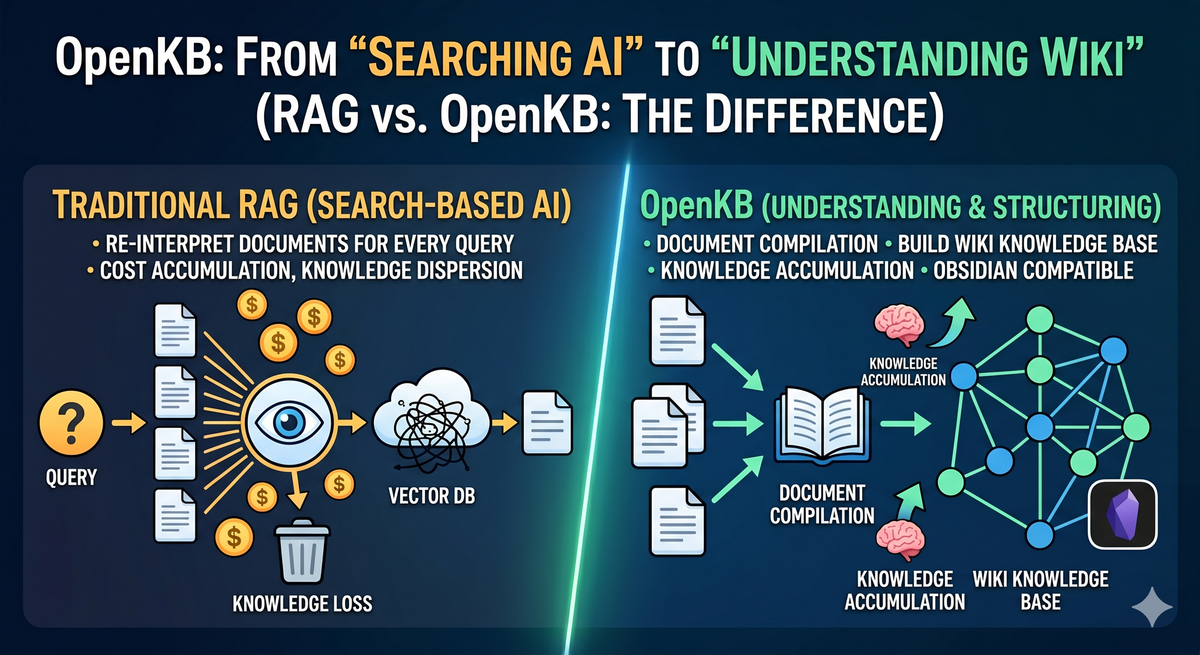
A fundamental shift is underway in how AI handles documents. Traditional RAG re-interprets documents with every query, while OpenKB compiles them once into a permanently structured wiki knowledge base — both are AI-powered document tools, but their design philosophies couldn't be more different.
1. What Is OpenKB?
OpenKB is an open-source knowledge base compiler developed by VectifyAI. The core philosophy is simple:
"Don't re-interpret documents every time. Understand them once and turn them into a wiki."
Traditional RAG retrieves documents and has the LLM synthesize answers in real time for every query. OpenKB takes the opposite approach — document processing is completed upfront in an offline compilation step, so queries are served from an already-structured wiki.
2. Why RAG Alone Falls Short
✅ The Cost and Inconsistency of Re-synthesis
Traditional RAG re-synthesizes from scratch every time, even for the same question on the same document. Token costs keep accumulating, and answer quality varies with prompt and context length.
OpenKB compiles only once. Subsequent queries read pre-generated wiki pages, so costs don't scale linearly with usage.
✅ RAG's Blind Spot: Lost Relationships Between Documents
Chunk-based RAG fragments documents. Those fragments lose the original context, cross-document relationships, and conceptual links.
OpenKB's PageIndex indexes documents as a tree structure, preserving logical hierarchy and reference relationships without vectors. The compiled wiki automatically generates cross-references, forming a knowledge graph across documents.
✅ Knowledge That Never Accumulates
RAG is consumed per query — adding new documents doesn't restructure existing knowledge. OpenKB integrates new documents into the existing wiki. The longer you run it, the more knowledge compounds and connects.
3. Under the Hood: How OpenKB Works
🎯 Core Architecture Components
-
PageIndex (Vectorless Document Indexing): A proprietary indexing technology developed by VectifyAI, called directly by OpenKB internally. OpenKB acts as the workflow orchestrator; actual document understanding is handled by the PageIndex package.
openkb add ./documents
    └─ indexer.py
        └─ PageIndexClient.add()   ← direct call to pageindex package
            └─ JSON tree construction → wiki compilation
Instead of splitting into chunks, PageIndex builds the table of contents (ToC) as a JSON tree, and the LLM reasons over relevant nodes directly. No vector DB or embeddings required — it achieved 98.7% accuracy on FinanceBench, outperforming vector RAG on specialized document analysis. (Paper: arxiv 2511.18177, PageIndex Docs)
Crucially, it works even when the source document has no table of contents. Meeting notes, plain text, and scanned PDFs with no headings or structure are handled by the LLM, which reads the content and generates a semantic hierarchy tree from scratch. The key role of PageIndex isn't "reading a table of contents" — it's "creating one."
Chapter 1 ├─ Section 1.1 ← LLM reasons: "Is this node relevant to the query?" │ └─ Subsection 1.1.1 └─ Section 1.2 Chapter 2 └─ ... -
Universal Format Converter (markitdown): PDF, Word, PowerPoint, Excel, HTML, Markdown — all formats processed through a single pipeline, including multimodal handling of images, tables, and charts.
-
Wiki Compiler: Consumes documents to auto-generate concept pages, summaries, and cross-references. Output is stored as pure Markdown, viewable in Obsidian or any Markdown reader.
-
Health Check Layer: Automatically identifies contradictions and information gaps in the compiled wiki, continuously monitoring knowledge base quality.
-
Multi-turn Chat: Provides multi-turn conversation over the compiled wiki, with resumable sessions that retain prior context.
-
Watch Mode: Monitors a designated folder and automatically triggers compilation when new files are added — the wiki updates the moment a file is dropped.
4. Get Started in 5 Minutes
1) Install
Using pipx avoids PATH conflicts:
brew install pipx
pipx install openkb
2) Set Environment Variables
OpenKB supports all LLM providers via LiteLLM:
export OPENAI_API_KEY="sk-..."
# Anthropic, Azure, and local Ollama all supported
3) Initialize the KB
Create a working directory and initialize:
mkdir my-kb && cd my-kb
openkb init
The following structure is created:
my-kb/
├── raw/                      # Drop source documents here for auto-detection
├── wiki/
│   ├── index.md              # Full knowledge base overview
│   ├── log.md                # Compilation history
│   ├── AGENTS.md             # Wiki schema & LLM instructions
│   ├── sources/              # Full converted text per document
│   ├── summaries/            # Per-document summaries
│   └── concepts/             # Cross-document synthesized concept pages
└── .openkb/
    ├── config.yaml           # Model, language, and other settings
    └── chats/                # Multi-turn chat session storage
After initialization, set the output language in .openkb/config.yaml. The default is English (en):
# .openkb/config.yaml
language: en        # en, ko, ja, zh, etc.
model: anthropic/claude-sonnet-4-6
pageindex_threshold: 20
4) Add Documents & Compile
openkb add ~/documents
PDFs, Word files, PPTs, and more in the folder are automatically compiled into a wiki.
5) Query & Chat
openkb query "What is the core message of this deck?"   # single query
openkb chat                                              # multi-turn chat
openkb chat --resume                                     # resume previous session
6) Watch Mode (Auto-update)
openkb watch
Drop a new file into the raw/ folder and the wiki updates automatically.
5. Obsidian Integration: Knowledge Graph Visualization
OpenKB outputs pure Markdown with [[wikilinks]]. It opens instantly in Obsidian Graph View.
Compile hundreds of company documents and see at a glance how concepts connect — a visualization of knowledge structure that no RAG system can provide.
Adding Graph Node Keywords
Default compilation generates nodes centered on major concepts. To add granular keywords like proper nouns and names, use the following approaches.
Method 1) Lower the pageindex_threshold
Lowering the threshold in .openkb/config.yaml generates nodes at a finer granularity:
pageindex_threshold: 5 # default 20 → lower = more nodes
Note that lowering the value increases compilation time and LLM cost.
Method 2) Manually Insert Wikilinks
Insert [[keyword]] links directly into files under wiki/summaries/:
<!-- wiki/summaries/document-name.md -->
The strategy proposed by [[John Smith]] was ...
Create a corresponding concept page to add it as a connected node in the graph:
echo "# John Smith" > wiki/concepts/john-smith.md
Note: running openkb add again may overwrite manual edits — use with caution in Watch Mode.
Method 3) Auto-extract with GLiNER (Most Systematic)
GLiNER is a lightweight NER (Named Entity Recognition) model that automatically extracts proper nouns — people, organizations, technologies, locations — from documents. A script to inject these into the OpenKB wiki can enrich graph nodes without manual work.
pip install gliner
Flow:
wiki/summaries/*.md
    └─ GLiNER (urchade/gliner_multi-v2.1)
        └─ Entity extraction (person / org / technology / location)
            └─ Post-processing normalization
                └─ [[concepts/slug|entity name]] wikilink injection
                    └─ concepts/slug.md stub file creation
In a real application, the following entities were automatically extracted from meeting note summaries and added as graph nodes:
| Type | Extracted Entities |
|---|---|
| Person | Matthew Shacksted |
| Organization | Tesoro/Accelerator, Parallel Works, NASA, DARPA, DoD, U.S. Government |
| Technology | Hadoop, Nvidia, RK2, RKE2, Kubernetes, SUSE, AWS |
| Location | Las Vegas, University of Arizona |
6. Wikilink vs. Graph DB
After hands-on use, a natural question arises: "How is this different from a Graph DB?"
Obsidian's wikilink graph and a Graph DB like Neo4j are both "graphs," but serve fundamentally different purposes.
| Wikilink (Obsidian) | Graph DB (Neo4j, etc.) | |
|---|---|---|
| Storage | Filesystem Markdown | Dedicated graph engine |
| Relationship expression | [[link]] — no direction or type |
(A)-[:TYPE]->(B) — explicit direction and type |
| Query | None (search only) | Complex pattern traversal with Cypher/Gremlin |
| Inference | Not possible | "Find all orgs within 2 hops of A" queries possible |
| Edge attributes | Not possible | Weight, date, confidence, etc. |
| Scale | Thousands of nodes | Billions of nodes and edges |
| Human-friendliness | High (plain Markdown) | Low (requires schema design) |
Wikilink = a knowledge map humans explore. Graph DB = a relational database machines reason over.
OpenKB + Obsidian is ideal for quickly structuring documents for human navigation. When the need shifts to querying relationship patterns for automated insight extraction, migrating to a Graph DB is the natural next step.
What Does This Mean in Practice?
| Situation | Right Tool |
|---|---|
| Team under 10, hundreds of documents | Wikilink (OpenKB) |
| Hundreds of pipeline/customer records, relationship-based insights required | Graph DB |
7. RAG vs. OpenKB: Core Comparison
| Traditional RAG | OpenKB | |
|---|---|---|
| Processing time | Real-time synthesis at query | Pre-processed at compile time |
| Knowledge structure | Chunks (fragmented pieces) | Wiki (connected knowledge graph) |
| Cross-document relationships | Lost at chunk level | Automatic cross-references |
| Query cost | LLM tokens consumed per query | Compiled wiki lookup |
| Knowledge accumulation | Volatile after query | Integrated into wiki on document add |
| Vector DB | Embeddings + vector DB required | PageIndex (vectorless) |
| Output format | LLM-generated text | Pure Markdown (Obsidian-compatible) |
| Quality validation | None | Built-in Health Check |
One-liner: RAG = AI that searches documents to answer. OpenKB = AI that understands documents to build a wiki.
8. Limitations: Not Yet Suited for Large-Scale Documents
OpenKB currently stores compilation results as filesystem Markdown only. There is no database or dedicated index backend.
| Scale | Suitability |
|---|---|
| Hundreds to thousands of documents | ✅ Well-suited |
| Tens of thousands of documents | ⚠️ Filesystem performance begins to degrade |
| 1M+ documents | ❌ Not feasible (OS file count limits + LLM compilation cost explosion) |
The GitHub roadmap lists "Database-backed storage engine" and "Scale to large document collections" as open goals — the team is aware of these constraints.
For environments requiring large document scale, a RAG + vector DB (Qdrant, Weaviate) combination is more realistic. OpenKB is best focused on structuring a few hundred core reference documents into a well-organized wiki.
Single Language Output Only
The language setting supports only one language at a time. Setting it to a non-English language generates summaries in that language, but concept filenames remain fixed as English slugs, so Obsidian graph node labels display in English. Parallel bilingual output is not currently supported — the workaround is to run separate KBs per language or add a translation script post-compilation.
9. Closing Thoughts
RAG is still valuable. For real-time access to the latest documents, large volumes of unstructured data, or flexible responses to diverse queries, RAG is the right tool.
But for internal knowledge you reference repeatedly, documents that need to accumulate and connect, and knowledge bases teams need to explore together — OpenKB is the better fit. Understand documents once, and that understanding compounds permanently.
For organizations where AI shouldn't merely "search" documents but "understand and structure" them, OpenKB is worth serious consideration.
References
| # | Source | Description | Link |
|---|---|---|---|
| 1 | VectifyAI | OpenKB GitHub repository | github.com/VectifyAI/OpenKB |
| 2 | VectifyAI | PageIndex GitHub repository | github.com/VectifyAI/PageIndex |
| 3 | arxiv 2511.18177 | "Rethinking Retrieval: From Traditional Retrieval Augmented Generation to Agentic Retrieval" — PageIndex technical paper, FinanceBench 98.7% accuracy | arxiv.org/abs/2511.18177 |
| 4 | PageIndex Docs | PageIndex concepts and usage guide | docs.pageindex.ai |