LangGraph Agentic RAG: When a Single Search Is No Longer Enough
Basic RAG retrieves and answers, even when questions are vague or results are incomplete. `agentic-rag-for-dummies` uses LangGraph to clarify queries, retry searches, and parallelize complex questions across agents. Supports Ollama locally or Claude, GPT-4, and Gemini in the cloud.
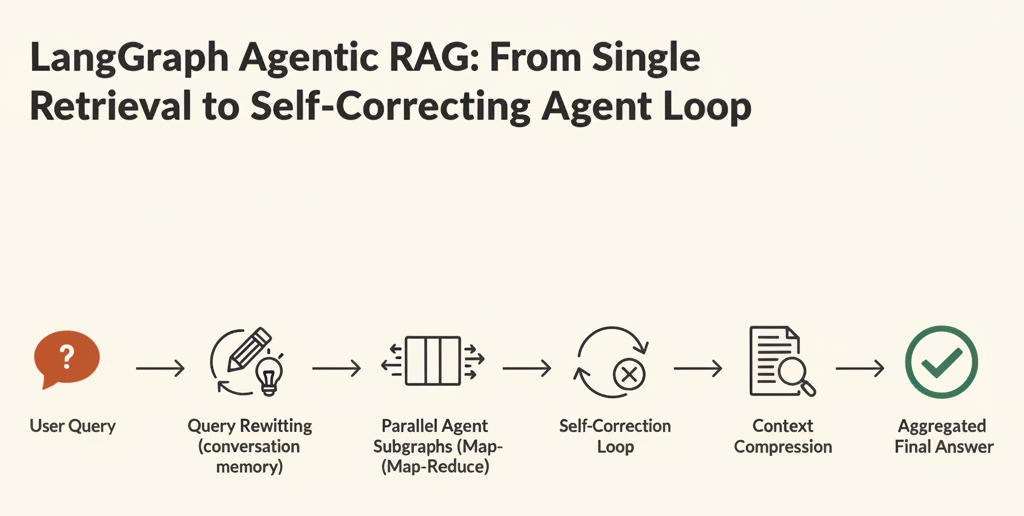
Most RAG tutorials follow the same pattern: chunk documents, index them in a vector DB, retrieve similar chunks at query time, and pass them to an LLM. This works — until a question is ambiguous, the first retrieval comes up empty, or a single query needs to cover two different topics at once. agentic-rag-for-dummies addresses these three failure modes with an agent loop.
1. What Is agentic-rag-for-dummies?
agentic-rag-for-dummies is a LangGraph-based reference implementation of Agentic RAG.
"Most RAG tutorials show basic concepts but lack guidance on building modular, agent-driven systems — this project bridges that gap."
In one sentence: basic RAG is a two-step pipeline (retrieve → answer). Agentic RAG is a state machine that loops through understand → rewrite → parallel search → self-correct → compress → answer.
The project offers two learning paths: a notebook-based path for concept exploration and a modular project structure for real deployment. LLM backends are swappable — start with Ollama locally, then move to Anthropic Claude, OpenAI, or Google Gemini. The vector DB is Qdrant.
2. Why Basic RAG Falls Short
It Searches Without Understanding
Ask basic RAG "How do I update it?" and it retrieves chunks similar to "update" — with no awareness that the previous turn was about SQL installation. The result is either off-topic content or asking the user to re-explain context they already provided.
It Answers Even When Results Are Insufficient
If retrieved chunks are irrelevant or incomplete, basic RAG passes them to the LLM anyway. The LLM produces a plausible-sounding response regardless, effectively hallucinating from empty context.
It Cannot Split Complex Queries
"What is JavaScript, and how does it differ from Python?" is two questions. Basic RAG handles them as one query, diluting retrieval quality for both topics simultaneously.
3. How It Works: Internal Architecture
Core Components
Hierarchical Indexing
Documents are split twice. Markdown headers (H1, H2, H3) define large Parent Chunks that preserve context. A fixed-size pass over each parent produces smaller Child Chunks for precision retrieval. Searches run against child chunks; the LLM reads from parent chunks.
Document → H2-level split → Parent Chunk (context)
               └→ fixed-size split → Child Chunk (retrieval precision)
4-Stage Query Workflow
Question → history summary → query rewrite → clarification → parallel agents → aggregation → answer
Stage 1 — Conversation Understanding: Maintains recent turns and a rolling summary to resolve pronouns like "it" or "that" without growing the context window indefinitely.
Stage 2 — Query Clarification: Detects underspecified questions like "Tell me about that thing" and pauses for a Human-in-the-loop confirmation. Clear questions are rewritten into retrieval-optimized form.
Stage 3 — Parallel Agent Search (Multi-Agent Map-Reduce): When multiple sub-queries are generated, LangGraph's Send API spawns independent agent subgraphs in parallel. Each agent independently loops through: Child Chunk search → Parent Chunk lookup → self-correction if results are insufficient → context compression if token budget is exceeded.
Stage 4 — Answer Aggregation: All agent responses are collected and merged into a single reply.
LangGraph Graph Structure
Main graph and agent subgraphs are nested.
# Main graph
START → summarize_history → rewrite_query
  → [ambiguous] request_clarification → rewrite_query (re-entry)
  → [clear]     Send(agent_subgraph × N) → aggregate_answers → END

# Agent subgraph (runs independently per sub-query)
START → orchestrator
  → [tool needed] tools → should_compress_context
      → [above threshold] compress_context → orchestrator
      → [below threshold] orchestrator (loop)
  → [budget exhausted] fallback_response → collect_answer → END
  → [done]            collect_answer → END
4. Context Compression and Self-Correction
As an agent calls tools repeatedly, messages accumulate. When the token count exceeds BASE_TOKEN_THRESHOLD, the compress_context node summarizes the conversation so far and explicitly records which Parent Chunk IDs and queries have already been used — preventing redundant searches.
# Track executed searches to avoid repetition
updated_ids = state.get("retrieval_keys", set()) | new_ids

# Decide whether to compress
max_allowed = BASE_TOKEN_THRESHOLD + int(current_token_summary * TOKEN_GROWTH_FACTOR)
goto = "compress_context" if current_tokens > max_allowed else "orchestrator"
When results are insufficient, the agent automatically rewrites the query and retries. MAX_TOOL_CALLS and MAX_ITERATIONS cap the loop; if the budget runs out, fallback_response returns the best available answer.
5. Try It Yourself
1) Install Ollama
Download the installer for your OS from ollama.com/download.
ollama --version
2) Choose and Pull a Model
| Model | Size | Tool Calling | Best For |
|---|---|---|---|
granite4.1:8b |
5.3 GB | Excellent (RAG-optimized) | Default, English-heavy docs |
qwen3:4b |
2.3 GB | Stable | Memory-constrained, multilingual |
qwen3:8b |
4.9 GB | Excellent | 16 GB+ RAM, best quality |
ollama pull granite4.1:8b
Tool calling is central to this system. Models smaller than 4B are not recommended — they may ignore instructions or run self-correction loops inefficiently.
3) Clone and Install
git clone https://github.com/GiovanniPasq/agentic-rag-for-dummies
cd agentic-rag-for-dummies

python -m venv .venv
source .venv/bin/activate   # macOS/Linux
# .venv\Scripts\activate    # Windows

pip install -r requirements.txt
4) Change the Model (Optional)
Edit two lines in project/config.py:
# Default
LLM_MODEL = "granite4.1:8b"
JUDGE_MODEL = "ministral-3:3b-instruct-2512-q8_0"

# Alternative
LLM_MODEL = "qwen3:4b"
JUDGE_MODEL = "qwen3:1.7b"
JUDGE_MODEL is only used by evaluation.ipynb for RAGAS quality scoring — a separate model avoids self-evaluation bias. It is not used when running python project/app.py.
5) Run
python project/app.py
# → http://127.0.0.1:7860
Upload a PDF in the Gradio UI and ask questions. To explore concepts first, open the Google Colab notebook and run cells in order.
6) Sample Conversation
# Conversation memory in action
User:  How do I install SQL?
Agent: [Installation steps]
User:  How do I update it?       ← "it" correctly resolved to SQL
Agent: [SQL update steps]

# Query clarification in action
User:  Tell me about that thing.
Agent: Could you clarify what topic you mean?
User:  The PostgreSQL installation process.
Agent: [PostgreSQL installation guide]
6. Basic RAG vs. LangGraph Agentic RAG
| Basic RAG | LangGraph Agentic RAG | |
|---|---|---|
| Conversation memory | None | Rolling summary + recent turns |
| Ambiguous questions | Retrieved as-is | Human-in-the-loop clarification |
| Complex queries | Single query | Parallel agent Map-Reduce |
| Insufficient results | Answers anyway | Self-corrects and retries |
| Context management | Hard token limit | Compression + deduplication |
| Precision vs. context | Trade-off | Hierarchical Indexing handles both |
| Observability | None | Langfuse integration |
| Quality evaluation | None | RAGAS metrics |
One line: Basic RAG retrieves and answers. Agentic RAG understands, clarifies, retries, processes in parallel, compresses, and then answers.
7. Google Is Solving the Same Problem: Gemini Enterprise Agentic RAG
The concepts in agentic-rag-for-dummies are not just an open-source experiment. Google Research and Google Cloud jointly developed and launched Cross-Corpus Retrieval powered by Agentic RAG on the Gemini Enterprise Agent Platform.
Structural Comparison
Both systems share the same core philosophy: if the context is insufficient, loop until it isn't.
| Concept | agentic-rag-for-dummies | Google Agentic RAG |
|---|---|---|
| Multi-agent | LangGraph Send API → parallel subgraphs |
Orchestrator → Planner → Search Fanout Agent |
| Query rewriting | Stage 2: rewrite node | Query Rewriter Agent |
| Retry on failure | Self-correction loop (MAX_TOOL_CALLS) |
Phase 4: Iteration |
| Query decomposition | Sub-query → Map-Reduce | Planner Agent maps information pathways |
| Final synthesis | aggregate_answers node |
Synthesis Agent |
What Google Added: Sufficient Context Agent
The most distinctive difference is the Sufficient Context Agent — an explicit quality-control layer. Where agentic-rag-for-dummies relies on the LLM to implicitly decide whether to retry, Google separates this into a dedicated agent that produces structured feedback:
Finding: "Medication list and dietary restrictions retrieved."
Gap:     "No allergy or adverse event information found in source documents."
Action:  "Re-search specifically for 'rash' or 'adverse events'."
This makes every retrieval decision auditable and traceable. On the FramesQA benchmark, the system achieved up to 34% accuracy improvement over Vanilla RAG.
What Only dummies Has
| Feature | Notes |
|---|---|
| Human-in-the-loop clarification | Pauses on ambiguous queries to ask the user |
| Conversation memory | Rolling summary preserves prior context |
| Context compression | Auto-summarizes when token budget is exceeded |
Positioning
| agentic-rag-for-dummies | Google Agentic RAG | |
|---|---|---|
| Nature | Open-source reference implementation | Enterprise managed service |
| Retrieval scope | Single Qdrant vector DB | Cross-corpus (multi-database routing) |
| Status | Freely modifiable and deployable | Google Cloud Public Preview |
The three failure modes introduced in Section 2 are not problems that only this project identified. LangGraph, AWS Bedrock Knowledge Bases, Azure AI Foundry, and Google Gemini Enterprise all officially support Agentic RAG workflows, and companies like Morgan Stanley (financial research), PwC (tax and compliance), and ServiceNow (IT workflows) have deployed this pattern in production. According to Google Cloud's 2025 report, 52% of enterprises running GenAI now have agents in production — indicating this is no longer an experimental approach.
That said, the biggest barrier in practice is still response quality. More loops mean more opportunities to iterate in the wrong direction. Basic RAG is perfectly adequate for simple Q&A or single-document retrieval. Agentic RAG makes sense when queries require multi-hop reasoning or span multiple data sources — exactly the situations this repository is designed to handle.
8. Limitations
Heavily dependent on local model quality. The default backend is Ollama, and models of 8B parameters or larger are recommended. Smaller models may ignore tool-calling instructions or run self-correction loops inefficiently.
Many tuning parameters. MAX_TOOL_CALLS, MAX_ITERATIONS, BASE_TOKEN_THRESHOLD, TOKEN_GROWTH_FACTOR, and k are all sensitive knobs. Manual tuning is required depending on document domain and query type.
Vector DB is locked to Qdrant. Switching to a different vector store requires replacing the db/ module directly.
No public benchmark. The repository does not report quantitative gains over basic RAG. Domain-specific evaluation using the RAGAS notebook is necessary.
9. Closing Thoughts
The ways basic RAG fails are predictable: ambiguous questions, insufficient retrieval results, missing conversation context, and complex queries flattened into a single lookup.
LangGraph Agentic RAG closes each of these gaps with an agent loop. It clarifies the question first, retries when results fall short, splits complex queries for parallel processing, and maintains context through rolling summaries.
The implementation is not simple. The stack runs deep — LangGraph state machine, Qdrant, Hierarchical Indexing, Langfuse. But the two-track learning path (notebook → modular project) keeps the entry barrier manageable. Before putting RAG into production, understanding where basic RAG breaks is the essential first step. This repository shows exactly where those breaks happen — and how to fix them in code.