
Milvus 3.0: Search Iceberg Data Without ETL (2.x ETL vs. 3.0 Zero-Copy)
3-Line Summary
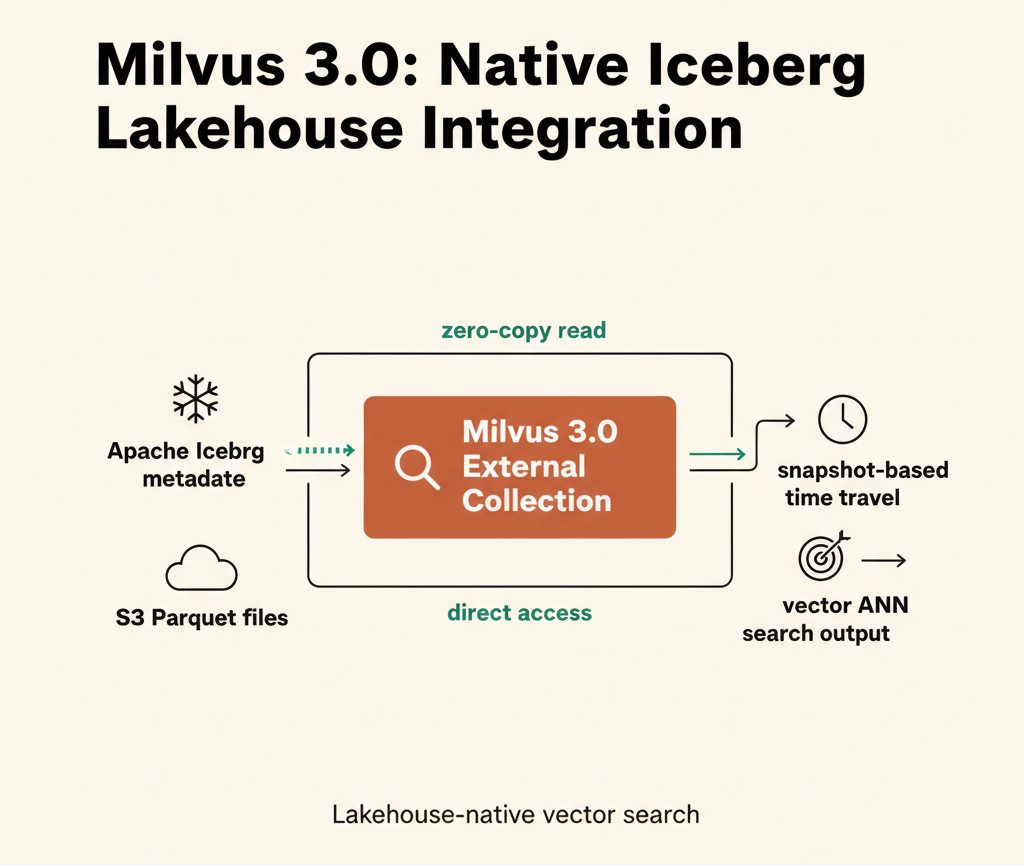
Up through Milvus 2.x, searching vector data stored in Iceberg required copying it through a separate ETL pipeline. Starting with 3.0, Milvus can perform vector search by referencing only the Iceberg metadata on S3 — no data copy needed (External Collection). An official release is still pending and write/CDC support is absent, but the way data lakes and vector search integrate has fundamentally changed.
Searching an Iceberg table sitting on S3 as-is — that is exactly what Milvus 3.0 makes possible.
1. What Is Milvus 3.0?
"Erasing the boundary between a vector database and a data lake"
Milvus 3.0 goes beyond its role as a vector DB by introducing the Vector Lake concept. Two components drive this shift.
Loon Engine: The execution engine that handles External Collections. It reads Iceberg Parquet files directly from S3 and builds vector indexes without copying data into Milvus internal storage.
Woodpecker: A built-in WAL (Write-Ahead Log) introduced in 2.6. It operates without Pulsar or Kafka, delivering roughly 7× the throughput of Pulsar against an S3 backend and reducing latency from 35 ms to 1.8 ms — with no separate cluster to operate.
2. Why Isn't the Old ETL Approach Enough?
In Milvus 2.x, searching Iceberg data required the following path:
Iceberg (S3) → ETL pipeline → Milvus insert → vector search
This approach has three structural problems.
Storage duplication: The original data lives in Iceberg, but an identical copy must also be stored in Milvus. Storage costs double.
Sync lag: Every time data is added to Iceberg, the ETL must run again. Pipeline maintenance overhead accumulates, and search results lag behind the source.
No Time Travel: Iceberg provides snapshot-based point-in-time queries, but data copied into Milvus has no concept of snapshots. Past-point-in-time search is impossible.
3. How External Collection Works Internally
The key to External Collection is that only metadata is referenced.
PyIceberg → metadata.json (S3) ← Milvus Loon Engine
                  ↓ snapshot_id-based
            Parquet files (S3) ← direct read (Zero-Copy)
                  ↓
            HNSW index build → vector search
Loon receives only the external_source (path to metadata.json) and external_spec (snapshot_id + S3 credentials), reads the Parquet files belonging to that snapshot directly, and builds the index. No data is copied into Milvus internal storage.
The structure of external_spec is as follows:
{
    "format": "iceberg-table",
    "snapshot_id": 1234567890,
    "extfs": {
        "cloud_provider": "minio",
        "access_key_id": "...",
        "access_key_value": "...",
        "region": "us-east-1",
        "use_virtual_host": "false",
        "use_ssl": "false"
    }
}
4. Hands-On
Prerequisites
pip install "pymilvus>=3.0.0" "pyiceberg[s3fs]" pyarrow numpy
1) Create an Iceberg Table
Create an Iceberg table on S3 and insert 1,000 random 128-dimensional vectors. PyIceberg stores the data as Parquet files on S3 and records a metadata.json containing snapshot information alongside them. Milvus later needs only this metadata.json path and a snapshot_id to locate the data.
from pyiceberg.catalog import load_catalog
import pyarrow as pa, numpy as np

# Use SQLite as the catalog backend (for local testing)
catalog = load_catalog("default", **{
    "type": "sql",
    "uri": "sqlite:////tmp/milvus-iceberg.db",
    "warehouse": "s3://my-bucket/iceberg/warehouse",
    "s3.endpoint": "http://localhost:9000",
    "s3.access-key-id": "...",
    "s3.secret-access-key": "...",
    "s3.path-style-access": "true",  # Required for MinIO/RustFS path-style access
})

tbl = catalog.load_table("default.vectors")

# Generate reproducible random vectors with seed=42
rng = np.random.default_rng(42)
tbl.append(pa.table({
    "id":     pa.array(range(1000), pa.int64()),
    "label":  pa.array([f"item_{i}" for i in range(1000)], pa.string()),
    "vector": pa.array(rng.random((1000, 128), dtype=np.float32).tolist(),
                       pa.list_(pa.float32(), 128)),
}))

# A new snapshot is automatically created after append
snap = tbl.current_snapshot()
print(snap.snapshot_id)      # 7929422292644868496
print(tbl.metadata_location) # s3://my-bucket/.../metadata/00001-dd47088e-...metadata.json
Once tbl.append() completes, two kinds of files appear on S3. Under data/, Parquet files holding the actual vectors; under metadata/, a metadata.json recording snapshot information. It is this metadata.json that Milvus references.
Sample data generated (seed=42, uniform distribution over [0.0, 1.0)):
| id | label | vector (first 4 of 128 dims) |
|---|---|---|
| 0 | item_0 | [0.0893, 0.7740, 0.6546, 0.4389, ...] |
| 1 | item_1 | [0.5746, 0.6347, 0.5654, 0.5536, ...] |
| 999 | item_999 | [0.6099, 0.8540, 0.3381, 0.2058, ...] |
2) Create an External Collection
Register an External Collection in Milvus. No data is copied at this stage. All that happens is binding the Iceberg table's metadata.json path (external_source) and snapshot information (external_spec) to the schema. Milvus will use this information to read the Parquet files directly later.
from pymilvus import MilvusClient, DataType

client = MilvusClient(uri="http://localhost:19530")

# Replace the hostname with the S3 endpoint accessible from the Milvus Pod
# "s3://my-bucket/" → "s3://s3-endpoint:9000/my-bucket/"
# The actual endpoint — not the bucket name — must be included for Loon to resolve correctly
external_source = tbl.metadata_location.replace(
    "s3://my-bucket/", "s3://s3-endpoint:9000/my-bucket/"
)

# snapshot_id: specifies which Iceberg snapshot to read
# use_virtual_host, use_ssl: set to false for MinIO/RustFS compatibility
external_spec = (
    '{"format": "iceberg-table",'
    f'"snapshot_id": {snap.snapshot_id},'
    '"extfs": {"cloud_provider": "minio", "region": "us-east-1",'
    '"access_key_id": "...", "access_key_value": "...",'
    '"use_virtual_host": "false", "use_ssl": "false"}}'
)

# Bind external_source and external_spec to the schema
schema = client.create_schema(
    external_source=external_source,
    external_spec=external_spec,
)
# external_field: maps Iceberg column names to Milvus fields
schema.add_field("id",     DataType.INT64,       external_field="id")
schema.add_field("label",  DataType.VARCHAR,      max_length=64, external_field="label")
schema.add_field("vector", DataType.FLOAT_VECTOR, dim=128, external_field="vector")

client.create_collection("iceberg_vectors", schema=schema)
After create_collection() returns, only the collection metadata has been registered inside Milvus. The Iceberg Parquet data has not been loaded yet.
3) Refresh → Index → Search
Refresh is the step where the Milvus Loon engine actually reads the Parquet files pointed to by external_source and prepares the index. Vector search becomes possible only after this completes. Refresh runs as an async job; poll its status until it finishes.
import time

# Start refresh — Loon reads Parquet files and builds segments
job_id = client.refresh_external_collection("iceberg_vectors")

# Poll every 3 seconds until RefreshCompleted
while True:
    p = client.get_refresh_external_collection_progress(job_id=job_id)
    if p.state == "RefreshCompleted":
        break
    elif p.state == "RefreshFailed":
        raise RuntimeError(p.reason)
    time.sleep(3)

# Build HNSW index (for high-accuracy ANN search)
index_params = client.prepare_index_params()
index_params.add_index("vector", index_type="HNSW", metric_type="L2",
                       params={"M": 16, "efConstruction": 200})
client.create_index("iceberg_vectors", index_params)

# Load the collection into memory, then search
client.load_collection("iceberg_vectors")
results = client.search(
    "iceberg_vectors",
    data=np.random.default_rng(99).random((3, 128), dtype=np.float32).tolist(),
    anns_field="vector",
    limit=5,                                              # return top-5
    output_fields=["id", "label"],
    search_params={"metric_type": "L2", "params": {"ef": 64}},
)
Results of running 3 queries against 1,000 vectors. All returned ids fall within the 0–999 range, confirming that the original Iceberg data was searched without any copy.
| Query | id | label | distance |
|---|---|---|---|
| Query[0] | 773 | item_773 | 13.1010 |
| Query[1] | 995 | item_995 | 12.6203 |
| Query[2] | 64 | item_64 | 15.7635 |
4) Incremental Refresh: The Right Way
When data is added to Iceberg, a new snapshot and metadata.json are generated. Calling refresh_external_collection() without arguments is not enough to reflect the change — Milvus reloads with the snapshot_id fixed to the time the collection was created. To apply a new snapshot, the latest snapshot_id and metadata_location must be passed explicitly.
# Query the new snapshot after appending 100 rows to Iceberg
tbl = catalog.load_table("default.vectors")
new_snap = tbl.current_snapshot()

# ❌ Calling without arguments — snapshot_id stays pinned to creation time (v1)
client.refresh_external_collection("iceberg_vectors")

# ✅ Pass the new metadata_location and snapshot_id together to apply v2
client.refresh_external_collection(
    collection_name="iceberg_vectors",
    external_source=make_external_source(tbl.metadata_location),  # new metadata.json path
    external_spec=make_external_spec(new_snap.snapshot_id),       # new snapshot_id
)
Actual test results comparing both approaches. The presence of id=1050 (added in v2) was used to determine whether the snapshot was reflected.
| Approach | v1 snapshot_id | v2 snapshot_id | Result |
|---|---|---|---|
| Test A: re-refresh with fixed spec | 7929422292644868496 | — | FAIL — id=1050 absent, pinned to v1 |
| Test B: pass new source/spec | — | 582536305514052781 | PASS — v2 reflected without recreating the collection |
5) Time Travel
Iceberg automatically preserves a snapshot on every append() call. If you specify a past snapshot ID in snapshot_id when creating an External Collection, only the data that existed at that point in time becomes searchable. It is also possible to mount the same Iceberg table into multiple collections simultaneously using different snapshot_id values.
# Create separate collections for v1 (500 rows), v2 (1,000 rows), and v3 (1,500 rows)
# Only snapshot_id differs; the rest of the creation procedure is identical
create_and_refresh(client, snap_id=v1_snap_id, metadata_loc=v1_meta_loc)  # id=0–499 only
create_and_refresh(client, snap_id=v2_snap_id, metadata_loc=v2_meta_loc)  # id=0–999 only
create_and_refresh(client, snap_id=v3_snap_id, metadata_loc=v3_meta_loc)  # id=0–1499 (all)
Results of checking for id=250 / 750 / 1250 in each snapshot-pinned collection. Data added after the specified snapshot was correctly excluded from results.
| Snapshot | snapshot_id | id=250 | id=750 | id=1250 |
|---|---|---|---|---|
| v1 (500 rows) | 712633362579329725 | FOUND | NOT FOUND | NOT FOUND |
| v2 (1,000 rows) | 4884067013805988212 | FOUND | FOUND | NOT FOUND |
| v3 (1,500 rows) | 4719625814627057901 | FOUND | FOUND | FOUND |
5. ETL vs. Zero-Copy: Key Comparison
| Item | Milvus 2.x (ETL) | Milvus 3.0 (Zero-Copy) |
|---|---|---|
| Data copy | Required | Not required |
| Storage cost | 2× (source + Milvus) | 1× (source only) |
| Sync method | ETL pipeline | refresh API |
| Time Travel | Not available | Available via snapshot_id |
| Schema change | Re-run ETL | rewrite + recreate collection |
| Production stability | GA | 3.0 GA target: 2026-06-26 |
One-line summary: ETL = copy then search, Zero-Copy = search the original directly
6. Limitations
Not yet GA: At the time of testing, Milvus 3.0 is in beta. The GA target date is 2026-06-26 at roughly 83% completion. Production use is recommended only after GA.
Read-only: External Collections support reads only. Writing to an Iceberg table directly or auto-syncing via CDC is on the 3.1 roadmap.
Schema changes require rework: If a column is added to the Iceberg table and you want Milvus to expose it, all Parquet files must be rewritten with tbl.overwrite(), and the collection must be dropped and recreated. Milvus Loon cannot fill in NULL for columns absent from older Parquet files.
Path configuration caveats:
external_sourcemust point to themetadata.jsonfile path, not a directory (remove trailing slashes)- The S3 URL scheme must be
s3://, notminio:// - The hostname must be replaced with an endpoint accessible from the Milvus Pod
7. Closing Thoughts
Milvus 3.0's External Collection marks a shift from "pushing data into a vector DB" to "searching the data lake directly." From a data engineering perspective, pipeline complexity shrinks, storage costs drop, and Iceberg's Time Travel and snapshot capabilities extend naturally into vector search.
That said, there is still ground to cover. A full data-lake-native real-time vector search pipeline will only be possible once 3.1 arrives with write support and automatic index updates. A follow-up review is planned for that point.