
Implementing Enterprise Data Governance with OpenMetadata
As data platforms mature, questions like "What is this table?" and "Can I trust this data?" never go away. We put OpenMetadata — PAASUP DIP's catalog — to the test with real services including StarRocks, Kafka, and Iceberg, validating Discovery, Lineage, Quality, and RBAC end to end.
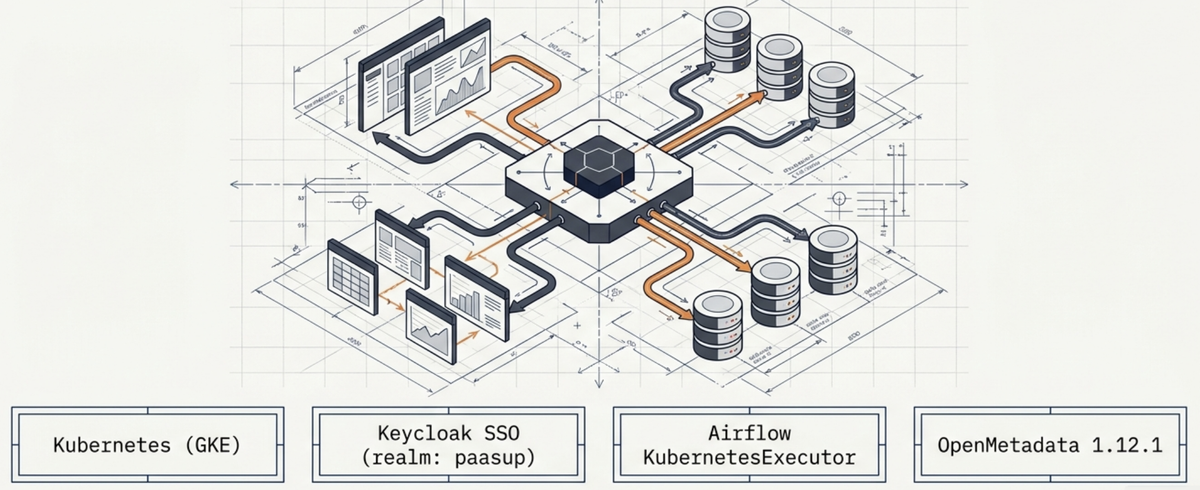
Table of Contents
- Why Data Governance?
- OpenMetadata Architecture Overview
- Data Discovery: Single Source of Truth for All Data Assets
- Data Lineage: Complete Tracking of Data Flow
- Data Quality & Observability: Ensuring Data Reliability
- Glossary & Classification: Establishing a Common Organizational Language
- RBAC: Precise Access Control
- In-Depth Service Integration Verification
- Operational Issues & Troubleshooting Reference
- Comprehensive Evaluation and Recommended Architecture
1. Why Data Governance?
As a data platform matures, questions like "What does this table contain?", "Where did this column come from?", and "Can I trust this data?" keep resurfacing — ironically, more often than before. When data assets grow to the hundreds or thousands, pipeline engineers, analysts, and governance teams end up referring to the same data by different names, and tracing the root cause of a quality issue can take days.
Data Governance addresses these problems structurally.
| Problem | Governance Solution |
|---|---|
| "What is this table?" | Data Discovery + Glossary |
| "Can I trust this data?" | Data Quality + Observability |
| "Where did this data come from?" | Data Lineage |
| "Who can see this?" | RBAC + Classification |
| "How well is this being managed right now?" | Data Insights KPI |
OpenMetadata delivers all of these capabilities in a single open-source platform. We installed OpenMetadata 1.12.1 directly in the PaaSup DIP (Data Intelligence Platform) environment, integrated real services, and rigorously validated each governance feature. This post shares the technical insights gained along the way.
2. OpenMetadata Architecture Overview
2.1 Platform Composition
┌─────────────────────────────────────────────────────┐
│                   OpenMetadata UI                    │
│         (Data Discovery · Lineage · Governance)      │
└───────────────────┬─────────────────────────────────┘
                    │ REST API
┌───────────────────▼─────────────────────────────────┐
│            OpenMetadata App Server                   │
│      (Java Spring Boot · Keycloak SSO Integration)   │
└────────┬──────────────────────────────┬─────────────┘
         │                              │
┌────────▼────────┐          ┌──────────▼──────────┐
│   OpenSearch    │          │       Airflow        │
│ (Metadata Search)│         │  (Ingestion Schedule)│
└─────────────────┘          └──────────┬──────────┘
                                        │ KubernetesExecutor
                              ┌─────────▼──────────┐
                              │  ephemeral worker   │
                              │  pod (deleted after │
                              │       execution)    │
                              └────────────────────┘
2.2 Creating an OpenMetadata Catalog in PAASUP DIP
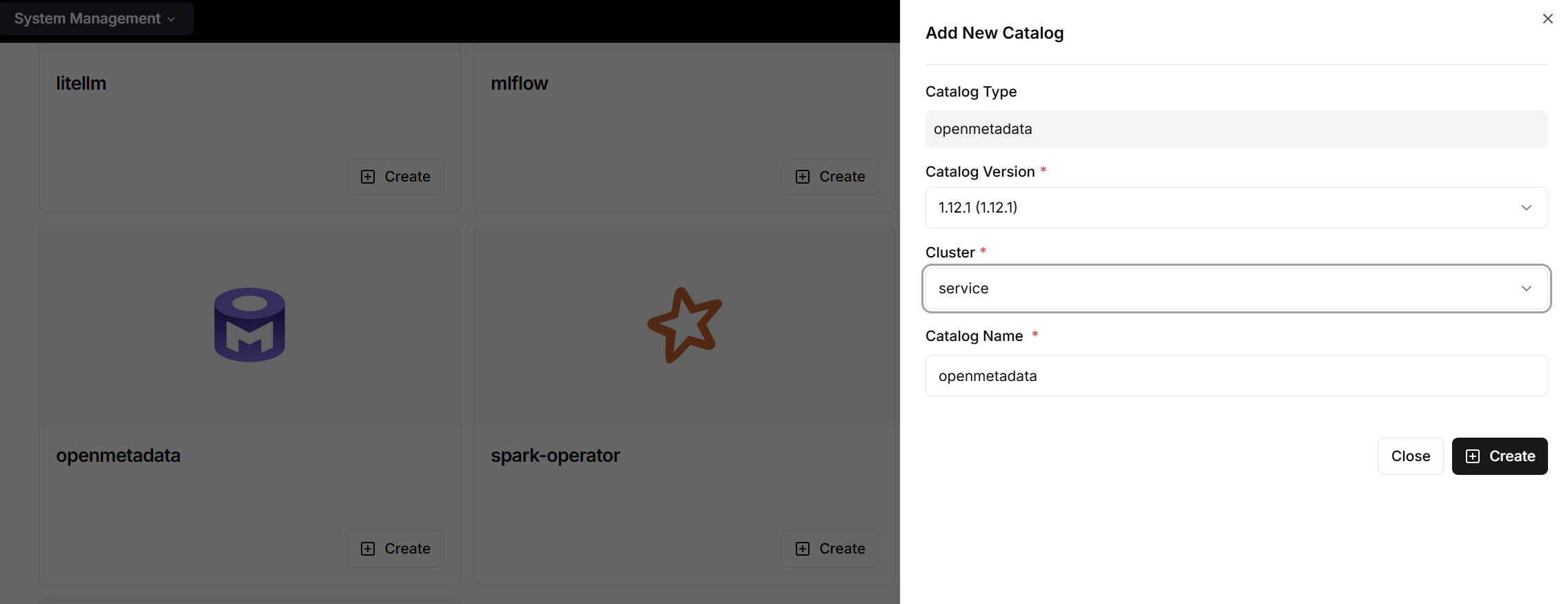
- Because OpenMetadata serves as the implementation of enterprise-wide data governance, the cluster administrator must create OpenMetadata as a cluster catalog within PAASUP DIP.
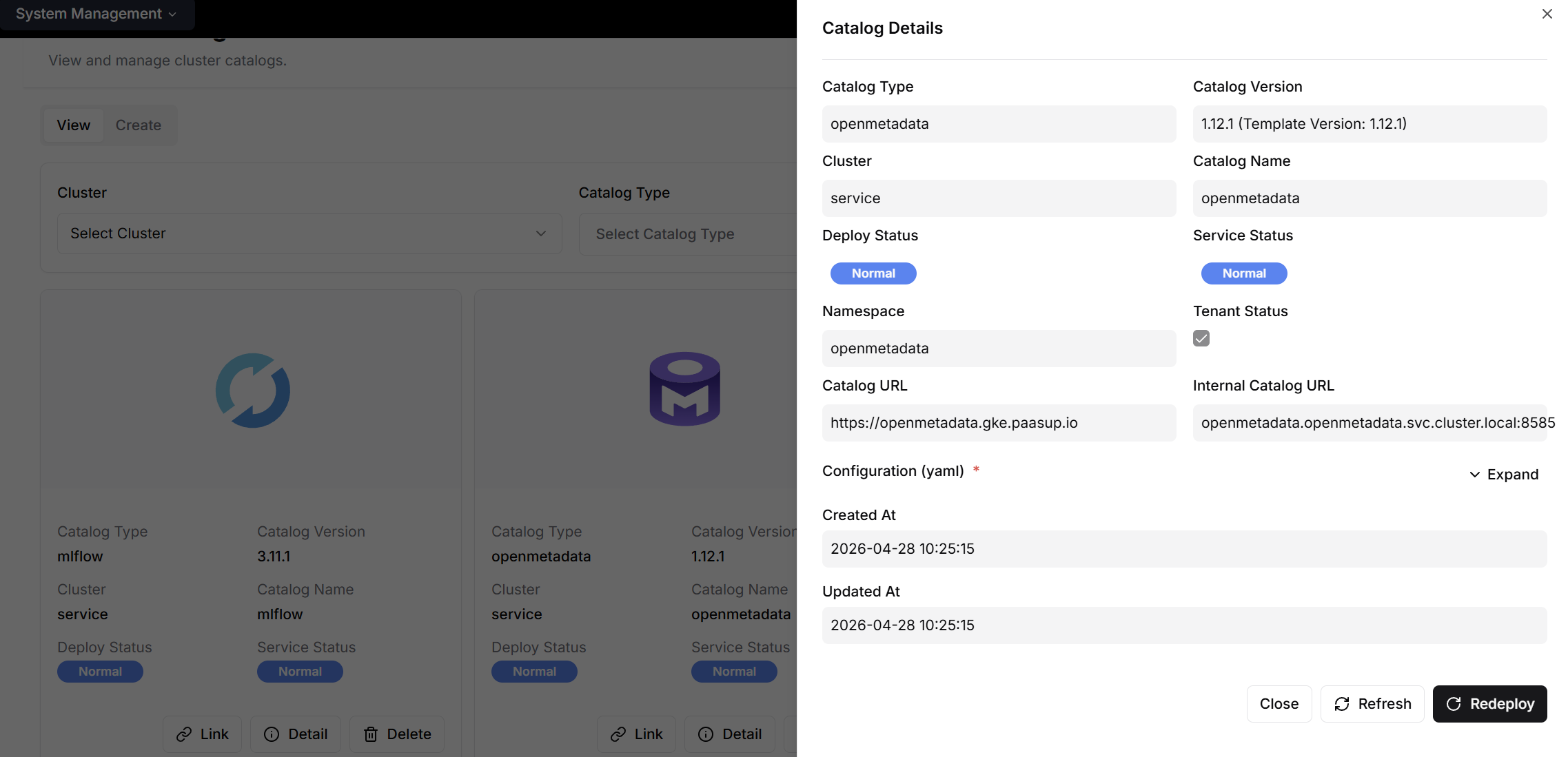
- The created OpenMetadata instance can be confirmed on the cluster catalog list screen.
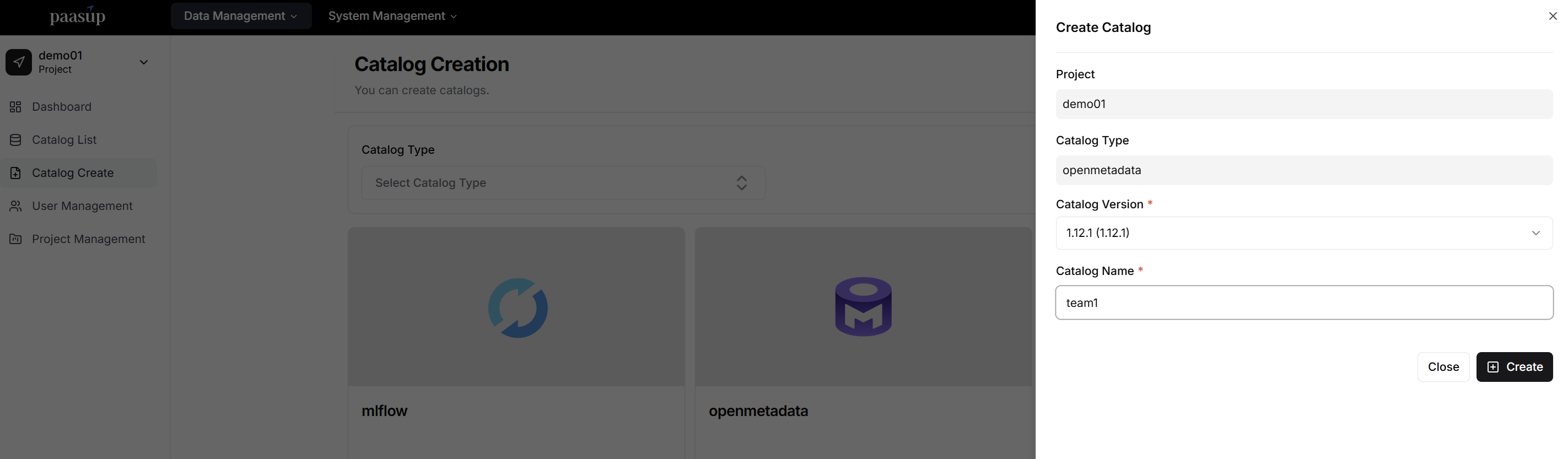
- Once the cluster administrator has created OpenMetadata, project administrators can create a catalog for their project via the [Create Catalog] screen, enabling them to manage data governance permissions at the team level.
2.3 Kubernetes Pod Structure (namespace: openmetadata)
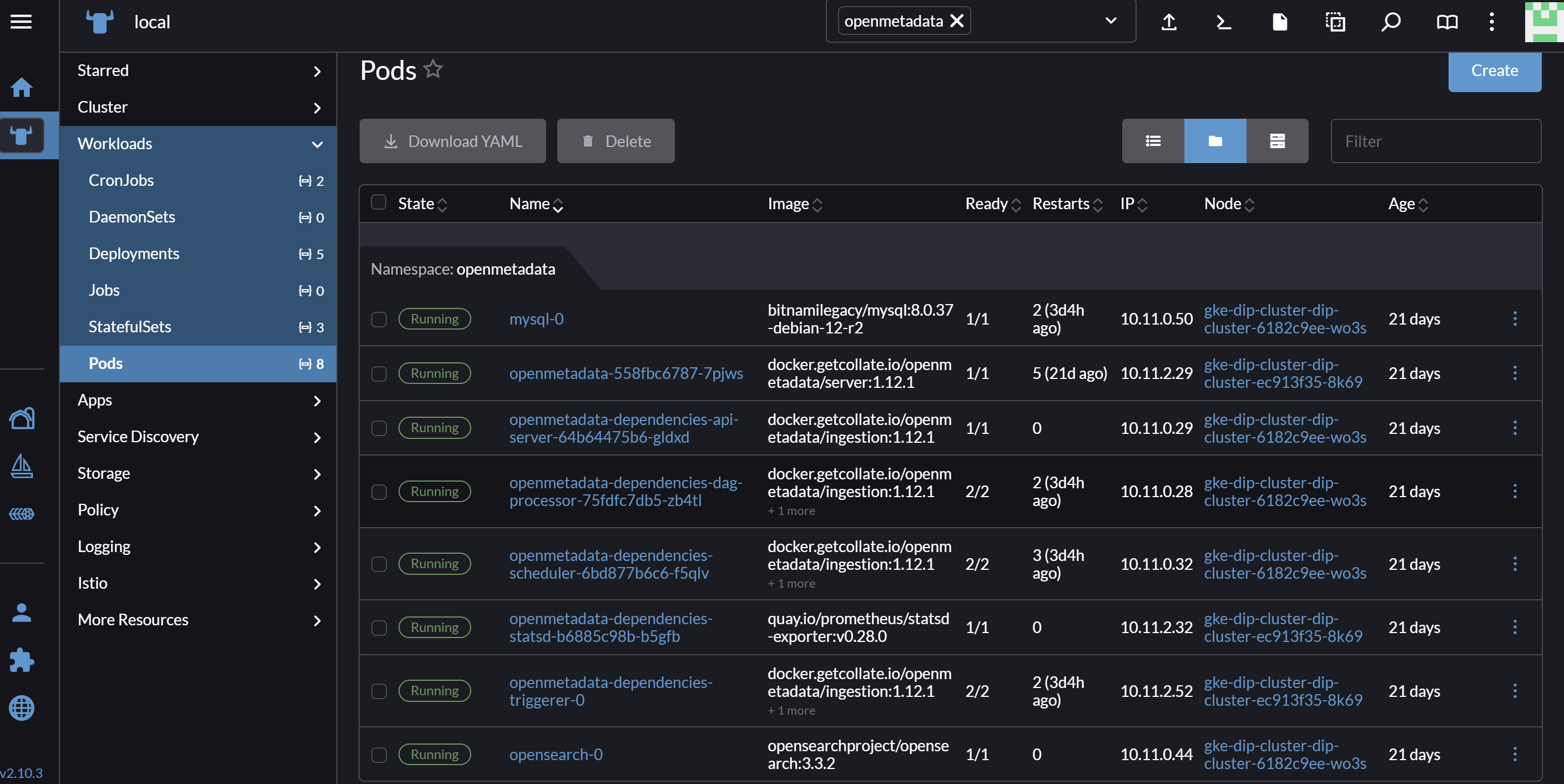
| Pod | Role |
|---|---|
openmetadata-* |
App server (REST API, Keycloak OIDC integration) |
openmetadata-dependencies-api-server-* |
Airflow API Server — ingestion trigger, CA cert file reference location |
openmetadata-dependencies-dag-processor-* |
DAG file parsing → MySQL sync (every 30 seconds) |
openmetadata-dependencies-scheduler-* |
Scheduler → creates ephemeral worker pods via KubernetesExecutor |
openmetadata-dependencies-triggerer-0 |
Async processing for Deferrable Operators |
opensearch-0 |
Metadata indexing and search engine |
mysql-0 |
Airflow metadata DB (DAG history, task state) |
Airflow Executor Execution Flow:
[OpenMetadata UI]
      ↓ ingestion trigger
[Airflow API Server] → [Scheduler] → [KubernetesExecutor]
                                             ↓
                                  ephemeral worker pod created
                                  (auto-deleted after execution)

[dag-processor] ← DAG .py file parsing → [MySQL]
                                             ↑
                                    [Scheduler] reads and executes
The ephemeral worker pod approach ensures each ingestion job runs in an isolated environment and is automatically cleaned up after completion, eliminating resource waste.
2.4 Registered Services
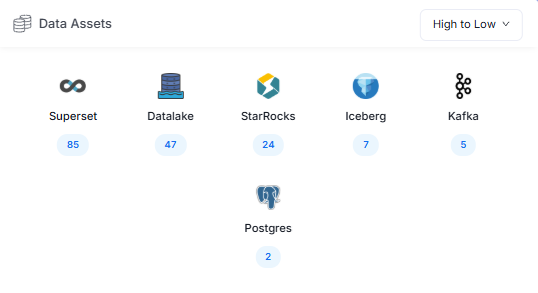
| Service | Type | Ingestion Method |
|---|---|---|
| StarRocks | Database | UI (Airflow schedule) |
| PostgreSQL | Database | UI (Airflow schedule) |
| Lakekeeper (Iceberg) | Database | CLI (Python SDK) — workaround due to UI form limitations |
| Kafka (Strimzi) | Messaging | UI (Airflow schedule) |
| MinIO CSV | Database (Datalake) | UI (Airflow schedule) |
| Superset | Dashboard | UI (Airflow schedule) |
3. Data Discovery: Single Source of Truth for All Data Assets
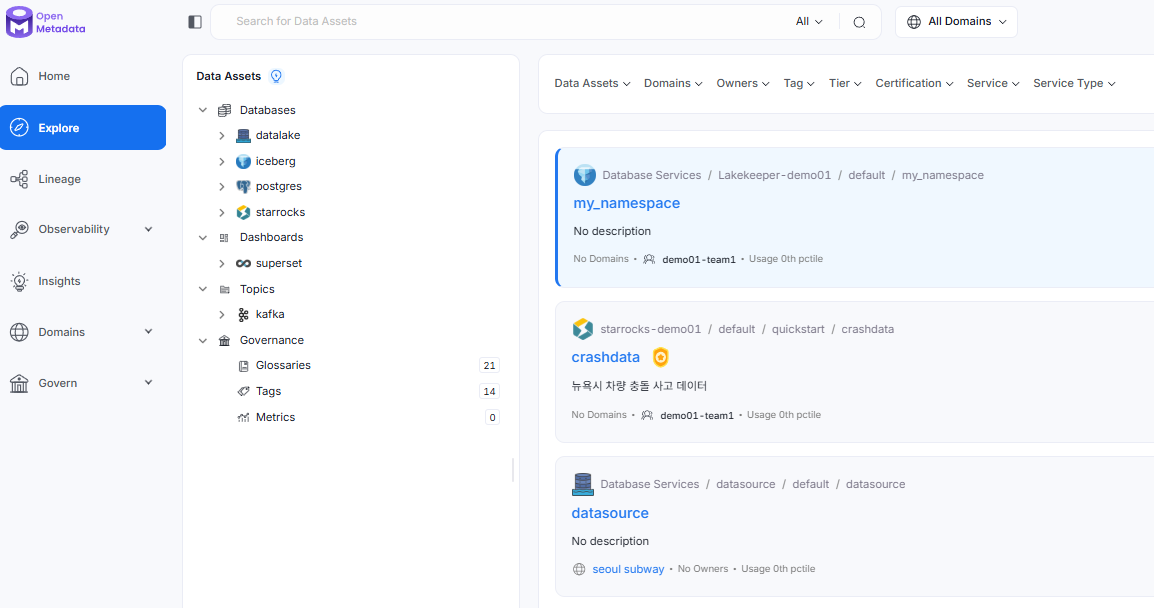
Data Discovery is the core of OpenMetadata. Tables, topics, dashboards, and ML models scattered across distributed data sources can all be explored through a single search interface.
3.1 Search Capabilities
- Keyword Search: Full-text search across table names, column names, descriptions, tags, and more
- Filters: Multi-dimensional filtering by service, type, owner, tag, domain, etc.
- Advanced Search: Support for compound condition queries
3.2 Asset Metadata Management
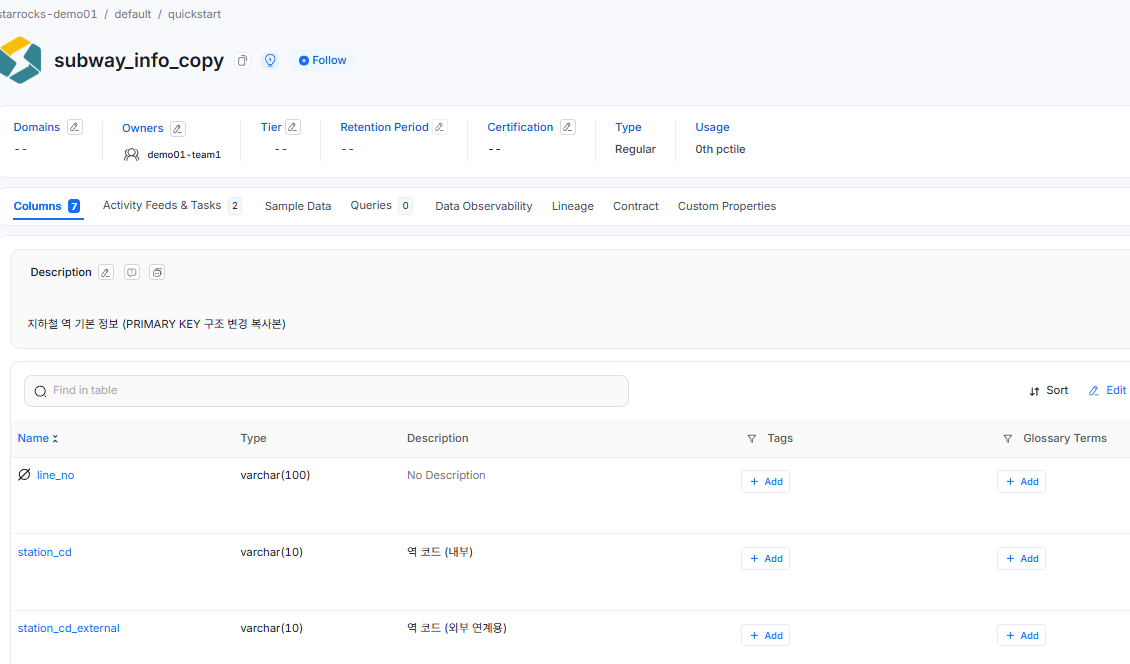
The detail page for each data asset provides centralized management of the following information.
| Metadata | Description |
|---|---|
| Schema | Column name, type, description, tags, Glossary term links |
| Owner | Assigned person/team (integrated with Data Insights KPI) |
| Domain | Business domain classification (e.g., Finance, Marketing) |
| Tags | Classification-based category tags |
| Tier | Data importance level (Tier 1–5) |
| Sample Data | Preview of actual data (up to 50 rows) |
| Statistics (Profile) | Row count, null rate, distinct value count, and other statistical metrics |
3.3 Sample Data Collection — Comparison by Service
Sample Data is critically helpful for data consumers to understand the actual contents of a table. However, not all services behave the same way.
| Service | Agent Support | Collection Method |
|---|---|---|
| StarRocks | ✅ | Profiler Agent (orm-profiler) |
| PostgreSQL | ✅ | Profiler Agent (orm-profiler) |
| Lakekeeper (Iceberg) | ❌ | Direct read via PyIceberg → API push |
| MinIO CSV | ❌ | Direct read via boto3 → API push |
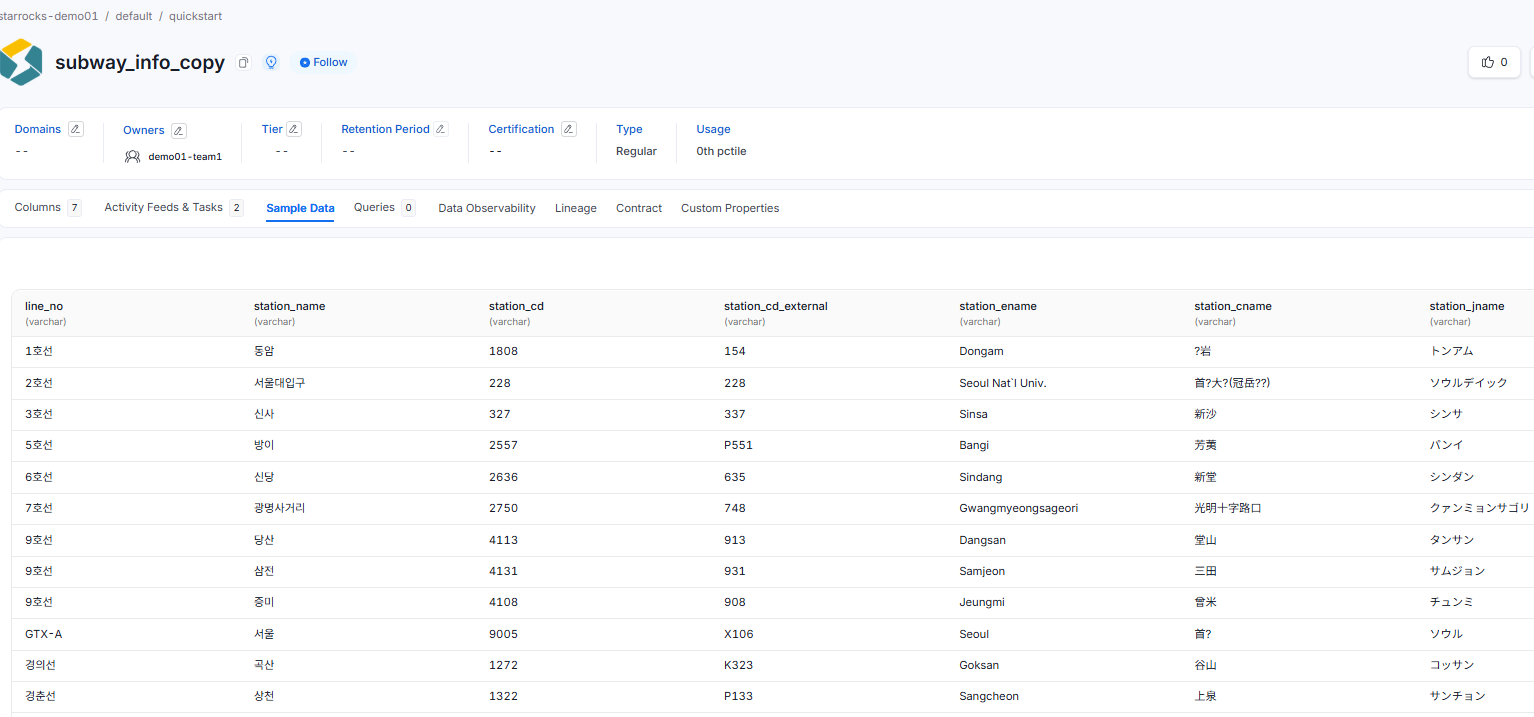
Lakekeeper (Iceberg) Issue: The orm-profiler uses SQLAlchemy dialect internally. However, Iceberg's RestCatalog has no SQLAlchemy interface, causing an AttributeError: 'RestCatalog' has no attribute 'dialect' error. The workaround was to read data directly with PyIceberg and push it via the SDK's ingest_table_sample_data() API.
# Core flow for Lakekeeper Sample Data collection
lk_token = fetch_lakekeeper_token()   # Obtain token with scope=lakekeeper from Keycloak
catalog = load_catalog("minio-iceberg", **config)
table = catalog.load_table(f"namespace.table_name")
df = table.scan(limit=50).to_pandas()
metadata.ingest_table_sample_data(table=om_table, sample_data=TableData(...))
MinIO CSV Issue: The Datalake Profiler Agent had a bug where it failed to recognize tables as processing targets when the table FQN contained .csv (silently exiting with Processed records: 0). This was resolved by reading the CSV directly with boto3 and applying a multi-encoding retry pattern.
# Auto-detect encoding pattern (StreamingBody can only be read once)
raw = s3_client.get_object(Bucket=bucket, Key=key)["Body"].read()
for enc in ["utf-8", "utf-8-sig", "cp949", "euc-kr", "latin-1"]:
    try:
        df = pd.read_csv(io.BytesIO(raw), nrows=50, encoding=enc, on_bad_lines="skip")
        break
    except Exception:
        continue
4. Data Lineage: Complete Tracking of Data Flow
Lineage answers questions like "Which table does the number in this dashboard come from?" and "If I change this column, what will be affected?"
4.1 Lineage Levels
- Table Level: Upstream/downstream visualization between tables
- Column Level: Tracking data flow for a specific column (Column-level lineage)
4.2 Supported Entities
Table · Topic (Kafka) · Dashboard · ML Model · Container · Pipeline
4.3 Lineage Registration Methods
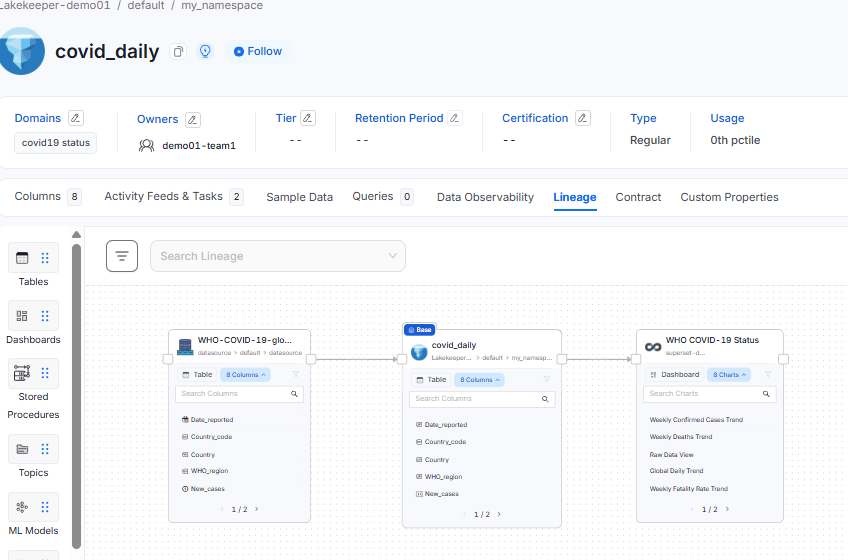
Automatic Collection: Automatically generated from execution history when integrated with Airflow/dbt pipelines
Manual Registration: Lineage tab in the UI → Edit → search for source/destination entities and connect edges
OpenLineage API: Direct push from Flink/Spark pipelines
# OpenLineage endpoint
POST http://openmetadata.openmetadata.svc.cluster.local:8585/api/v1/lineage/openlineage/api/v1/lineage
| Tool | Library |
|---|---|
| Spark | openlineage-spark |
| Flink | openlineage-flink |
Note: For manual registration, both entities must already be registered in OpenMetadata before they can be linked.
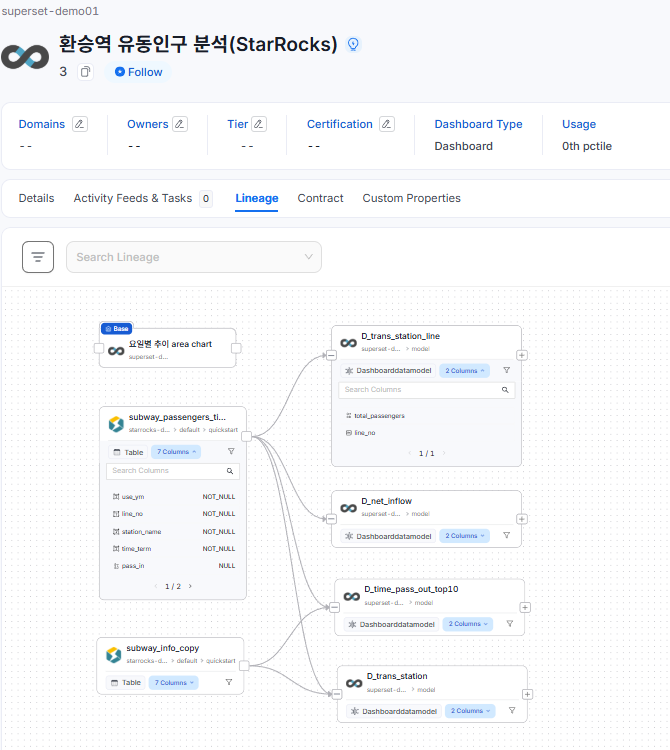
4.4 Superset Dashboard Lineage
The Superset connector automatically constructs lineage from Chart → Data Model (query) → source Table during dashboard ingestion. This lets you immediately see in the UI which table a given chart is referencing.
Validation results: 11 Dashboards, 58 Charts, 34 Data Models — 85 entities registered successfully (100% success rate).
5. Data Quality & Observability: Ensuring Data Reliability
5.1 Profiler — Statistics Collection
The Profiler periodically collects statistical information about tables.
| Collected Metric | Example |
|---|---|
| Row count | 1,234,567 |
| Null rate | 2.3% |
| Distinct value count | 456 |
| Min / Max | 0 / 9,999 |
| Mean / Standard deviation | 512.3 / 201.7 |
5.2 Quality Tests — Rule-Based Validation
Quality rules can be set on individual columns or tables, with alerts triggered when rules are violated.
Table: subway_passengers
Column: boarding_count
Rule: columnValuesToBeBetween(minValue=0, maxValue=100000)
5.3 Incident Manager
When a quality test fails, an Incident is automatically created. Assignee allocation, status tracking (Open → Acknowledged → Resolved), and related asset linking allow quality issues to be managed in a manner similar to an ITSM workflow.
5.4 Data Contracts
This feature formalizes schema, quality, and SLA standards as "contracts" between data producers and consumers. Contract violations are automatically detected and stakeholders are notified.
6. Glossary & Classification: Establishing a Common Organizational Language
6.1 Glossary
One of the most fundamental yet critical tasks in data governance is standardizing business terminology. OpenMetadata's Glossary allows you to build a hierarchical term structure and link it to actual data assets (tables and columns).
Structure of the glossary (starrocks-glossary) built in this validation:
| Top-Level Category | Child Terms (partial) |
|---|---|
subway_data |
station_id · station_name · boarding_count · alighting_count · card_type |
data_engineering |
ingestion · profiler · sample_data · pipeline · lineage |
monitoring |
latency · error_rate · throughput · api_request |
Total: 21 terms (3 top-level + 18 child terms)
Bulk Registration via CSV Import:
First, prepare a glossary in CSV format as shown below.
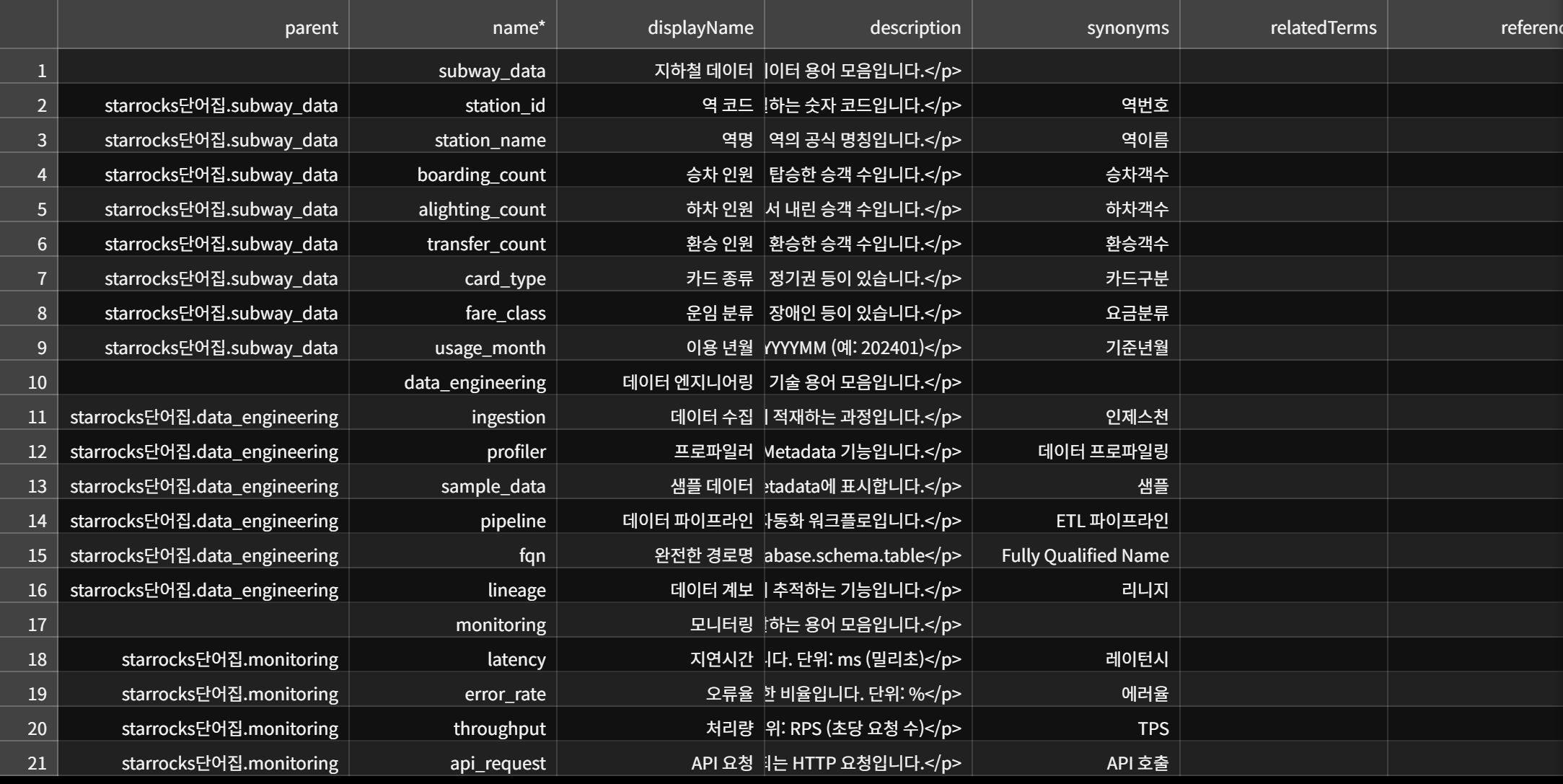
This can be done via Govern → Glossary → ⋮ → Import → Upload CSV. However, the parent field must use FQN format.
If a plain term name is entered, all child terms will be silently dropped. If you're unsure of the existing format, it's recommended to first export the current CSV via ⋮ → Export to confirm the format.
6.2 Classification & Tags
Classification defines the organization's data categorization framework. For example, you can create classifications such as PII, DataAccess, and Confidential, and define specific tags under each.
Tags are more than simple labels — they are used as conditions in RBAC policies (see Chapter 7).
7. RBAC: Precise Access Control
7.1 Policy/Role Hierarchy
Rule (subordinate to Policy, cannot be reused independently)
  ↓
Policy (shareable across multiple Roles)  ← unit of sharing
  ↓
Role → User / Team
7.2 Default Roles
| Role | Access Scope | Primary Use |
|---|---|---|
Admin |
Full | Full platform administration |
DataConsumer |
Full (read-only) | Data exploration and utilization |
DataSteward |
Owned assets of own team only | Team data metadata management |
For a
DataStewardto view a table, the Owner of that table must be set to their team (of type Group).
7.3 Policy Condition Expressions
Policy condition expressions support only the following functions. An important constraint is that service names cannot be specified directly as conditions.
| Condition Function | Description |
|---|---|
matchAnyTag('tagFQN') |
Resource has a specific tag |
isOwner() |
Current user is the resource owner |
noOwner() |
Resource has no owner |
inAnyTeam('teamName') |
Current user belongs to a specific team |
7.4 Practical Example: Blocking Access to a Specific Service
Goal: Block testor user from accessing all of starrocks-demo01
Since direct service name specification is not supported, this is implemented using a "tag-based DENY policy" pattern.
Step 1 — Create Classification and Tag
Govern → Classifications → Add Classification
  Name: DataAccess
  ↓
DataAccess → + Add Tag
  Name: StarRocks-Restricted
Step 2 — Apply Tag to StarRocks Tables
Table detail page → Edit Tags → Add DataAccess.StarRocks-Restricted
(For large numbers of tables, use an API bulk-tagging script)
Step 3 — Create DENY Policy
Settings → Access Control → Policies → Add Policy
  Name:       deny-starrocks-access
  Effect:     Deny
  Operations: ViewAll
  Resources:  All
  Condition:  matchAnyTag('DataAccess.StarRocks-Restricted')
Step 4 — Create Role and Assign to User
Role: starrocks-blocked (Policy: deny-starrocks-access)
  → Assign role to testor user
How It Works:
Organization Policy  →  Allow ViewAll (all users)
testor's additional role →  Deny ViewAll (assets with DataAccess.StarRocks-Restricted tag)
                                ↑ DENY always takes precedence over ALLOW
Operational Notes:
- Tags apply only to the entity they are assigned to — no automatic propagation through the hierarchy
- To block an entire service, the tag must be applied individually to all child tables
- When new tables are added later, the tag must also be applied to them (bulk-tagging automation recommended)
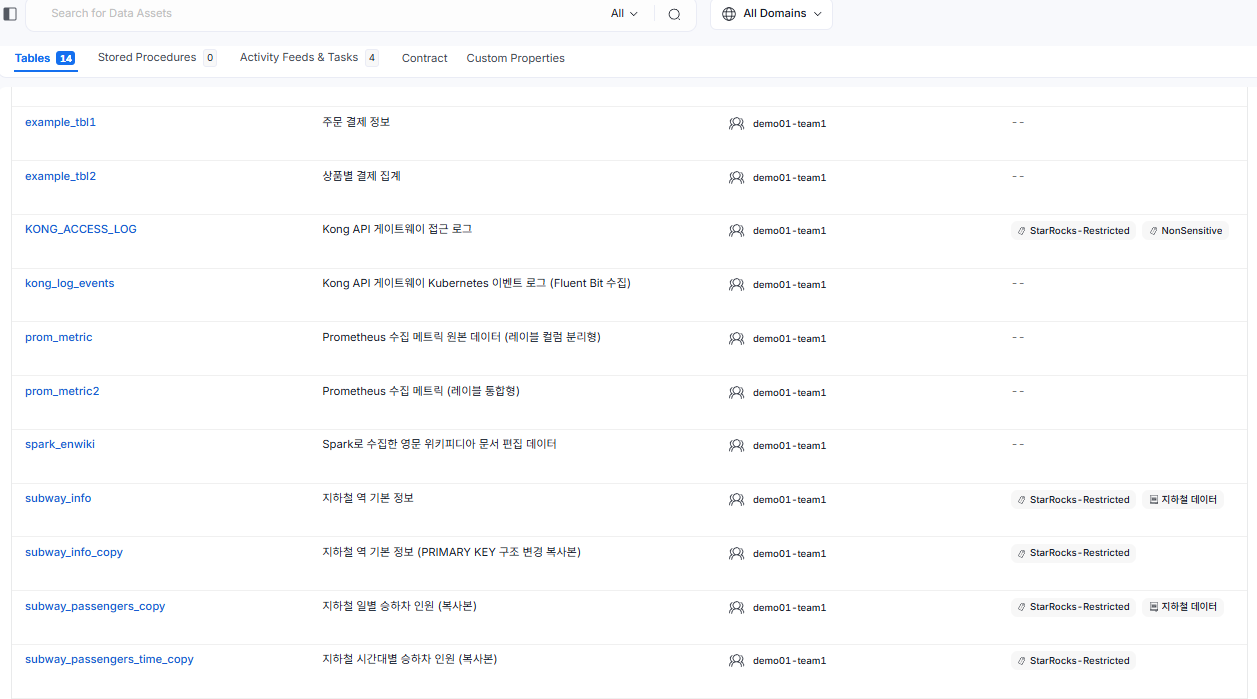
View from admin login — quickstart DB table list (example)
Tables KONG_ACCESS_LOG, subway_info, subway_info_copy, subway_passengers_copy, subway_passengers_time_copy have their tags set to StarRocks-Restricted.
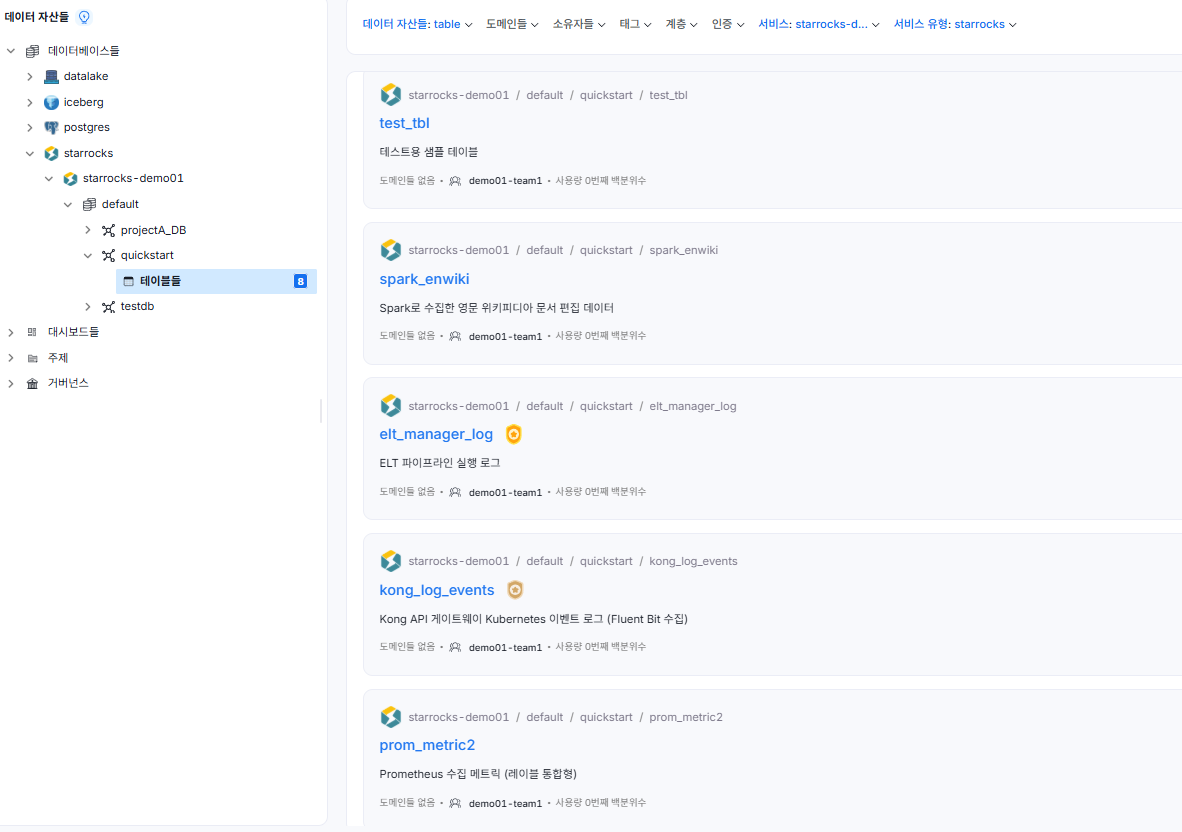
View from testor login — quickstart DB table list (example)
The testor user cannot view tables tagged with StarRocks-Restricted.
8. In-Depth Service Integration Verification
8.1 Lakekeeper (Iceberg) Integration
[OpenMetadata] → [Keycloak] → [Lakekeeper (Iceberg REST Catalog)] → [MinIO]
This was the integration that produced the most issues during our validation.
Issue 1: Missing Required Parameter Fields in the UI Connection Form
The Iceberg connection form in OpenMetadata 1.12.1 lacks input fields for the following two parameters:
| Required Parameter | Role |
|---|---|
scope=lakekeeper |
Grants Lakekeeper permissions to the Keycloak token |
warehouse=minio-iceberg |
Specifies the warehouse to access |
→ Workaround: Run ingestion directly via Python SDK CLI
Issue 2: Fernet-Encrypted Bot Token
When the Fernet Secrets Manager is enabled, the API returns fernet:gAAAAAB... format instead of a plaintext JWT.
# Check Fernet key
kubectl exec -n openmetadata <pod> -- env | grep FERNET_KEY
from cryptography.fernet import Fernet
plain_jwt = Fernet(fernet_key).decrypt(encrypted).decode()
Final Ingestion YAML (key sections):
source:
  type: iceberg
  serviceName: Lakekeeper-demo01
  serviceConnection:
    config:
      type: Iceberg
      catalog:
        name: minio-iceberg
        connection:
          uri: http://lakekeeper.lakekeeper.svc.cluster.local:8181/catalog
          token: "<scope=lakekeeper token>"
          fileSystem:
            type:
              awsAccessKeyId: adminuser
              awsRegion: us-east-1
              endPointURL: http://minio.minio.svc.cluster.local:9000
        warehouseLocation: minio-iceberg
Automation Strategy:
CLI ingestion does not create Airflow DAGs, so manual re-execution is required when schemas change. Two automation options are available:
| Method | Description | Difficulty |
|---|---|---|
| cron | Regular execution of run_lakekeeper_ingestion.py |
Easy |
| Custom Airflow image | Install openmetadata-ingestion[iceberg] in worker image, then register UI agent |
Hard (canonical approach) |
8.2 Kafka (Strimzi) Integration
[OpenMetadata] → [Airflow API Server] → [Kafka Cluster (SASL_SSL · SCRAM-SHA-512)]
Issue 1: CA Certificate PEM Format Corruption
When using the "enter file contents" option in the UI, line breaks (\n) are converted to spaces ( ) before saving → librdkafka PEM parsing failure.
→ Resolved by using the "specify file path" option
# Extract CA cert from Strimzi broker pod → copy to Airflow API server pod
kubectl exec -n kafka-cluster kafka-cluster-broker-0 \
  -- cat /opt/kafka/cluster-ca-certs/ca.crt > /tmp/kafka-cluster-ca.crt
Issue 2: security.protocol Not Configured
Without explicitly specifying it in the Consumer Config, it defaults to PLAINTEXT, causing connection failure on the SSL port (9094). security.protocol=SASL_SSL must be explicitly set.
Issue 3: /tmp Directory is Wiped on Pod Restart
Mount the CA cert permanently using a K8s Secret.
kubectl create secret generic kafka-cluster-ca \
  --from-file=ca.crt=/tmp/kafka-cluster-ca.crt -n openmetadata

kubectl patch deployment openmetadata-dependencies-api-server \
  -n openmetadata --type=json \
  -p='[
    {"op":"add","path":"/spec/template/spec/volumes/-",
     "value":{"name":"kafka-ca","secret":{"secretName":"kafka-cluster-ca"}}},
    {"op":"add","path":"/spec/template/spec/containers/0/volumeMounts/-",
     "value":{"name":"kafka-ca","mountPath":"/etc/kafka-ssl","readOnly":true}}
  ]'
# UI CA cert path: /etc/kafka-ssl/ca.crt
8.3 MinIO CSV Integration
MinIO's flat CSV structure (datasource/FILE.csv) does not match the folder structure required by the Storage connector, so the Datalake connector was used as a workaround.
| Item | Storage Service | Datalake (adopted) |
|---|---|---|
| Registered entity type | Container | Table |
| Flat CSV support | Not supported | Supported |
| openmetadata.json required | Required | Not required |
| Lineage connection target | Container | Table |
Result: 45 CSV files automatically discovered and successfully registered as Table entities.
8.4 Superset Dashboard Integration
The Superset connector reads Superset's internal metadata DB (dashboard and chart information) and registers it in OpenMetadata.
Issue: Incorrect Connection Type Configuration
Despite Superset's backend DB (containing dashboard and ab_user tables) being PostgreSQL, it was initially configured with MySQLConnection, causing failures. Resolved by switching to PostgresConnection.
Issue: MySQL OOMKill → Cascading Restart
During ingestion, Filtered: 10 / Processed: 0 was observed along with cascading pod restarts across the namespace. Filtered: N does not always indicate a filter configuration problem. It can also appear when write failures occur due to MySQL OOM.
# Confirm OOMKill
kubectl describe pod -n openmetadata mysql-0 | grep -A5 "Last State"
# → Reason: OOMKilled / Exit Code: 137

# Fix: increase memory limit
kubectl patch statefulset mysql -n openmetadata \
  --type=json \
  -p='[
    {"op":"replace","path":"/spec/template/spec/containers/0/resources/limits/memory","value":"1536Mi"},
    {"op":"replace","path":"/spec/template/spec/containers/0/resources/requests/memory","value":"768Mi"}
  ]'
9. Operational Issues & Troubleshooting Reference
9.1 dag-processor Continuous Restart (RESTARTS: 113)
Root Cause: MySQLdb (C extension) does not enable SO_KEEPALIVE by default. In GKE environments, the network layer terminates TCP connections after 10 minutes of idle time. Expired connections linger in the pool and are used at COMMIT time, causing repeated Error 2013 (Lost connection) failures.
SQLAlchemy options such as pool_pre_ping and pool_recycle had no effect.
Fix: Switch to the PyMySQL (pure Python) driver
kubectl set env deployment/openmetadata-dependencies-dag-processor \
  AIRFLOW__DATABASE__SQL_ALCHEMY_CONN="mysql+pymysql://airflow_user:<password>@mysql:3306/airflow_db" \
  AIRFLOW__CORE__SQL_ALCHEMY_CONN="mysql+pymysql://airflow_user:<password>@mysql:3306/airflow_db" \
  -n openmetadata
9.2 UI vs. CLI Ingestion — Decision Guide
| Item | UI Ingestion | CLI Ingestion |
|---|---|---|
| Target user | Operators, data managers | Developers, DevOps |
| Execution method | Airflow agent schedule | Direct execution or CI/CD |
| Agent registration | Automatic (Airflow DAG created) | None (manual re-execution required) |
| Monitoring | Execution history visible in UI | Controlled via scripts/pipelines |
When CLI is necessary:
- When the UI form lacks parameter input fields (this case: Lakekeeper
scope,warehouse) - When the bot JWT renewal page in the UI throws an error after reinstallation
9.3 Operational Checklist
| Item | How to Verify |
|---|---|
| dag-processor DB driver | Check that AIRFLOW__DATABASE__SQL_ALCHEMY_CONN contains pymysql |
| Kafka CA cert persistence | Confirm /etc/kafka-ssl/ca.crt path exists (Secret mount) |
| bot JWT validity | Check that jwtToken field in DAG JSON matches the current token |
| Lakekeeper ingestion automation | Confirm use of cron or custom Airflow image |
| Glossary CSV parent field | Confirm use of {glossary-name}.{term-name} FQN format |
| RBAC new tables | No automatic tag propagation → manually tag new tables or use bulk script |
10. Comprehensive Evaluation and Recommended Architecture
10.1 OpenMetadata Governance Feature Maturity Assessment
| Feature | Rating | Notes |
|---|---|---|
| Data Discovery | ⭐⭐⭐⭐⭐ | Multi-source integration, excellent search quality |
| Data Lineage | ⭐⭐⭐⭐ | Supports automatic, manual, and OpenLineage API |
| Data Quality | ⭐⭐⭐⭐ | Profiler + Tests + Incident Manager trifecta |
| Glossary | ⭐⭐⭐⭐ | Convenient CSV import; FQN rules require attention |
| Classification/Tags | ⭐⭐⭐⭐⭐ | Highly polished including RBAC integration |
| RBAC | ⭐⭐⭐ | Tag-based workaround required; direct service targeting not supported |
| Iceberg Integration | ⭐⭐ | UI form limitations, Profiler incompatibility — CLI workaround required |
| Kafka Integration | ⭐⭐⭐ | CA cert handling requires care; stable once configured |
| Superset Integration | ⭐⭐⭐⭐ | Strength is automatic Dashboard Lineage construction |
10.2 Recommended Operational Patterns
┌──────────────────────────────────────────────────────────┐
│  Data Governance Maturity Roadmap                        │
│                                                          │
│  Phase 1 (Foundation) → Phase 2 (Quality) → Phase 3 (Automation) │
│                                                          │
│  • Register services    • Set up Profiler   • Automate Lineage  │
│  • Assign Owners        • Quality Tests     • Formalize RBAC    │
│  • Build Glossary       • Run Incidents     • Monitor KPIs      │
│  • Design Tag schema    • Obtain Sample Data • Automate alerts  │
└──────────────────────────────────────────────────────────┘
10.3 Conclusion
OpenMetadata provides enterprise-grade functionality at breadth as an open-source Data Governance platform. In particular, Discovery (integrating diverse data sources into a single interface), Lineage (traceable down to the column level), and Glossary (standardizing business terminology) are all highly mature.
That said, there are issues that only surface in real production environments — including UI limitations in the Iceberg (RestCatalog) integration, the lack of direct service targeting in RBAC, and MySQL TCP connection problems in GKE environments. We hope this post serves as a reference that helps teams adopting OpenMetadata in similar environments avoid the same pitfalls.
References
| Service | Link |
|---|---|
| OpenMetadata Official Docs | https://docs.open-metadata.org |
| OpenMetadata GitHub | https://github.com/open-metadata/OpenMetadata |
| Apache Airflow | https://airflow.apache.org/docs |
| OpenLineage | https://openlineage.io |
| Keycloak | https://www.keycloak.org/documentation |
This post was written based on content verified through direct operation of OpenMetadata 1.12.1 in a PAASUP DIP environment.