
End-to-End MLOps Pipeline with KFP, MLflow, and KServe
This post walks through an end-to-end MLOps pipeline built on PAASUP DIP — combining KFP v2, MLflow, MinIO, and KServe — covering data ingestion, challenger/champion promotion, zero-downtime KServe deployment, and production considerations.
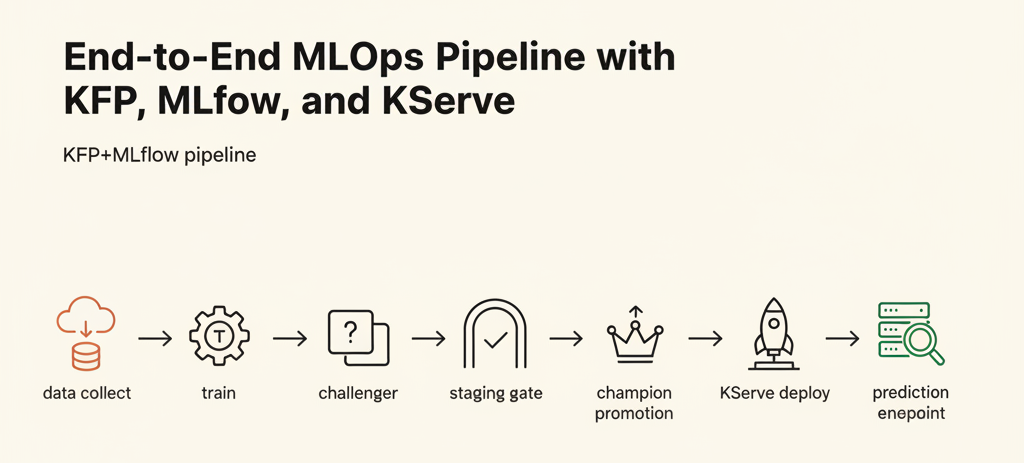
Table of Contents
- Architecture Overview
- Kubeflow Pipelines v2: Components and Pipeline Registration
- MLflow Model Registry: Alias-Based Model Lifecycle
- MinIO: S3-Compatible Artifact Storage
- KServe and ServingRuntime: Model Serving
- Staging Validation and Promotion: Alias Switch + InferenceService Patch
- Notifications and Human Approval Gate
- Production Considerations
- Wrapping Up
Automating the MLOps flow from training to serving on your own infrastructure requires combining workflow orchestration, experiment tracking, artifact storage, and a serving runtime. Kubeflow Pipelines v2 (KFP), MLflow, MinIO, and KServe are a well-established open-source stack for this. This post explains how to wire them together into a pipeline covering data ingestion → training → staging validation → production promotion → serving, and what to plan for when running this stack in production.
The setup described here is based on PAASUP DIP (Data Intelligence Platform) — a Kubernetes-native data and ML operations platform where KFP, MLflow, MinIO, and KServe can be deployed with a few clicks from the catalog. If you're running your own Kubernetes cluster, deploy each component separately and the same configuration applies.
1. Architecture Overview
The key idea behind the KFP + MLflow + KServe stack is separation of concerns. KFP orchestrates component-level workflows; MLflow serves as the single source of truth for experiments, models, and artifacts; KServe serves models registered in the MLflow Model Registry in a Kubernetes-native way. The components connect through standard interfaces — the KFP API, MLflow REST API, S3, and Kubernetes CRDs — so individual components can be swapped with relatively low friction.
Pipelines can be a single end-to-end unit or split into independent pipelines per role (data, training, validation, promotion), as in this example. The trade-offs are covered in Section 2.
The overall flow runs from data collection and preprocessing, through training, staging validation, and production promotion and serving. In this example, we split the flow into four independent pipelines by role.
[Data Pipeline]
  Collect → Preprocess → MLflow artifact log
                              │
                              ▼
[Training Pipeline]
  Load data → Train → MLflow register (@challenger)
                              │
                              ▼
[Staging Pipeline]
  Latency test → shadow test (@champion vs @challenger)
  → Notification → Human approval gate
                              │
                              ▼
[Promotion Pipeline]
  @challenger → @champion promotion → KServe deploy
                              │
                              ▼
[KServe InferenceService]
  Load model → ServingRuntime → Inference endpoint
This post uses a setup combining four KFP v2 pipelines, MLflow, MinIO, and KServe in a PAASUP DIP environment to run an iris classifier end to end. Iris is chosen as a minimal workload for exposing integration points, failure modes, and operational details — not for the domain itself.
| Component / Feature | Notes |
|---|---|
| 4 KFP v2 pipelines compiled and registered | |
| MLflow alias-based challenger / champion flow | Includes first-promotion branch (no champion yet) |
KServe InferenceService storageUri patch |
Includes MLflow artifact URI → S3 format conversion |
| MLflow + MinIO artifact flow |
2. Kubeflow Pipelines v2: Components and Pipeline Registration
KFP is a workflow orchestration tool that runs each pipeline step in an isolated container, so you can retry only the failed step and track progress in the KFP UI. Unlike running Python scripts in sequence, KFP lets you configure separate resources, base images, and Secrets per component, which makes it well-suited for large-scale training pipelines.
KFP v2 uses Python decorators (@dsl.component, @dsl.pipeline) to define components and DAGs, then registers the compiled YAML with the KFP API server. Component inputs and outputs pass through KFP Output Parameters and Artifacts, and each component runs as a separate Pod. This isolation means you can set different base images, resource requests, and Secret injection per component, and scope retries to the individual component that failed.
Pipelines can be a single end-to-end unit or split into independent pipelines by role — data, training, staging, promotion — as in this example.
| Approach | Strengths | Best for |
|---|---|---|
| Single pipeline | Full flow visible in one screen, simple argument passing | Initial setup, simple workloads |
| Separate pipelines | Per-stage KFP run tracking, independent schedules and approval gates | Human-in-the-loop workflows, different stage cadences |
Registering a pipeline with KFP breaks into compile and upload steps. Compiling first lets you catch syntax errors before hitting the server.
# submit.py — register and run flow (excerpt)
from kfp import compiler, Client

compiler.Compiler().compile(pipeline_func, "pipeline.yaml")
client = Client(host=KFP_HOST)
client.upload_pipeline("pipeline.yaml", pipeline_name="iris-training-pipeline")
# or run directly after registration
client.create_run_from_pipeline_func(
    pipeline_func, arguments={"data_run_id": data_run_id},
)
One thing to watch with KFP Output Parameters: the data_run_id that Pipeline 2/3/4 receive as input is the MLflow run ID generated by Pipeline 1's last component — not the KFP run ID produced by submit.py. These IDs have similar names but are separate identifiers. To get it, open the Pipeline 1 run in the KFP UI and copy from the data-log step's Output Parameters. When adding automated triggers, make sure the Sensor explicitly maps to the correct MLflow run ID — passing the KFP run ID by mistake is a common source of debugging confusion.
In the early stages, manually triggering data → training → staging → promotion pipelines in sequence and entering data_run_id by hand is perfectly workable.
KFP Operations: Automated Triggers and Run Lifecycle
Manual triggering works for PoC, but production requires pipelines to fire automatically on signals like data arrival, MLflow events, or Git pushes. Wire Argo Events EventSources (S3/MinIO/Kafka/Webhook) to a Sensor that calls the KFP Client. When data lands, the Sensor triggers a training pipeline run and injects data_run_id as a parameter.
apiVersion: argoproj.io/v1alpha1
kind: Sensor
metadata:
  name: minio-data-arrived
spec:
  dependencies:
    - name: data-event
      eventSourceName: minio-events
      eventName: data-bucket-put
  triggers:
    - template:
        name: kfp-training-run
        k8s:
          operation: create
          source:
            resource:
              apiVersion: batch/v1
              kind: Job
              # ... Job spec calling KFP Client create_run
Generate deduplication keys from the Sensor's eventContext or the object ETag. If the same key arrives within a time window, the Sensor skips the trigger.
KFP pipeline definitions themselves are best synced from Git via Argo CD to prevent environment drift. A Gitea/GitHub Actions self-hosted runner handles the component code change → compile → register → run CI loop. These three layers serve distinct roles:
| Automation layer | Role |
|---|---|
| Argo CD | Syncs KFP pipeline definitions, ServingRuntime, and InferenceService YAMLs from Git |
| Argo Events | Triggers the next KFP run from S3/MinIO/Kafka/Webhook events, passes data_run_id |
| Gitea / GitHub Actions self-hosted runner | Code change → compile → register → run CI |
KFP runs are not deleted automatically. Without a cleanup cronjob, MLMD and PVC grow without bound — within a month or two, the MLMD database becomes bloated and KFP UI response times degrade. Define a run retention policy per namespace.
3. MLflow Model Registry: Alias-Based Model Lifecycle
MLflow handles experiment tracking, model registration and versioning, and artifact storage on a single platform — letting you record which parameters produced which metrics and manage the lifecycle of validated models through the Registry.
MLflow Model Registry supports aliases on model versions to represent lifecycle state. Aliases, introduced in MLflow 2.x to replace the older stage concept (Staging/Production), accept arbitrary strings — making it straightforward to map your organization's lifecycle policy directly. This setup uses three aliases:
@challenger: newly registered model waiting for validation@champion: the currently serving model@archived: a former champion
The training pipeline runs three hyperparameter combinations, logs them to MLflow, then registers the top-accuracy run as @challenger. Wrapping StandardScaler and the classifier together in a sklearn Pipeline and logging that as the artifact means the serving endpoint accepts raw inputs without a separate preprocessing step — the simplest way to prevent training-serving skew. The trade-off is that preprocessing is versioned per model, so different model versions can have different preprocessing implementations.
hp_configs = [
    {"n_estimators": 50,  "max_depth": 3},
    {"n_estimators": 100, "max_depth": 5},
    {"n_estimators": 200, "max_depth": 7},
]
best_run_id, best_accuracy = None, 0.0
for hp in hp_configs:
    clf = RandomForestClassifier(**hp, random_state=42, n_jobs=-1)
    clf.fit(X_train, y_train)
    acc = float(accuracy_score(y_test, clf.predict(X_test)))
    pipe = Pipeline([("scaler", scaler), ("clf", clf)])

    with mlflow.start_run(run_name=f"train-n{hp['n_estimators']}-d{hp['max_depth']}") as run:
        mlflow.log_params(hp)
        mlflow.log_metrics({"accuracy": acc})
        signature = mlflow.models.infer_signature(X_train, clf.predict(X_test))
        mlflow.sklearn.log_model(pipe, "model", signature=signature)
        if acc > best_accuracy:
            best_accuracy, best_run_id = acc, run.info.run_id

# in the following component
mv = mlflow.register_model(f"runs:/{best_run_id}/model", model_name)
client.set_registered_model_alias(model_name, "challenger", mv.version)
Running all three HP configurations inside a single component rather than splitting them was deliberate. Splitting would require serializing and passing the best-run result through a KFP Artifact, adding boilerplate — and run-level comparison closes naturally inside MLflow. If the hyperparameter space grows or you need per-trial GPU isolation, switching to a dedicated HPO tool like Katib is the natural next step: each trial becomes a separate KFP run with distributed execution.
A few alias-related points worth noting:
- An alias exists independently of a model version, so registration and alias assignment can happen at different times. Assign aliases after validation passes, not immediately on registration.
- A model version can hold multiple aliases simultaneously, but your code needs to explicitly revoke
@championbefore assigning@archived— otherwise a version could carry both. - Switching an alias is a single API call, but the KServe
InferenceServicepatch must happen at the same time. Switching the alias without patching leaves the Registry and serving state diverged. - MLflow Webhooks can forward alias-change events to external systems (Slack, KFP, audit logs), providing a full audit trail of who promoted which model and when.
PAASUP DIP's MLflow deployment includes the mlflow-oidc-auth plugin out of the box, so no separate installation is needed. Whether you're on DIP or a self-managed cluster, mlflow-oidc-auth introduces one non-obvious constraint:
- Access Token: Keycloak Bearer tokens cannot be used directly with the MLflow API. Generate an Access Token from the MLflow UI — go to the lock icon (Permissions) at the bottom left → User Page. This path is hard to find in the official docs and is typically discovered by trial and error.
- Basic Auth injection: Inject the token via
MLFLOW_TRACKING_USERNAME/MLFLOW_TRACKING_PASSWORDin Basic Auth format. Standardizing this from the KFP component Secret injection step ensures a consistent credential path across all pipeline components. - TLS (optional): If your MLflow endpoint uses a self-signed certificate, you may need
MLFLOW_TRACKING_INSECURE_TLS=true. This wasn't needed here since the internal URL was HTTP, but the same applies to HTTPS endpoints with an untrusted certificate.
MLflow Pod memory consumption varies significantly depending on plugin configuration. In the DIP environment, a 2Gi memory limit triggered OOMKills. The culprit was four concurrent components: the Huey worker, mlflow-oidc-auth plugin, uvicorn workers, and a custom workspace plugin. The workspace plugin routes all artifact uploads and downloads through the MLflow Pod's HTTP proxy, so removing --serve-artifacts doesn't help. The fix was raising the Pod memory limit from 2Gi to 4Gi+ in Rancher. Track container_memory_working_set_bytes via Prometheus and set a pre-emptive alert before the limit is reached.
| Setting | Recommended starting value | Notes |
|---|---|---|
| MLflow Pod memory limit | 4Gi | OOM avoidance; scale up based on workload |
| Tracking DB connection pool | 20–50 | Based on concurrent KFP component count |
| Artifact upload timeout | 300s | Prevents failures on large model uploads |
| OIDC token expiry | 8–24h | Covers long-running pipelines |
If an OIDC token expires mid-pipeline, the final MLflow call in the last component will fail with a 401. Standardize on either extending token expiry or adding a per-component token-refresh helper.
MLflow Operations: Training-Serving Consistency and Feature Stores
Bundling preprocessing into the model artifact via Pipeline(scaler+clf) is simple, but breaks down when multiple models share the same features or when online and offline feature definitions need to diverge. In production, a dedicated Feature Store centralizes feature definitions, computation logic, and reuse metadata, eliminating training-serving skew.
| Feature Store | Strength |
|---|---|
| Feast | Open-source, official Kubeflow integration blueprint |
| Tecton | Real-time streaming ingestion |
| Hopsworks | Online/offline integration + governance UI |
Feast is most compatible with self-hosted setups and fits this stack well. If real-time ingestion or a governance UI is a priority, Tecton or Hopsworks are worth evaluating.
Data validation also needs to gate the training pipeline at the entry point. Use Great Expectations or TFDV to check schema, value ranges, and null rates, and abort the pipeline on failure so broken distributions don't propagate downstream. For full reproducibility, you need an immutable identifier for the training dataset — MLflow's data_run_id stays at the run level, so tracking input dataset hashes via MLMD or DVC enables auditing and reproduction. KFP includes MLMD internally, but this setup doesn't use it; note also that MLMD lacks multi-tenancy support.
4. MinIO: S3-Compatible Artifact Storage
MinIO is an S3-compatible object storage server you can run on your own infrastructure. It stores ML artifacts — model files, preprocessing outputs — without any cloud dependency, and its S3 API compatibility means MLflow, KServe, and any other S3 client connect without modification.
MLflow's artifact store can be pointed at any S3-compatible backend, and MinIO is the most common self-hosted choice. In this setup, s3://mlflow/artifacts/ is configured as MLflow's default artifact root. The same objects are read back by KServe's storage-initializer, so no extra copy step is needed between training and serving.
Two setup tasks are required before running the stack. First, create a MinIO user and policy so KFP components can access the bucket. The mc commands below are one-time setup, but if users and buckets aren't managed as IaC they're often missed when rebuilding environments. Declare them in a Terraform minio provider or a Helm chart users: block.
mc admin user add minio kfp-user "<password>"
mc admin policy attach minio readwrite --user kfp-user
mc mb minio/mlflow
Second, separate the KServe storage-initializer Secret from the KFP pipeline Secret. This setup uses two Secrets because KFP component Pods receive credentials via use_secret_as_env(), while the KServe storage-initializer runs as an init container — outside KFP's injection mechanism. The result is mlops-pipeline-secrets (for KFP) and kserve-minio-secret (for KServe, linked to the kserve-minio-sa ServiceAccount).
| Secret | Purpose | Injection path |
|---|---|---|
mlops-pipeline-secrets |
MLflow / MinIO / notification credentials for the 4 KFP pipelines | kfp_kubernetes.use_secret_as_env() |
kserve-minio-secret |
MinIO model download for the KServe storage-initializer | ServiceAccount annotation |
Linking kserve-minio-secret to a ServiceAccount is KServe's standard pattern, but if the annotation keys (serving.kserve.io/s3-endpoint, serving.kserve.io/s3-usehttps, etc.) are wrong, the storage-initializer will infer the wrong endpoint. For MinIO running without HTTPS, set both s3-usehttps: "0" and s3-verifyssl: "0" or the init container will fail to download.
apiVersion: v1
kind: ServiceAccount
metadata:
  name: kserve-minio-sa
  namespace: demo01-kubeflow
secrets:
  - name: kserve-minio-secret
---
apiVersion: v1
kind: Secret
metadata:
  name: kserve-minio-secret
  namespace: demo01-kubeflow
  annotations:
    serving.kserve.io/s3-endpoint: minio.minio.svc:9000
    serving.kserve.io/s3-usehttps: "0"
    serving.kserve.io/s3-verifyssl: "0"
    serving.kserve.io/s3-region: us-east-1
type: Opaque
stringData:
  AWS_ACCESS_KEY_ID: <kserve-readonly>
  AWS_SECRET_ACCESS_KEY: <password>
Set spec.predictor.serviceAccountName to kserve-minio-sa in the InferenceService and the storage-initializer mounts the Secret automatically. Keep the KServe AWS_ACCESS_KEY_ID as a read-only account, separate from the readwrite account used by KFP components, to reduce the permission surface.
MinIO Operations: Permissions, Versioning, and Audit
A single credential with read/write across all buckets means one compromised account can destroy all stored artifacts. Use mc admin policy to scope each account to specific buckets. Starting with Kubeflow 1.11, per-namespace S3 credentials are the default and the default KFP storage switches to SeaweedFS — if you're on an older stack, the pattern above remains valid. Migrating to 1.11+ affects both the KFP MLMD metadata store and the MLflow artifact buckets simultaneously. Since these are separate data planes, define separate migration procedures for each.
Issuing proper certificates via cert-manager + Let's Encrypt or an internal CA removes the need for MLFLOW_TRACKING_INSECURE_TLS=true and also resolves the KServe storage-initializer's insecure TLS issue.
| Setting | Recommendation | Notes |
|---|---|---|
| Permission scoping | Bucket-scoped policy (mc admin policy) |
Limits blast radius per account |
| Versioning | Enable per bucket via MinIO console or mc version enable |
Recover from overwrites or accidental deletes |
| Lifecycle | Auto-expire non-champion artifacts after N days | Keeps storage costs in check |
| Audit log | Rotate and forward to an external security system | Records who accessed what and when |
5. KServe and ServingRuntime: Model Serving
KServe is a Kubernetes-native model serving platform that exposes trained models via REST/gRPC APIs. It manages runtime containers per model format automatically and supports autoscaling based on request load.
KServe runs as a model serving controller on top of Knative, delivering autoscaling, routing, and the v2 inference protocol through a single InferenceService custom resource. Inference containers per model format are defined as ServingRuntime (namespace-scoped) or ClusterServingRuntime (cluster-wide). This two-tier separation lets you manage model registration and runtime definition independently, and multiple InferenceService instances can share the same runtime.
For MLflow models, we use MLServer's mlserver_mlflow.MLflowRuntime. The default KServe ClusterServingRuntime requires a modelClass label at model registration time. To avoid this overhead, this setup defines a namespace-specific ServingRuntime with MLSERVER_MODEL_IMPLEMENTATION hardcoded to mlserver_mlflow.MLflowRuntime.
apiVersion: serving.kserve.io/v1alpha1
kind: ServingRuntime
metadata:
  name: mlserver-mlflow
  namespace: demo01-kubeflow
spec:
  protocolVersions: [v2]
  supportedModelFormats:
    - name: mlflow
      version: "2"
      autoSelect: true
  containers:
    - name: kserve-container
      image: docker.io/seldonio/mlserver:1.5.0
      env:
        - { name: MLSERVER_MODEL_IMPLEMENTATION, value: "mlserver_mlflow.MLflowRuntime" }
        - { name: MLSERVER_MODEL_NAME,           value: "{{.Name}}" }
        - { name: MLSERVER_MODEL_URI,            value: /mnt/models }
        - { name: MLSERVER_HTTP_PORT,            value: "8080" }
      resources:
        requests: { cpu: "500m", memory: 1Gi }
        limits:   { cpu: "1",    memory: 2Gi }
In KServe v0.15, namespace-scoped ServingRuntime auto-select is unreliable. Explicitly setting spec.predictor.model.runtime: mlserver-mlflow in the InferenceService ensures stable matching. This behavior is not documented prominently and is a common cause of first-inference failures on fresh setups. If you see this on KServe v0.15+, check kubectl describe inferenceservice events for no runtime found or ambiguous runtime first.
The ServingRuntime resource limits are sufficient for single-model inference but need tuning alongside containerConcurrency as load increases. MLServer distributes prediction requests across worker processes, so 1 CPU core can queue under burst traffic.
The InferenceService can be defined as follows — explicitly referencing the ServingRuntime above to avoid the v0.15 auto-select issue. serviceAccountName reuses kserve-minio-sa from Section 4.
apiVersion: serving.kserve.io/v1beta1
kind: InferenceService
metadata:
  name: iris-serving
  namespace: demo01-kubeflow
spec:
  predictor:
    serviceAccountName: kserve-minio-sa
    minReplicas: 1
    containerConcurrency: 4
    model:
      runtime: mlserver-mlflow
      modelFormat:
        name: mlflow
      storageUri: s3://mlflow/artifacts/<run_id>/artifacts/model
minReplicas: 1 trades off scale-to-zero against stable cold-start latency. Setting minReplicas: 0 is an option for cost-sensitive environments, but adds tens of seconds to the first call — make sure your service SLO accounts for this before choosing it.
KServe Operations: Canary, Auto-Rollback, and HPA
Patching storageUri replaces the model via a Knative Revision rolling update, cutting traffic to the new version all at once. If the new version has a problem, all requests are affected — so production deployments need a mechanism to run old and new models in parallel for a period.
| Setting | Configuration | Notes |
|---|---|---|
| Canary / Blue-Green | InferenceService.spec.predictor.canaryTrafficPercent |
Split traffic between new and old Revisions, promote incrementally |
| Auto-rollback | Argo Rollouts AnalysisTemplate (Prometheus query) or KServe canary + Knative Revision pin | Restore previous Revision on error rate or latency regression |
| Scale-to-zero / HPA | minReplicas, containerConcurrency, target annotation |
Knative KPA-based; cold start trade-off |
Starting with canaryTrafficPercent is straightforward: send 10% to the new Revision, observe latency and error rate, then step through 25 → 50 → 100. For auto-rollback, an Argo Rollouts AnalysisTemplate with a 5-minute Prometheus query window can reset canaryTrafficPercent to the previous Revision when an error rate threshold is crossed.
KServe supports scale-to-zero and autoscaling via Knative KPA, but minReplicas, containerConcurrency, and target annotations need to be tuned to your load profile — otherwise you'll see queuing under burst traffic and wasted resources at idle. GPU models also need KServe's accelerator option and a separate node pool configuration.
KServe Operations: Monitoring and Alerts
Latency measurement in this setup covers 100 inference calls in the latency_test component — production traffic monitoring requires additional instrumentation. KServe inference latency, QPS, and error rate alongside KFP run status can all be collected via Prometheus + Grafana. Infrastructure alerts (OOM, Pod restarts) and model alerts (latency regression, accuracy drop) go to different audiences, so routing them to separate Alertmanager channels is standard practice.
6. Staging Validation and Promotion: Alias Switch + InferenceService Patch
Pipeline 3 (staging) and Pipeline 4 (promotion) handle the actual lifecycle transitions. Staging loads @challenger alone to validate latency bounds and accuracy against @champion; promotion bundles the alias switch and KServe InferenceService patch as a single step. They're separate pipelines because a human approval gate sits between them — if automatic promotion is appropriate for your workload, merging them into one pipeline is fine.
Staging validation runs two gates:
| Gate | Measurement | Threshold (example) |
|---|---|---|
| latency_test | p99 latency from repeated single-inference calls against @challenger |
100ms |
| shadow_test | Disagreement rate between @champion and @challenger on the same inputs, plus challenger accuracy |
Disagreement < 5%, accuracy ≥ champion |
latency_test checks the challenger's response time in isolation; shadow_test compares model behavior and only runs when a champion exists. This naturally produces the first-promotion branch: with no champion present, there is no comparison target.
In the DIP environment, the staging gates produced the following results: p99 latency 2.34ms (threshold 100ms), champion vs. challenger disagreement rate 0.0000 (threshold 5%), and challenger / champion accuracy both 0.9667. These numbers confirm that both gates and their threshold comparisons worked as intended. For real domain workloads, redefine thresholds based on your service SLO and increase the number of latency_test iterations for a tighter confidence interval.
Including gate results — metrics, measured values, thresholds, and pass/fail status — in the Slack/Telegram message lets approvers make a decision without opening a separate dashboard.
The first promotion has no @champion. This setup handles the missing-champion case with a try/except branch in both shadow_test and promote_to_champion. shadow_test returns disagreement_rate=0.0, challenger_acc=-1.0, champion_acc=-1.0 and passes through. Using -1.0 as an explicit sentinel value makes "no champion yet" immediately visible in notification messages and prevents confusion with real accuracy values in downstream dashboards.
On promotion, deploying to KServe means patching InferenceService.spec.predictor.model.storageUri. The patched URI uses the same path as Section 4: the storage-initializer uses kserve-minio-sa to download from MinIO, so no credential reconfiguration is needed. MLflow stores artifact URIs in mlflow-artifacts:/path/... format, which the KServe storage-initializer does not recognize — convert the URI to s3://mlflow/artifacts/... before patching.
artifact_uri = mlflow_client.get_model_version_download_uri(model_name, champion_version)
if artifact_uri.startswith("mlflow-artifacts:"):
    s3_path = artifact_uri[len("mlflow-artifacts:"):]
    storage_uri = f"s3://mlflow/artifacts{s3_path}"
else:
    storage_uri = artifact_uri

config.load_incluster_config()
custom_api = client.CustomObjectsApi()
body = {"spec": {"predictor": {"model": {
    "runtime": "mlserver-mlflow",
    "modelFormat": {"name": "mlflow"},
    "storageUri": storage_uri,
}}}}
custom_api.patch_namespaced_custom_object(
    group="serving.kserve.io", version="v1beta1",
    namespace=serving_namespace, plural="inferenceservices",
    name=inference_service_name, body=body,
)
This URI conversion is needed for any self-hosted MLflow + MinIO setup. Note that Databricks-managed MLflow uses a different artifact URI scheme that the KServe storage-initializer also doesn't recognize — bridging Databricks MLflow all the way to KServe serving requires a separate export step. Also, patch_namespaced_custom_object requires inferenceservices/patch RBAC permission — the ServiceAccount for the Pipeline 4 component Pod needs a Role/RoleBinding granting this before the pipeline runs.
After promotion, call the serving endpoint (http://iris-serving.<namespace>.<cluster-domain>/v2/models/iris-serving/infer) to confirm the new model is live. If the response doesn't immediately reflect the new model, check the Knative Revision ready state and storage-initializer logs. The previous Revision continues to serve until the new MLServer container passes its startup probe.
The v2 inference protocol request format:
{
  "inputs": [
    {
      "name": "input-0",
      "shape": [1, 4],
      "datatype": "FP64",
      "data": [5.1, 3.5, 1.4, 0.2]
    }
  ]
}
Column order and dtype must match the infer_signature recorded at training time. A mismatch returns a 400 from MLServer.
7. Notifications and Human Approval Gate
The handoff where a human reviews staging results and decides on promotion is a responsibility boundary that tooling can't automate away. In this setup, Pipeline 3's final step sends results via Slack and Telegram Webhooks, and the responsible person manually triggers Pipeline 4 from the KFP UI. The right choice depends on your workload. Recommendation models with limited safety impact can often promote automatically; safety-critical or regulated domains should require explicit human sign-off.
Webhook failures are treated as non-fatal and don't block the pipeline run. In production, define alert recipient groups, on-call rotations, and deduplication policies upfront. For a ChatOps-style gate, the Slack interactive message + webhook → KFP Client create_run pattern moves the approval step into chat.
Points to address when designing the approval gate:
- Approver group: Assign to a group or role, not a single person, so the flow keeps moving during vacations and handoffs.
- Approval deadline: Challenger validation data ages out. Set a window (24–72 hours) and resend the notification on expiry.
- Approval record: Log who approved which model and when in an MLflow
iris-promotionexperiment run for audit traceability. - Rejection path: When a challenger is rejected, move it to
@archivedor a@rejectedalias. Without this, the same challenger can re-enter the approval queue and cause confusion.
8. Production Considerations
Component-specific operational items are covered at the end of each section. This section covers cross-cutting concerns only.
Security & Multi-Tenancy
- Pod security hardening: Kubeflow 1.11 applies baseline PSS (Pod Security Standards) to user namespaces by default. Applying root avoidance and capability drops to KFP component Pods and
kserve-minio-sais standard. - Inference authentication: The inference endpoint in this setup has no authentication. Restricting access via Istio AuthorizationPolicy + Keycloak/OIDC is the recommended pattern.
- Network isolation: Defaulting to deny inter-namespace traffic and allowing only the necessary egress via NetworkPolicy reduces the lateral movement surface.
- Secret rotation: Connect MinIO credentials and MLflow tokens to External Secrets Operator or Vault for automated rotation.
Operational Continuity
- Backup and disaster recovery: This setup uses a single cluster and a single MinIO instance with no backup. In production, define separate RPO/RTO targets for MLflow DB dumps, MinIO site replication, and KFP MLMD backups.
- Reproducible environments: Pin KFP component images and
ServingRuntimedefinitions in Git with digest pinning (@sha256:...) so the environment can be rebuilt identically.
Cost Management
- Lifecycle policies: KFP runs grow unbounded without a cleanup cronjob. Apply lifecycle expiration to non-champion MinIO artifacts to control storage costs.
- GPU node pool separation: Use nodeSelector to route small workloads to CPU node pools and large model training to GPU node pools, reducing resource contention between training and serving.
Wrapping Up
This setup confirmed that KFP v2, MLflow, MinIO, and KServe can be wired together in a PAASUP DIP environment to produce a working end-to-end model lifecycle. The staging gates passed with p99 latency of 2.34ms (threshold 100ms), disagreement rate of 0.0000 (threshold 5%), and accuracy of 0.9667 for both challenger and champion — verifying that both the latency and shadow gates evaluated their branches and thresholds correctly. Several operational details are easy to miss in official documentation: the mlflow-artifacts: URI conversion, explicit namespace ServingRuntime matching, Secret separation, and MLflow Pod memory limits. All of these apply equally when building the same stack on PAASUP DIP.
The core deployment pattern is straightforward: switch the challenger alias to champion in MLflow, then patch the InferenceService's storageUri to the new path. KServe handles the rest via Knative Revision rolling update, replacing the model without downtime. The same structure applies to any model format MLflow can save — PyTorch, XGBoost, LightGBM, and others work without changes to the pipeline. If you're using PAASUP DIP, KFP, MLflow, MinIO, and KServe can all be deployed from the catalog in a few clicks, letting you start the pipeline described here without any infrastructure setup.
References
- KServe Official Documentation — Introduction and Deployment Overview
- MLflow + KServe + MinIO End-to-End Deployment Pattern
- Kubeflow 1.11 Release Notes — PSS, per-namespace S3, SeaweedFS
- Event-Driven ML Pipelines with Argo Events
- Evidently / Alibi Detect / NannyML Comparison
- Sigstore model-signing v1.0 stable release
- Feast vs Tecton vs Hopsworks Comparison
- MLOps CI/CD Implementation Guide with KFP